Preface
In the rapidly evolving landscape of data systems, we often find ourselves gluing together disparate technologies to build a complete platform. We use Redis for caching, Neo4j for graphs, Qdrant or Pinecone for vectors, and Spark for analytics. This fragmentation leads to “Frankenstein” architectures—complex, fragile, and hard to maintain.
Samyama (Sanskrit for “Integration” or “Binding together”) was born from a desire to collapse this complexity.
Since its inception, Samyama has evolved from a high-performance research prototype into a production-ready ecosystem. To serve both the open-source community and the demanding needs of global industry, Samyama is now offered in two editions:
- Community Edition (OSS): The feature-complete, high-performance core for developers and startups.
- Enterprise Edition: Production-hardened with observability, disaster recovery, and advanced optimization for mission-critical workloads.
This book is the story of building Samyama-Graph, a modern, high-performance graph database written in Rust. It is not just a user manual; it is an architectural deep dive. We will peel back the layers to show you how it works—from the byte-level serialization in RocksDB to the lock-free concurrency of our MVCC engine, and up to the distributed consensus algorithms that keep it alive.
Why Rust?
When building a database in the 2020s, the choice of language is pivotal. We chose Rust not just for its hype, but for its promise: Fearless Concurrency.
A graph database is, by definition, a pointer-chasing engine. It demands random memory access patterns that are notoriously hard to optimize and easy to mess up (hello, segmentation faults!). Rust’s ownership model allowed us to implement complex memory management strategies—like Arena Allocation and localized reference counting—without the overhead of a Garbage Collector or the safety risks of C++.
Who is this book for?
- System Architects who want to understand the internals of a modern database.
- Rust Developers curious about real-world patterns for FFI, concurrency, and distributed systems.
- Data Engineers looking for a unified solution for their graph and AI workloads.
Let’s begin the journey.
About the Project & Author
Samyama.ai: The Vision
Samyama Graph is sponsored and developed by Samyama.ai, a company dedicated to building the future of autonomous, hardware-accelerated knowledge systems. Our mission is to unify the fragmented data landscape of graphs, vectors, and optimization into a single “Mechanical Sympathy” engine.
For enterprise inquiries, partnerships, or support, visit our official website: https://samyama.ai
About the Author: Sandeep Kunkunuru
The architecture and implementation of Samyama Graph, as well as this technical guide, are led by Sandeep Kunkunuru.
Sandeep is a specialist in high-performance Rust systems, distributed consensus, and the application of metaheuristic optimization to large-scale graph data. He is the primary maintainer of the Samyama open-source core and the lead architect behind the Enterprise Hardware-Accelerated edition.
Connect with the Project & Author:
- LinkedIn: https://www.linkedin.com/in/sandeepkunkunuru/
- GitHub: https://github.com/samyama-ai/samyama-graph
- Twitter/X: https://x.com/Samyama_AI
Samyama Overview Slides (HTML)
Persistence at Scale
Every database must answer a fundamental question: How do we not lose data?
For an in-memory graph database like Samyama, this is doubly critical. While we prioritize speed by keeping the active dataset in RAM, we need a robust, battle-tested persistence layer to ensure durability (the ‘D’ in ACID) and to support datasets larger than memory.
We chose RocksDB.
Why RocksDB?
RocksDB, originally forked from Google’s LevelDB by Facebook, is an embedded key-value store based on a Log-Structured Merge-Tree (LSM-Tree). It is the industry standard for high-performance storage engines, powering systems like CockroachDB, TiKV, and Kafka Streams.
The LSM-Tree Advantage
Graph workloads are write-heavy. Creating a single “relationship” between two nodes might involve updating adjacency lists on both ends, updating indices, and writing to the transaction log.
Traditional B-Tree storage suffers from Write Amplification—changing a few bytes can require rewriting entire 4KB or 8KB pages.
LSM-Trees solve this by turning random writes into sequential ones. Here is how Samyama flows data into RocksDB:
graph TD
    Client[Client Write Request] --> WAL[(Write-Ahead Log)]
    WAL --> MemTable[In-Memory MemTable]
    MemTable -- "Flushes when full (64MB)" --> L0[SSTable Level 0]
    L0 -- "Background Compaction" --> L1[SSTable Level 1]
    L1 -- "Background Compaction" --> L2[SSTable Level 2]

    style WAL fill:#f9f,stroke:#333,stroke-width:2px
    style MemTable fill:#bbf,stroke:#333,stroke-width:2px
    style L0 fill:#dfd,stroke:#333
    style L1 fill:#dfd,stroke:#333
    style L2 fill:#dfd,stroke:#333
This architecture allows Samyama to sustain massive ingestion rates, as seen in benches/full_benchmark.rs where we achieve over 250,000 nodes/second (CPU) and over 400,000 nodes/second (GPU-accelerated) in raw write throughput.
Schema Design: Mapping Graphs to Key-Value
How do you store a graph (nodes and edges) in a Key-Value store? We use Column Families (logical partitions within RocksDB) to separate different types of data, preventing them from slowing each other down during compaction.
graph LR
    DB[(RocksDB Instance)]
    DB --> CF_Default["CF: default <br> Metadata & Versioning"]
    DB --> CF_Nodes["CF: nodes <br> NodeId -> StoredNode"]
    DB --> CF_Edges["CF: edges <br> EdgeId -> StoredEdge"]
    DB --> CF_Indices["CF: indices <br> B-Tree Property Indices"]
Key Structure
We use a simple, efficient binary encoding for keys. All IDs are u64 integers.
- Node Key:
[u8; 8]-> Big-Endian representation ofNodeId. - Edge Key:
[u8; 8]-> Big-Endian representation ofEdgeId.
Value Serialization
For the values (the actual data), we need a format that is compact and fast to deserialize. We chose Bincode.
Bincode is a Rust-specific binary serialization format that effectively dumps the memory representation of a struct to disk. It is significantly faster than JSON, Protobuf, or MsgPack for Rust-to-Rust communication.
#![allow(unused)]
fn main() {
#[derive(Serialize, Deserialize)]
struct StoredNode {
    id: u64,
    labels: Vec<String>,
    properties: Vec<u8>, // Compressed property map
    created_at: i64,
    updated_at: i64,
}
}
The Persistence Code
The integration lives in src/persistence/storage.rs. Here is a simplified view of how we initialize RocksDB with optimal settings for graph workloads:
#![allow(unused)]
fn main() {
pub fn open(path: impl AsRef<Path>) -> StorageResult<Self> {
    let mut opts = Options::default();
    opts.create_if_missing(true);

    // Performance Tuning
    opts.set_write_buffer_size(64 * 1024 * 1024); // 64MB batches
    opts.set_compression_type(rocksdb::DBCompressionType::Lz4);

    let cf_descriptors = vec![
        ColumnFamilyDescriptor::new("default", Options::default()),
        ColumnFamilyDescriptor::new("nodes", Self::node_cf_options()),
        ColumnFamilyDescriptor::new("edges", Self::edge_cf_options()),
        ColumnFamilyDescriptor::new("indices", Self::index_cf_options()),
    ];

    let db = DB::open_cf_descriptors(&opts, &path, cf_descriptors)?;
    Ok(Self { db: Arc::new(db), /* ... */ })
}
}
Developer Tip: Check out
examples/persistence_demo.rsto see a full working example of how to configure Samyama to persist data to disk, write millions of edges, shut down the server, and seamlessly recover state on the next boot.
Durability vs. Performance
We allow users to configure the sync behavior.
- Strict Mode: Every write calls
fsync, guaranteeing data is on disk. Slower but safest. - Background Mode: Writes are acknowledged once in the OS buffer cache. Faster, but risks data loss on power failure (process crash is still safe).
In Samyama, we default to a balanced approach: the Raft log (for consensus) is always fsync’d, while the RocksDB state machine catches up asynchronously. This ensures cluster-wide consistency even if a single node fails.
Managing State (MVCC & Memory)
In a high-performance database, “State” is the enemy of speed. Managing it requires locks, and locks kill concurrency.
If User A is reading a graph to calculate the shortest path between two cities, and User B updates a road in the middle of that calculation, what should happen?
- Locking: User B waits until User A finishes. (Safe but slow).
- Dirty Read: User A sees the half-updated state and crashes. (Fast but broken).
- MVCC: User A sees the “old” version of the road, while User B writes the “new” version. Both proceed in parallel.
Samyama implements Multi-Version Concurrency Control (MVCC) using a specialized in-memory structure that prioritizes cache locality and zero-overhead lookups.
The Data Structure: Versioned Arena
Unlike traditional graph databases that rely heavily on scattered heap allocations (Box<Node>, Rc<RefCell<Node>>), Samyama uses a Versioned Arena pattern defined centrally in src/graph/store.rs.
graph TD
    subgraph "GraphStore"
        Nodes["nodes: Vec<Vec<Node>>"]
        Edges["edges: Vec<Vec<Edge>>"]
        Outgoing["outgoing: Vec<Vec<EdgeId>>"]
        Incoming["incoming: Vec<Vec<EdgeId>>"]
    end

    subgraph "Version Chain (Inside nodes[NodeId])"
        V1["Version 1 (old)"] --> V2["Version 2"]
        V2 --> V3["Version 3 (latest)"]
    end

    Nodes -.-> V1
#![allow(unused)]
fn main() {
pub struct GraphStore {
    /// Node storage (Arena with versioning: NodeId -> [Versions])
    nodes: Vec<Vec<Node>>,

    /// Edge storage (Arena with versioning: EdgeId -> [Versions])
    edges: Vec<Vec<Edge>>,

    /// Outgoing edges for each node (adjacency list)
    outgoing: Vec<Vec<EdgeId>>,

    /// Incoming edges for each node (adjacency list)
    incoming: Vec<Vec<EdgeId>>,

    /// Current global version for MVCC
    pub current_version: u64,

    // Additional fields omitted for clarity:
    // free_id_pools, label_index, edge_type_index,
    // cardinality_stats, tenant metadata, etc.
}
}
1. The ID is the Index
A NodeId in Samyama is not a random UUID; it’s a direct u64 index into the nodes vector. NodeId(5) means “look at index 5 in the vector”. This gives us O(1) access time without hashing, ensuring cache-friendly contiguous memory layout.
2. The Version Chain & Snapshot Isolation
The inner vector Vec<Node> and Vec<Edge> represents the history of that entity. When a query starts, it grabs the current_version. The engine iterates backward over the history chain to find the newest version <= query_version, guaranteeing Snapshot Isolation without holding read locks.
Developer Tip: See
benches/mvcc_benchmark.rsto observe how Samyama maintains read latencies <5µs even under heavy concurrent write pressure due to this lock-free snapshot mechanism.
Columnar Property Storage & Indices
Beyond the core topology, GraphStore integrates dedicated sub-systems for high-performance access:
graph LR
    subgraph "ColumnStore"
        Age["Age Column: Vec<i64>"]
        Name["Name Column: Vec<String>"]
        Salary["Salary Column: Vec<f64>"]
    end

    Query[Query Engine] -- "SIMD Aggregation" --> Age
    Query -- "Late Materialization" --> Name
#![allow(unused)]
fn main() {
    /// Vector indices manager
    pub vector_index: Arc<VectorIndexManager>,

    /// Property indices manager
    pub property_index: Arc<IndexManager>,

    /// Columnar storage for node properties
    pub node_columns: ColumnStore,

    /// Columnar storage for edge properties
    pub edge_columns: ColumnStore,
}
By separating structural metadata (topology, version) from the actual property values (stored in ColumnStore), Samyama enables Late Materialization. The engine can traverse millions of relationships scanning only the outgoing adjacency lists, and query the node_columns only when the user requests specific attributes in the RETURN clause. This drastically reduces CPU cache eviction.
Graph Statistics for Optimization
Finally, GraphStore maintains internal GraphStatistics, tracking label_counts, edge_type_counts, and PropertyStats (null fraction, distinct counts, selectivity). This allows the query planner to intelligently order operators based on cost estimations. See the Query Optimization chapter for details on how statistics drive the cost-based optimizer.
ACID Guarantees
Samyama provides strong transactional guarantees aligned with the ACID model:
| Property | Status | Mechanism |
|---|---|---|
| Atomicity | ✅ | RocksDB WriteBatch + WAL ensures all-or-nothing modifications |
| Consistency | ✅ | Schema validation + Raft consensus (writes acknowledged after quorum) |
| Isolation | ⚠️ Partial | Per-query isolation via RwLock; MVCC foundation for snapshot isolation. Interactive BEGIN...COMMIT transactions planned |
| Durability | ✅ | RocksDB persistence + Raft replication to majority before acknowledgment |
CAP Trade-off
Samyama’s Raft-based clustering chooses CP (Consistency + Partition Tolerance):
- During a network partition, the minority partition cannot accept writes (preserving consistency)
- Reads from the majority partition remain consistent
- Availability is sacrificed during partitions in favor of data correctness
Technology Choices (The “Why”)
Building a database is an exercise in trade-offs. In this chapter, we explore the specific technology choices that define Samyama and why we chose them over popular alternatives.
Rust vs. The World
Why not C++? Why not Go?
As documented in our internal benchmarks, Rust provides a unique combination of Memory Safety and Zero-Cost Abstractions.
The Performance Gap
In a pure graph traversal benchmark on 1 million nodes (execution only, excluding parse/plan overhead):
- Rust: 12ms (with 450MB RAM)
- Go: 45ms (with 850MB RAM + GC Pauses)
- Java: 38ms (with 1200MB RAM + GC Pauses)
Note: These numbers measure raw traversal execution time. End-to-end Cypher query latency (including parsing and planning) is higher—see the Performance & Benchmarks chapter for full breakdowns.
The “Cautionary Tale of InfluxDB” served as a warning to us. Originally written in Go, the InfluxDB team eventually rewrote their core query engine in Rust to eliminate unpredictable garbage collection pauses that were impacting P99 latencies. We chose to start with Rust to avoid that “technical debt” from day one.
RocksDB vs. B-Trees
We chose an LSM-Tree (RocksDB) over a B-Tree (LMDB).
Graph workloads are naturally write-heavy—every relationship creation involves multiple index updates. B-Trees suffer from “Write Amplification,” where changing a few bytes requires rewriting entire pages. RocksDB turns these random writes into sequential appends, allowing Samyama to sustain over 255,000 node writes per second (CPU) and over 412,000 node writes per second (GPU-accelerated), significantly outperforming LMDB in write-heavy scenarios.
Optimized Serialization: Bincode
Traditional serialization formats like JSON or Protobuf introduce significant overhead. For a performance-first database like Samyama, we needed a format that could serialize and deserialize data with minimal CPU cycles.
We chose Bincode.
Bincode is a compact, binary serialization format specifically optimized for Rust-to-Rust communication. It effectively takes the memory layout of a Rust struct and dumps it to disk.
- Speed: Deserializing a
StoredNodefrom RocksDB takes nanoseconds. - Compactness: No field names or metadata overhead; only the raw values are stored.
- Safety: Integrated with
serde, it ensures that even if the disk format is corrupted, the database won’t crash on invalid memory access.
Mechanical Sympathy: Custom Columnar Storage
For property-heavy analytical queries, even Bincode is too slow because it still requires “hydrating” a full node object. To solve this, Samyama uses a custom Columnar Property Storage for high-performance property access.
By storing properties in a columnar format (e.g., all “ages” together), we achieve Mechanical Sympathy:
- Cache Locality: The CPU can prefetch thousands of values at once into the L1 cache.
- SIMD-Friendly Layout: The columnar layout is designed to be SIMD-friendly, enabling auto-vectorization by the Rust compiler and future integration with explicit SIMD intrinsics.
- Late Materialization: We avoid fetching properties from disk until the very last stage of a query, reducing I/O and CPU overhead by orders of magnitude.
Hardware Acceleration: Why wgpu?
When deciding how to add GPU acceleration to Samyama, we evaluated several options including CUDA, OpenCL, and Vulkan. We ultimately chose wgpu, the Rust implementation of the WebGPU API.
The Portability Advantage
Unlike CUDA (limited to NVIDIA) or OpenCL (which can be temperamental across platforms), wgpu offers a common abstraction layer that targets the most performant native API of the host system:
- Metal on macOS and iOS.
- Vulkan on Linux and Android.
- DirectX 12 on Windows.
Native Performance with WGSL
By writing our compute shaders in WGSL (WebGPU Shading Language), we can offload intensive graph algorithms like PageRank and community detection to the GPU’s thousands of cores. This allows Samyama to remain “Hardware Agnostic” while still delivering hardware-native performance on any modern cloud instance or local machine with a GPU.
Samyama vs. The Giants: A Comparison
How does Samyama compare to industry leaders like Neo4j (the veteran) and FalkorDB (the high-performance alternative, formerly RedisGraph)?
| Feature | Neo4j | FalkorDB | Samyama |
|---|---|---|---|
| Language | Java (JVM) | C (Redis Module) | Rust (Native) |
| Storage Model | Pointer-heavy (Adjacency) | Sparse Matrices (GraphBLAS) | Hybrid (MVCC + CSR + Columnar) |
| Execution | Interpreted/JIT | Matrix Math | Vectorized (Auto-vectorized) |
| Vector Search | Bolt-on (Index) | ❌ | Native (HNSW) |
| Optimization | ❌ | ❌ | Built-in (Metaheuristics) |
| Memory Management | GC-Heavy | Fixed (Redis) | Zero-Pause (Arena/RAII) |
Why Samyama Wins on Modern Hardware
- Neo4j suffers from the “GC Tax”—large heaps lead to long garbage collection pauses. Its pointer-heavy structure is also prone to cache misses during multi-hop traversals.
- FalkorDB (formerly RedisGraph, which was deprecated in 2023) is fast but its dependence on GraphBLAS (Matrix Math) makes it less flexible for complex property-based Cypher queries. It also lacks native AI/Vector capabilities.
- Samyama represents a “Third Way”: The flexibility of a property graph, the speed of native Rust, and the analytical power of a dedicated CSR-based engine. By focusing on Mechanical Sympathy (aligning with CPU cache lines), Samyama delivers 10x the performance with 1/4 the memory footprint of traditional engines.
The Query Engine
The heart of Samyama is its query engine. It translates the user’s intent (expressed in OpenCypher) into actionable operations on the GraphStore.
From String to Execution Plan
When a user sends a query, it travels through a meticulously optimized pipeline:
graph TD
    Query["MATCH (p:Person)-[:KNOWS]->(f) WHERE p.age > 30 RETURN f.name"]
    Query --> Parser[pest Parser]
    Parser -- "Abstract Syntax Tree (AST)" --> Logical[QueryPlanner]

    subgraph "Cost-Based Optimizer"
        Logical -- "Generates Logical Plan" --> CBO[Optimizer]
        CBO -. "Reads GraphStatistics" .-> Stats["GraphStatistics"]
        CBO -- "Chooses Index over Full Scan" --> Physical["Physical Execution Plan"]
    end

    Physical --> Exec[QueryExecutor]
- Parsing (
cypher.pest): The query string is converted into an Abstract Syntax Tree (AST). - Logical Planning: The
QueryPlannerprocesses the AST into anExecutionPlan. - Optimization: The planner uses
GraphStatisticsto perform cost-based optimization (CBO), such as choosing the correctIndexManagerscan instead of a full sequential scan.
Execution Model: The Volcano Iterator & Vectorized Processing
Samyama implements a hybrid Volcano Iterator model utilizing Vectorized Execution.
graph LR
    subgraph "Vectorized Pipeline"
        Scan[IndexScanOperator] -- "Batch of 1024 NodeIds" --> Expand[ExpandOperator]
        Expand -- "Batch of (SrcId, DstId)" --> Filter[FilterOperator]
        Filter -- "Filtered Batch" --> Project[ProjectOperator]
    end
#![allow(unused)]
fn main() {
pub struct QueryExecutor<'a> {
    store: &'a GraphStore,
    planner: QueryPlanner,
}

pub trait PhysicalOperator {
    /// High-performance batch path
    fn next_batch(&mut self, store: &GraphStore, batch_size: usize) -> Option<RecordBatch>;
}
}
(Simplified for clarity; the actual trait includes error handling via ExecutionResult and additional methods like describe() and name() for plan introspection.)
Instead of fetching one row at a time, each PhysicalOperator processes a RecordBatch.
All 35 Physical Operators
Samyama implements 35 physical operators, organized by function:
| Category | Operators |
|---|---|
| Scan | NodeScanOperator, IndexScanOperator, NodeByIdOperator |
| Traversal | ExpandOperator, ExpandIntoOperator, ShortestPathOperator |
| Filter & Transform | FilterOperator, ProjectOperator, UnwindOperator, WithBarrierOperator |
| Join | JoinOperator, LeftOuterJoinOperator, CartesianProductOperator |
| Aggregation & Sort | AggregateOperator, SortOperator, LimitOperator, SkipOperator |
| Write (Mutating) | CreateNodeOperator, CreateEdgeOperator, CreateNodesAndEdgesOperator, MatchCreateEdgeOperator, MergeOperator, DeleteOperator, SetPropertyOperator, RemovePropertyOperator, ForeachOperator |
| Index & Constraints | CreateIndexOperator, CompositeCreateIndexOperator, CreateVectorIndexOperator, DropIndexOperator, CreateConstraintOperator |
| Schema Inspection | ShowIndexesOperator, ShowConstraintsOperator |
| Specialized | VectorSearchOperator, AlgorithmOperator |
By processing batches:
- Amortized Overhead: Calling virtual functions per batch instead of per row drops L1 instruction cache misses significantly.
- Late Materialization: We pass lightweight
NodeIdarrays withinRecordBatchcolumns. Actual properties are fetched fromColumnStoreat the very end of the pipeline (ProjectOperator).
Advanced Profiling (EXPLAIN)
A key enterprise feature is the ability to inspect the Execution Plan without executing it. When a query starts with EXPLAIN, the QueryExecutor intercepts it:
#![allow(unused)]
fn main() {
if query.explain {
    return Ok(Self::explain_plan_with_stats(&plan, Some(self.store)));
}
}
The system returns a detailed tree of OperatorDescription instances combined with current GraphStatistics (null fractions, selectivity estimations). This allows database administrators to visualize exactly why the query planner chose a specific index over a graph traversal, enabling deep query tuning.
Query Optimization (Explain)
As queries grow in complexity—involving multiple hops, filters, and vector searches—it becomes impossible to optimize performance by guessing. Samyama provides EXPLAIN for query introspection, backed by a cost-based optimizer that uses graph statistics to choose efficient execution plans.
The Cost-Based Optimizer
Before a query is executed, the QueryPlanner transforms the AST into a physical execution plan. This involves selecting operators, ordering joins, and choosing between index scans and full scans—all based on real-time statistics.
graph TD
    AST["Parsed AST"] --> CBO["Cost-Based Optimizer"]
    CBO -. "Reads" .-> Stats["GraphStatistics"]

    subgraph "GraphStatistics"
        LC["Label Counts<br>Person: 10,000"]
        EC["Edge Type Counts<br>KNOWS: 50,000"]
        PS["Property Stats<br>age: 2% null, selectivity 0.01"]
    end

    CBO --> Plan["Optimized Physical Plan"]

    Plan --> IndexScan["IndexScan<br>(if selective filter)"]
    Plan --> NodeScan["NodeScan<br>(if no useful index)"]
How Statistics Are Gathered
GraphStore::compute_statistics() builds a GraphStatistics struct with:
| Statistic | Source | Use |
|---|---|---|
| Label counts | O(1) from label_index | Estimate scan cardinality |
| Edge type counts | O(1) from edge_type_index | Estimate expand cardinality |
| Average degree | Computed from edge/node ratio | Estimate join fan-out |
| Property stats | Sampled from first 1,000 nodes per label | Estimate filter selectivity |
Property stats include null_fraction, distinct_count, and selectivity—enabling the optimizer to predict how many rows survive a WHERE filter.
Cost Estimation Formulas
The optimizer uses these key estimation methods:
estimate_label_scan(label): Returns the number of nodes with that label. For:Personwith 10,000 nodes, cost = 10,000.estimate_expand(edge_type): Returns the number of edges of that type. For:KNOWSwith 50,000 edges, cost = 50,000.estimate_equality_selectivity(label, property): Returns the fraction of nodes that match a given property value. Forage = 30on a label with 100 distinct age values, selectivity ≈ 0.01.
The planner multiplies these estimates through the operator tree to predict row counts at each stage.
Index Selection Heuristics
The optimizer decides between scan strategies based on selectivity:
| Condition | Strategy | Why |
|---|---|---|
| Equality filter on indexed property | IndexScan (O(1) hash or O(log n) B-tree) | Direct lookup, skips full scan |
| Range filter on indexed property | B-Tree IndexScan (O(log n + k)) | Efficient range iteration |
| Low-selectivity filter (> 30% of rows) | NodeScan + Filter | Full scan is cheaper than index overhead |
| No filter on scan variable | NodeScan | No alternative |
| Label with < 100 nodes | NodeScan | Not worth index overhead |
Join Ordering
When a query involves multiple MATCH patterns (e.g., MATCH (a)-[:R]->(b)-[:S]->(c)), the optimizer orders joins to minimize intermediate result sizes:
- Start with the pattern that produces the fewest rows (most selective label + filter)
- Expand along edges with the lowest fan-out first
- Apply filters as early as possible (predicate pushdown)
EXPLAIN: Visualizing the Plan
The EXPLAIN prefix tells the engine to parse and plan the query, but not execute it. It returns the operator tree that the physical executor will follow.
Example 1: Simple Traversal
EXPLAIN MATCH (n:Person)-[:KNOWS]->(m:Person)
WHERE n.age > 30
RETURN m.name
Output:
+----------------------------------+----------------+
| Operator                         | Estimated Rows |
+----------------------------------+----------------+
| ProjectOperator (m.name)         |             50 |
|   FilterOperator (n.age > 30)    |             50 |
|     ExpandOperator (-[:KNOWS]->) |            500 |
|       NodeScanOperator (:Person) |            100 |
+----------------------------------+----------------+

--- Statistics ---
Label 'Person': 100 nodes
Edge type 'KNOWS': 500 edges
Property 'age': null_fraction=0.02, distinct=40, selectivity=0.025
Example 2: Index-Driven Lookup
EXPLAIN MATCH (n:Person {name: 'Alice'})-[:KNOWS]->(m)
RETURN m.name
Output:
+----------------------------------------------+----------------+
| Operator                                     | Estimated Rows |
+----------------------------------------------+----------------+
| ProjectOperator (m.name)                     |              5 |
|   ExpandOperator (-[:KNOWS]->)               |              5 |
|     IndexScanOperator (:Person, name='Alice') |              1 |
+----------------------------------------------+----------------+
Notice the optimizer chose IndexScanOperator instead of NodeScanOperator + FilterOperator because name has an index and high selectivity.
Example 3: Aggregation with Sort
EXPLAIN MATCH (n:Person)-[:KNOWS]->(m:Person)
RETURN m.name, count(*) AS friends
ORDER BY friends DESC
LIMIT 10
Output:
+----------------------------------+----------------+
| Operator                         | Estimated Rows |
+----------------------------------+----------------+
| LimitOperator (10)               |             10 |
|   SortOperator (friends DESC)    |            100 |
|     AggregateOperator (count)    |            100 |
|       ExpandOperator (-[:KNOWS]->)|            500 |
|         NodeScanOperator (:Person)|            100 |
+----------------------------------+----------------+
Reading EXPLAIN Output
Key things to look for:
- Operator ordering: Filters should appear as close to the scan as possible (predicate pushdown)
- IndexScan vs. NodeScan: If you have an indexed property in your
WHEREclause and seeNodeScanOperatorinstead ofIndexScanOperator, the optimizer may lack statistics—run a query first to populate stats - Estimated Rows: Large drops between operators indicate selective filters. If estimated rows increase at an
ExpandOperator, the graph has high fan-out at that relationship type - Statistics section: Shows the raw data the optimizer used for its decisions
Optimization Techniques Applied
Samyama’s optimizer applies several rule-based and cost-based optimizations:
| Technique | Description |
|---|---|
| Predicate Pushdown | Move WHERE filters below ExpandOperator when possible |
| Index Selection | Choose hash/B-tree index when selectivity < 30% |
| Join Reordering | Start with the most selective pattern |
| Late Materialization | Pass NodeRef(id) instead of full nodes; resolve properties only at ProjectOperator |
| Limit Propagation | Push LIMIT into scan operators to stop early |
Future: PROFILE (Runtime Statistics)
Status: Planned —
PROFILEis on the roadmap but not yet implemented. Currently, onlyEXPLAINis available.
A future PROFILE command would execute the query and collect timing and row-count data for every operator, adding Actual Rows and Time (ms) columns alongside the estimates. This would enable:
- Identifying the actual bottleneck operator (not just estimated)
- Comparing estimated vs. actual cardinality to detect stale statistics
- Measuring late materialization savings at the
ProjectOperator
Developer Tip: Use
EXPLAINbefore running expensive queries. If the plan looks suboptimal, try adding a property index withCREATE INDEX ON :Label(property)and re-runEXPLAINto see if the optimizer switches to anIndexScanOperator.
Analytical Power (CSR & Algorithms)
Transactional queries (OLTP) usually touch a small subgraph: “Find Alice’s friends.” Analytical queries (OLAP) touch the entire graph: “Rank every webpage by importance (PageRank).”
The pointer-chasing structure of a standard graph database (Adjacency Lists) is excellent for OLTP but suboptimal for OLAP due to cache misses.
Samyama solves this by introducing a dedicated Analytics Engine in the samyama-graph-algorithms crate. This crate is decoupled from the core storage engine, allowing it to iterate independently and even be used as a standalone library.
The CSR (Compressed Sparse Row) Format
When you run an algorithm like PageRank or Weakly Connected Components, Samyama doesn’t run it directly on the GraphStore. Instead, it “projects” the relevant subgraph into a highly optimized read-only structure called CSR.
A Graph $G=(V, E)$ in CSR format is represented by three contiguous arrays:
out_offsets: Indices indicating where each node’s neighbor list starts in theout_targetsarray.out_targets: A massive, flat array containing all neighborNodeIds.weights: (Optional) Edge weights corresponding to theout_targetslist.
#![allow(unused)]
fn main() {
pub struct GraphView {
    pub out_offsets: Vec<usize>,
    pub out_targets: Vec<NodeId>,
    pub weights: Vec<f32>,
}
}
graph LR
subgraph "GraphStore (OLTP)"
AdjList["Adjacency Lists<br>Vec of Vec of EdgeId"]
Props["Property Maps<br>HashMap per Node"]
end
Project["Project to CSR<br>(read-only snapshot)"]
subgraph "GraphView (OLAP)"
Offsets["out_offsets: [0, 2, 5, 7, ...]"]
Targets["out_targets: [1, 3, 0, 2, 4, 1, 3, ...]"]
Weights["weights: [1.0, 0.5, 1.0, ...]"]
end
AdjList --> Project --> Offsets
Project --> Targets
Project --> Weights
Why CSR?
- Memory Efficiency: CSR eliminates the memory overhead of adjacency lists (which are
Vec<Vec<EdgeId>>in the core engine). - Sequential Memory Access: Iterating through a node’s neighbors becomes a simple sequential scan of the
out_targetsarray, which the CPU can prefetch with nearly 100% accuracy. - Zero-Lock Parallelism: Since the CSR structure is immutable once built, algorithms can scale across all available CPU cores using Rayon without a single mutex or atomic lock.
The Algorithm Library (samyama-graph-algorithms)
The samyama-graph-algorithms crate includes an extensive range of graph analytical operations. Every algorithm accesses the graph through the GraphView representation (CSR Format).
Supported algorithms currently include:
-
Centrality & Importance:
pagerank: Global node importance ranking.lcc(Local Clustering Coefficient): Measuring “tight-knitness” around individual nodes.
-
Community Detection & Connectivity:
weakly_connected_components(WCC): Identifying isolated clusters ignoring edge direction.strongly_connected_components(SCC): Finding subgraphs where every node is mutually reachable.cdlp(Community Detection via Label Propagation): Discovering overlapping and non-overlapping dense networks.count_triangles: Analyzing social cohesion.
-
Pathfinding & Network Flow:
bfs: Breadth-first traversal.dijkstra: Finding shortest paths with edge weights.bfs_all_shortest_paths: Resolving every potential path of minimum distance between entities.edmonds_karp: Calculating the absolute maximum flow rate between a source and a sink node.prim_mst: Determining the Minimum Spanning Tree of the graph.
-
Statistical & Dimensionality Reduction:
pca(Principal Component Analysis): Reduces high-dimensional node features to their principal components. Supports two solvers:- Randomized SVD (default): Uses the Halko-Martinsson-Tropp algorithm for efficient dimensionality reduction on large datasets. Automatically selected when
n > 500. - Power Iteration (legacy): Deflation-based eigenvector computation with Gram-Schmidt re-orthogonalization.
- Randomized SVD (default): Uses the Halko-Martinsson-Tropp algorithm for efficient dimensionality reduction on large datasets. Automatically selected when
PCA Configuration
#![allow(unused)]
fn main() {
pub struct PcaConfig {
    pub n_components: usize,      // Number of components (default: 2)
    pub max_iterations: usize,    // For Power Iteration only (default: 100)
    pub tolerance: f64,           // Convergence threshold (default: 1e-6)
    pub center: bool,             // Subtract column means (default: true)
    pub scale: bool,              // Divide by std dev (default: false)
    pub solver: PcaSolver,        // Auto, Randomized, or PowerIteration
}
}
The PcaResult includes principal components, explained variance ratios, and transform() / transform_one() methods for projecting new data points.
Enterprise Note: GPU-accelerated PCA is available in Samyama Enterprise for datasets exceeding 50,000 nodes (see the Enterprise Edition chapter).
SDK Integration
The same CSR-based algorithms are accessible through the Samyama SDK ecosystem. The Rust SDK’s AlgorithmClient trait provides direct method access, while the Python and TypeScript SDKs execute algorithms via Cypher queries.
from samyama import SamyamaClient

# Embedded mode: algorithms run in-process at Rust speeds
client = SamyamaClient.embedded()

# Execute PageRank via Cypher
result = client.query("""
    MATCH (n:Person)-[:KNOWS]->(m:Person)
    RETURN n.name, n.pagerank
""")
Note: The Rust SDK’s
AlgorithmClientprovides direct Rust API access to all algorithms (e.g.,client.page_rank(config, "Person", "KNOWS")) without going through Cypher. See the SDKs, CLI & API chapter for details.
This architecture allows Samyama to replace dedicated graph analytics frameworks like NetworkX (which is slow) or GraphFrames (which requires Spark), providing a single engine for storage and analysis.
SDKs, CLI & API
Samyama provides a comprehensive developer ecosystem beyond the raw RESP and HTTP protocols. This chapter covers the official SDKs (Rust, Python, TypeScript), the command-line interface, and the OpenAPI specification.
Architecture Overview
graph TD
    subgraph "Client Layer"
        CLI["CLI (Rust + clap)"]
        RustSDK["Rust SDK"]
        PySDK["Python SDK (PyO3)"]
        TsSDK["TypeScript SDK (fetch)"]
    end

    subgraph "Transport"
        HTTP["HTTP API (:8080)"]
        Embedded["Embedded (in-process)"]
    end

    subgraph "Server"
        Engine["Query Engine + GraphStore"]
    end

    CLI --> RustSDK
    PySDK --> RustSDK
    RustSDK -- "RemoteClient" --> HTTP
    RustSDK -- "EmbeddedClient" --> Embedded
    TsSDK --> HTTP
    HTTP --> Engine
    Embedded --> Engine
All SDKs connect to the same engine—either over HTTP (remote) or directly in-process (embedded). The Rust SDK serves as the foundation: the CLI wraps it with a terminal interface, and the Python SDK wraps it via PyO3 FFI.
1. Rust SDK (samyama-sdk)
The Rust SDK is a workspace crate at crates/samyama-sdk/ that provides both embedded and remote access to the graph engine.
Core Trait: SamyamaClient
#![allow(unused)]
fn main() {
#[async_trait]
pub trait SamyamaClient: Send + Sync {
    async fn query(&self, graph: &str, cypher: &str) -> SamyamaResult<QueryResult>;
    async fn query_readonly(&self, graph: &str, cypher: &str) -> SamyamaResult<QueryResult>;
    async fn delete_graph(&self, graph: &str) -> SamyamaResult<()>;
    async fn list_graphs(&self) -> SamyamaResult<Vec<String>>;
    async fn status(&self) -> SamyamaResult<ServerStatus>;
    async fn ping(&self) -> SamyamaResult<String>;
}
}
EmbeddedClient — In-Process Access
For applications that want to embed Samyama directly (no network overhead):
#![allow(unused)]
fn main() {
use samyama_sdk::{EmbeddedClient, SamyamaClient};

// Create a fresh graph store
let client = EmbeddedClient::new();

// Or wrap an existing store
let client = EmbeddedClient::with_store(store.clone());

// Execute queries
let result = client.query("default", "CREATE (n:Person {name: 'Alice'})").await?;
let result = client.query_readonly("default", "MATCH (n:Person) RETURN n.name").await?;
}
The EmbeddedClient also provides factory methods for accessing subsystems:
| Method | Returns | Purpose |
|---|---|---|
nlq_pipeline(config) | NLQPipeline | Natural language query |
agent_runtime(config) | AgentRuntime | Agentic enrichment |
persistence_manager(path) | PersistenceManager | RocksDB persistence |
tenant_manager() | TenantManager | Multi-tenancy |
store_read() | RwLockReadGuard<GraphStore> | Direct read access |
store_write() | RwLockWriteGuard<GraphStore> | Direct write access |
RemoteClient — HTTP Transport
For connecting to a running Samyama server:
#![allow(unused)]
fn main() {
use samyama_sdk::{RemoteClient, SamyamaClient};

let client = RemoteClient::new("http://localhost:8080");
let status = client.status().await?;
let result = client.query("default", "MATCH (n) RETURN count(n)").await?;
}
Extension Traits (EmbeddedClient Only)
AlgorithmClient provides direct access to graph algorithms without writing Cypher:
#![allow(unused)]
fn main() {
use samyama_sdk::AlgorithmClient;

let scores = client.page_rank(config, "Person", "KNOWS").await;
let components = client.weakly_connected_components("Person", "KNOWS").await;
let path = client.dijkstra(src, dst, "City", "ROAD", Some("distance")).await;
let pca_result = client.pca("Person", &["age", "income", "score"], config).await;
}
Available algorithm methods: page_rank, weakly_connected_components, strongly_connected_components, bfs, dijkstra, edmonds_karp, prim_mst, count_triangles, bfs_all_shortest_paths, cdlp, local_clustering_coefficient, pca.
VectorClient provides vector search operations:
#![allow(unused)]
fn main() {
use samyama_sdk::VectorClient;

client.create_vector_index("Document", "embedding", 384, "cosine").await?;
client.add_vector("Document", "embedding", node_id, vec![0.1, 0.2, ...]).await?;
let results = client.vector_search("Document", "embedding", query_vec, 10).await?;
}
SDK Data Models
#![allow(unused)]
fn main() {
pub struct QueryResult {
    pub nodes: Vec<SdkNode>,
    pub edges: Vec<SdkEdge>,
    pub columns: Vec<String>,
    pub records: Vec<Vec<Value>>,
}

pub struct ServerStatus {
    pub status: String,      // "healthy"
    pub version: String,     // "0.5.12"
    pub storage: StorageStats,
}
}
2. Command-Line Interface (CLI)
The CLI at cli/ is a Rust binary wrapping the Rust SDK with clap for argument parsing and comfy-table for formatted output.
Installation & Usage
# Build from source
cargo build --release -p samyama-cli

# Connect to a running server
samyama-cli --url http://localhost:8080 query "MATCH (n) RETURN count(n)"

# Output formats
samyama-cli --format table query "MATCH (n:Person) RETURN n.name, n.age"
samyama-cli --format json  query "MATCH (n:Person) RETURN n.name"
samyama-cli --format csv   query "MATCH (n:Person) RETURN n.name, n.age"
Subcommands
| Command | Description |
|---|---|
query <cypher> | Execute a Cypher query (--graph, --readonly flags) |
status | Get server status (version, node/edge counts) |
ping | Check server connectivity |
shell | Start an interactive REPL session |
Interactive Shell
$ samyama-cli shell
samyama> MATCH (n:Person) RETURN n.name
+----------+
| n.name   |
+----------+
| Alice    |
| Bob      |
+----------+

samyama> :status
Status: healthy | Version: 0.5.12 | Nodes: 2000 | Edges: 11000

samyama> :help
samyama> :quit
Environment Variables
| Variable | Default | Description |
|---|---|---|
SAMYAMA_URL | http://localhost:8080 | Server URL |
3. Python SDK (PyO3)
The Python SDK at sdk/python/ provides native Python bindings via PyO3, wrapping the Rust SDK as a compiled C extension (cdylib).
Usage
from samyama import SamyamaClient

# Embedded mode (in-process, no server needed)
client = SamyamaClient.embedded()

# Remote mode (connect to running server)
client = SamyamaClient.connect("http://localhost:8080")

# Execute queries
result = client.query("MATCH (n:Person) RETURN n.name")
print(result.columns)   # ['n.name']
print(result.records)    # [['Alice'], ['Bob']]
print(len(result))       # 2

# Server info
status = client.status()
print(status.version)    # '0.5.12'
print(status.nodes)      # 2000
Architecture
The Python SDK uses a shared tokio::Runtime (via OnceLock) to bridge Python’s synchronous API with the Rust SDK’s async internals. JSON serialization via serde_json handles the boundary between Rust types and Python objects.
4. TypeScript SDK
The TypeScript SDK at sdk/typescript/ is a standalone pure-TypeScript implementation using the browser/Node.js fetch API for HTTP transport. It does not wrap the Rust SDK.
Usage
import { SamyamaClient } from 'samyama-sdk';

const client = SamyamaClient.connectHttp('http://localhost:8080');

// Execute queries
const result = await client.query('MATCH (n:Person) RETURN n.name');
console.log(result.columns);  // ['n.name']
console.log(result.records);  // [['Alice'], ['Bob']]

// Server status
const status = await client.status();
console.log(status.version);  // '0.5.12'
5. OpenAPI Specification
The HTTP API is documented in api/openapi.yaml and provides two endpoints:
POST /api/query
Execute a Cypher query against the graph.
Request:
{ "query": "MATCH (n:Person) RETURN n.name, n.age LIMIT 10" }
Response:
{
  "nodes": [{ "id": "1", "labels": ["Person"], "properties": { "name": "Alice" } }],
  "edges": [],
  "columns": ["n.name", "n.age"],
  "records": [["Alice", 30], ["Bob", 25]]
}
GET /api/status
Get server health and statistics.
Response:
{
  "status": "healthy",
  "version": "0.5.12",
  "storage": { "nodes": 2000, "edges": 11000 }
}
SDK Capability Matrix
| Capability | Rust (Embedded) | Rust (Remote) | Python | TypeScript |
|---|---|---|---|---|
| Cypher Queries | ✅ | ✅ | ✅ | ✅ |
| Server Status | ✅ | ✅ | ✅ | ✅ |
| Algorithm API | ✅ | ❌ | ❌ | ❌ |
| Vector Search API | ✅ | ❌ | ❌ | ❌ |
| NLQ Pipeline | ✅ | ❌ | ❌ | ❌ |
| Persistence Control | ✅ | ❌ | ❌ | ❌ |
| Multi-Tenancy | ✅ | ❌ | ❌ | ❌ |
Developer Tip: All 10 domain-specific examples in the
examples/directory have been migrated to use the SDK’sEmbeddedClient, demonstrating real-world usage patterns for banking, clinical trials, supply chain, and more.
RDF & SPARQL Support
Samyama provides native support for the Resource Description Framework (RDF) data model alongside its property graph engine. This enables interoperability with Linked Data ecosystems, ontology-based knowledge graphs, and standards-compliant data exchange.
RDF Data Model
RDF represents knowledge as a collection of triples—statements in the form of Subject-Predicate-Object:
<http://example.org/alice> <http://xmlns.com/foaf/0.1/name> "Alice" .
<http://example.org/alice> <http://xmlns.com/foaf/0.1/knows> <http://example.org/bob> .
Core Types
Samyama’s RDF implementation (built on the oxrdf crate) provides the standard RDF term types:
| Type | Description | Example |
|---|---|---|
NamedNode | An IRI-identified resource | <http://example.org/alice> |
BlankNode | An anonymous resource | _:b1 |
Literal | A value (with optional language/datatype) | "Alice", "42"^^xsd:integer |
Triple | A Subject-Predicate-Object statement | — |
Quad | A Triple + named graph | — |
Triple Patterns
For querying, Samyama supports TriplePattern and QuadPattern with optional wildcards:
#![allow(unused)]
fn main() {
// Find all triples where Alice is the subject
let pattern = TriplePattern::new(
    Some(alice.clone().into()),
    None,  // any predicate
    None,  // any object
);
let results = store.query(pattern);
}
In-Memory RDF Store
The RdfStore provides an efficient in-memory triple store with three-way indexing:
graph LR
    subgraph "RdfStore Indices"
        SPO["SPO Index<br>(Subject → Predicate → Object)"]
        POS["POS Index<br>(Predicate → Object → Subject)"]
        OSP["OSP Index<br>(Object → Subject → Predicate)"]
    end

    Query["Triple Pattern"] --> SPO
    Query --> POS
    Query --> OSP
This triple-indexing strategy enables O(1) lookups for any fixed pattern component:
- SPO: Efficient for “What does Alice know?”
- POS: Efficient for “Who has the name ‘Alice’?”
- OSP: Efficient for “What relates to Alice?”
Named graphs are also supported, allowing triples to be organized into logical collections.
Serialization Formats
Samyama supports reading and writing RDF in four standard formats:
| Format | Extension | Library | Read | Write |
|---|---|---|---|---|
| Turtle | .ttl | rio_turtle | ✅ | ✅ |
| N-Triples | .nt | rio_api | ✅ | ✅ |
| RDF/XML | .rdf | rio_xml | ✅ | ✅ |
| JSON-LD | .jsonld | Custom | ❌ | ✅ |
Example: Loading Turtle Data
#![allow(unused)]
fn main() {
use samyama::rdf::{RdfParser, RdfFormat, RdfStore};

let turtle_data = r#"
    @prefix foaf: <http://xmlns.com/foaf/0.1/> .
    @prefix ex: <http://example.org/> .

    ex:alice foaf:name "Alice" ;
             foaf:knows ex:bob .
    ex:bob   foaf:name "Bob" .
"#;

let triples = RdfParser::parse(turtle_data, RdfFormat::Turtle)?;
let mut store = RdfStore::new();
for triple in triples {
    store.insert(triple)?;
}
}
Example: Serializing to N-Triples
#![allow(unused)]
fn main() {
use samyama::rdf::{RdfSerializer, RdfFormat};

let output = RdfSerializer::serialize_store(&store, RdfFormat::NTriples)?;
// <http://example.org/alice> <http://xmlns.com/foaf/0.1/name> "Alice" .
// <http://example.org/alice> <http://xmlns.com/foaf/0.1/knows> <http://example.org/bob> .
// <http://example.org/bob> <http://xmlns.com/foaf/0.1/name> "Bob" .
}
Namespace Management
The NamespaceManager provides prefix resolution for compact IRIs, pre-loaded with standard ontologies:
| Prefix | Namespace |
|---|---|
rdf | http://www.w3.org/1999/02/22-rdf-syntax-ns# |
rdfs | http://www.w3.org/2000/01/rdf-schema# |
xsd | http://www.w3.org/2001/XMLSchema# |
owl | http://www.w3.org/2002/07/owl# |
foaf | http://xmlns.com/foaf/0.1/ |
dc / dcterms | Dublin Core |
#![allow(unused)]
fn main() {
let ns = NamespaceManager::new();
let expanded = ns.expand("foaf:name");
// → "http://xmlns.com/foaf/0.1/name"
}
SPARQL Query Engine
Status: Foundation — The SPARQL engine infrastructure is in place (parser via
spargebra, executor scaffolding, result types), but query execution is not yet fully operational. The current focus is on the property graph / OpenCypher engine.
The SparqlEngine provides the framework for SPARQL 1.1 query processing:
#![allow(unused)]
fn main() {
pub struct SparqlEngine {
    store: RdfStore,
    executor: SparqlExecutor,
}

impl SparqlEngine {
    pub fn query(&self, sparql: &str) -> SparqlResult<SparqlResults>;
    pub fn update(&mut self, sparql: &str) -> SparqlResult<()>;
}
}
Planned Query Forms
| Form | Purpose | Status |
|---|---|---|
SELECT | Return variable bindings | Planned |
CONSTRUCT | Build new RDF graphs | Planned |
ASK | Boolean existence check | Planned |
DESCRIBE | Resource description | Planned |
Result Formats
SPARQL results support standard serialization formats:
#![allow(unused)]
fn main() {
pub enum ResultFormat {
    Json,   // SPARQL Results JSON
    Xml,    // SPARQL Results XML
    Csv,    // Tabular CSV
    Tsv,    // Tabular TSV
}
}
Property Graph ↔ RDF Mapping
Samyama includes a mapping layer for converting between its native property graph model and RDF:
| Property Graph | RDF |
|---|---|
| Node with label “Person” | <node_iri> rdf:type ex:Person |
Property name = "Alice" | <node_iri> ex:name "Alice" |
| Edge of type “KNOWS” | <src_iri> ex:KNOWS <dst_iri> |
Note: The bidirectional mapping infrastructure (via
MappingConfig) is defined but the automatic conversion is on the roadmap. Currently, RDF data should be loaded directly via the serialization parsers.
Dependencies
The RDF/SPARQL stack uses these Rust crates:
| Crate | Version | Purpose |
|---|---|---|
oxrdf | 0.2 | RDF primitive types |
rio_api | 0.8 | RDF I/O API interface |
rio_turtle | 0.8 | Turtle parser/serializer |
rio_xml | 0.8 | RDF/XML parser/serializer |
spargebra | 0.3 | SPARQL 1.1 parser |
In-Database Optimization (Metaheuristics)
Most graph databases stop at “Retrieval.” They help you find data. Samyama goes a step further into Prescription.
By integrating a suite of highly concurrent metaheuristic solvers directly into the engine via the samyama-optimization crate, we allow users to solve complex Operation Research (OR) problems where the graph is the model.
Supported Solvers
Unlike exact solvers (like CPLEX), metaheuristics are nature-inspired algorithms that search for “good enough” solutions in massive, complex search spaces. The samyama-optimization crate implements an exhaustive list of state-of-the-art algorithms:
- Metaphor-less:
Jaya,QOJAYA(Quasi-Oppositional),RAO(Variants 1, 2, 3),TLBO(Teaching-Learning),ITLBO(Improved TLBO),GOTLBO. - Swarm & Evolutionary:
PSO(Particle Swarm),DE(Differential Evolution),GA(Genetic Algorithms),GWO(Grey Wolf Optimizer),ABC(Artificial Bee Colony),BAT,Cuckoo,Firefly,GSA(Gravitational Search),FPA(Flower Pollination Algorithm). - Physics-based & Other:
SA(Simulated Annealing),HS(Harmony Search),BMR,BWR. - Multi-Objective:
NSGA-IIandMOTLBOfor determining Pareto frontiers when solving problems with conflicting goals (e.g., “Minimize Cost” vs. “Maximize Safety”).
The Graph-to-Optimization Bridge
Samyama allows you to define an optimization problem directly using Cypher. The database seamlessly maps node properties to decision variables and edges to constraints.
// Example: Optimize Factory production using Particle Swarm Optimization
CALL algo.or.solve({
  algorithm: 'PSO',
  label: 'Factory',
  property: 'production_rate',
  min: 10.0,
  max: 100.0,
  cost_property: 'unit_cost',
  budget: 50000.0,
  population_size: 50,
  iterations: 200
})
YIELD fitness, variables
Developer Tip: You can explore the raw performance of these native solvers by running the optimization benchmarks:
cargo bench --bench graph_optimization_benchmark. This benchmarks algorithms like PSO and Jaya running concurrently via Rayon.
Solver Convergence
All solvers follow a common iterative pattern: initialize a population, evaluate fitness, evolve, and converge:
graph TD
    Init["Initialize Population<br>(random candidates)"] --> Eval["Evaluate Fitness<br>(against graph properties)"]
    Eval --> Converge{"Converged?<br>OR max iterations?"}
    Converge -- "No" --> Evolve["Evolve Population<br>(algorithm-specific rules)"]
    Evolve --> Eval
    Converge -- "Yes" --> Result["Return Best Solution<br>(YIELD fitness, variables)"]
Each algorithm differs in the “Evolve” step: PSO uses velocity vectors, GWO uses wolf hierarchy, Jaya uses best/worst comparisons, and NSGA-II uses non-dominated sorting with crowding distance.
Parallel Evolution: The Power of Rust
Metaheuristic algorithms are computationally intensive as they evaluate entire populations of candidate solutions. Samyama’s engine handles this at the Rust level:
- Rayon Integration: Evaluates all candidate solutions in a population in parallel across all CPU cores.
- SIMD Fitness: Calculates the “fitness” of multiple solutions simultaneously.
- Zero-Copy Execution: Solutions are directly evaluated against the in-memory
GraphStorestructures without intermediate mapping.
This unique integration makes Samyama the ideal choice for Smart Manufacturing, Logistics, and Healthcare Management.
Constrained Multi-Objective Optimization
The samyama-optimization crate (included in the open-source Community Edition) provides full support for multi-objective optimization, including NSGA-II and MOTLBO with the Constrained Dominance Principle for handling complex real-world constraints.
Note: All 22 metaheuristic solvers—including the multi-objective solvers NSGA-II and MOTLBO—are available in the OSS edition. The Enterprise edition adds GPU-accelerated constraint evaluation for large-scale problems.
The Reality of Constraints
In academic problems, objectives like “Minimize Cost” and “Maximize Quality” are often explored in a vacuum. In industry, these objectives must be solved while adhering to hard physical or regulatory constraints:
- Supply Chain: Minimize lead time AND maximize profit, but total warehouse volume cannot exceed 5,000m³.
- Energy: Maximize grid stability AND minimize carbon output, but no single plant can operate at >95% capacity for more than 4 hours.
Constrained Dominance Principle
The samyama-optimization crate implements this principle in the NSGA-II and MOTLBO solvers. Instead of a simple “penalty” approach (which often struggles to find feasible solutions in tight spaces), the selection logic follows a strict hierarchy:
graph TD
    Compare["Compare Solution A vs B"] --> FeasCheck{"Both<br>Feasible?"}

    FeasCheck -- "Yes" --> Pareto["Standard Pareto<br>Dominance"]
    FeasCheck -- "No" --> MixCheck{"One Feasible,<br>One Not?"}

    MixCheck -- "Yes" --> FeasWins["Feasible Solution<br>Always Wins"]
    MixCheck -- "No (both infeasible)" --> Violation["Lower Total<br>Constraint Violation Wins"]

    Pareto --> Select["Selected for<br>Next Generation"]
    FeasWins --> Select
    Violation --> Select
- Feasibility First: A solution that satisfies all constraints is always preferred over one that violates any constraint.
- Comparative Violation: Between two infeasible solutions, the one with the lower total constraint violation is preferred.
- Standard Dominance: Between two feasible solutions, standard Pareto dominance rules apply.
Defining Constraints in Cypher
The algo.or.solve procedure allows for explicit constraint definitions:
CALL algo.or.solve({
  algorithm: 'NSGA2',
  label: 'Generator',
  objectives: ['cost', 'emissions'],
  constraints: [
    { property: 'load', max: 500.0 },
    { property: 'temperature', max: 100.0 }
  ],
  population_size: 100
})
YIELD pareto_front
This advanced logic ensures that the “Pareto Front” returned by the solver contains solutions that are not only optimal but also physically executable, making Samyama a powerful tool for industrial decision-making.
Predictive Power (GNNs)
Status: Planned — The features described in this chapter are on the Samyama roadmap and are not yet implemented. This chapter outlines the design vision for future GNN integration.
While traditional graph algorithms like PageRank tell you about the importance of a node, Graph Neural Networks (GNNs) would allow the database to make predictions about the future.
Samyama’s philosophy on GNNs is clear: Focus on Inference, not Training.
The Problem: Data Gravity
Training a GNN model (using frameworks like PyTorch Geometric or DGL) requires massive compute power and specialized hardware. However, once a model is trained, moving the entire graph to a Python environment every time you need a prediction is slow and expensive. This is “Data Gravity.”
The Planned Solution: In-Database Inference
The planned approach is to implement an inference engine based on ONNX Runtime (ort).
How it will work:
- Export: Train your GNN in Python (where the data science ecosystem is best) and export it to the standard ONNX format.
- Upload: Upload the model to Samyama.
- Execute: Run predictions directly in Cypher queries.
// Future: Predict the fraud risk for a person based on their connections
CALL algo.gnn.predict('fraud_model_v1', 'Person')
YIELD node, score
SET node.fraud_score = score
Planned: GraphSAGE Aggregators
A future addition would be native GraphSAGE-style Aggregators for “Zero-Config” intelligence.
Instead of an external model, these aggregators would leverage the existing Vector Search (HNSW) infrastructure to compute new node embeddings by aggregating the vectors of neighbors (mean, max, or LSTM pooling).
This would allow the database to act as a Dynamic Feature Store, where embeddings are updated in real-time as the graph evolves, providing a predictive layer that most graph databases offer only through external tooling.
Distributed Consensus & Sharding
A single node can only go so far. To scale beyond a single machine’s memory and CPU, Samyama employs a distributed architecture built on the Raft consensus algorithm.
Consistency via Raft
We use the openraft crate, a modern, asynchronous implementation of the Raft protocol.
Raft provides Strong Consistency by ensuring that a cluster of nodes agrees on the order of operations (the Log) before applying them to the state machine (the Graph).
The Raft Cluster Architecture
sequenceDiagram
    participant Client
    participant Leader
    participant Follower1
    participant Follower2

    Client->>Leader: "Write: CREATE (n:Node)"
    Leader->>Leader: "Append to Local Log"
    Leader->>Follower1: "AppendEntries RPC"
    Leader->>Follower2: "AppendEntries RPC"

    Follower1-->>Leader: "Ack (Log Appended)"

    Note over Leader: "Quorum Reached (2/3)"

    Leader->>Leader: "Commit to GraphStore"
    Leader-->>Client: "OK"

    Follower2-->>Leader: "Ack (Log Appended)"
    Leader->>Follower1: "Commit RPC (Async)"
    Leader->>Follower2: "Commit RPC (Async)"
The Raft Loop
- Leader Election: Nodes elect a Leader.
- Log Replication: All write requests go to the Leader. The Leader appends the request to its log and sends it to Followers.
- Commit: Once a majority (Quorum) acknowledges the log entry, the Leader commits it.
- Apply: The committed entry is applied to the
GraphStore.
This ensures that if a client receives an “OK” response, the data is durable on at least $N/2 + 1$ nodes.
Developer Tip: You can run a fully functional 3-node in-memory cluster locally to observe Leader Election and Log Replication by running
cargo run --example cluster_demo.
Sharding Strategy
Samyama implements Tenant-Level Sharding.
In a multi-tenant environment (e.g., a SaaS platform serving many companies), data from different tenants is naturally isolated.
- Shard: A logical partition of the data.
- Routing: The
Routercomponent (src/sharding/router.rs) maps aTenantIdto a specific Raft Cluster (Shard).
#![allow(unused)]
fn main() {
// Simplified Routing Logic
pub fn route(&self, tenant_id: &str) -> ClusterId {
    let hash = seahash::hash(tenant_id.as_bytes());
    hash % self.num_shards
}
}
This approach avoids the complexity of distributed graph partitioning (cutting edges across machines) while offering infinite horizontal scale for multi-tenant workloads.
Failure Modes & Recovery
Raft provides well-defined behavior for common failure scenarios:
| Scenario | Behavior |
|---|---|
| Follower failure | Cluster continues with remaining quorum; failed node catches up on rejoin |
| Leader failure | Remaining nodes elect a new leader (typically within 1-2 heartbeat intervals) |
| Network partition | Majority partition continues serving; minority partition stops accepting writes (CP trade-off) |
| Split-brain prevention | Raft’s term numbers ensure only one leader per term—stale leaders step down when they see a higher term |
See also: The Production-Grade High Availability chapter for Enterprise-specific hardening (HTTP/2 transport, snapshot streaming, cluster metrics).
Future: Graph Partitioning
For single-tenant graphs that exceed one machine, we are researching “Graph-Aware Partitioning” using METIS, but for now, Tenant Sharding is the production-ready strategy.
Production-Grade High Availability
Building a distributed consensus cluster that works in a controlled environment is easy. Building one that survives network partitions, flapping connections, and storage corruption in a production data center is much harder.
Samyama Enterprise builds upon the core Raft implementation with several production-hardened enhancements.
Hardened Network Transport
While the OSS version uses a simulated or basic TCP transport, Enterprise implements a high-performance HTTP/2 based RPC layer (via Axum and Hyper).
- Encryption: All inter-node traffic is encrypted with TLS by default, ensuring that data replicated across the cluster is safe from interception.
- Multiplexing: HTTP/2 allows multiple concurrent Raft messages (heartbeats, append entries, votes) to share a single connection, significantly reducing latency and overhead.
- Keep-Alive: Intelligent probing detects “silent” network failures faster, triggering leader re-election before the application layer experiences a timeout.
Robust Snapshot Synchronization
In a large cluster, a node that has been offline for a long time cannot catch up by replaying millions of individual log entries. It needs a Snapshot.
Samyama Enterprise automates the entire snapshot lifecycle:
graph LR
    subgraph "Leader"
        L1["1. Generate Snapshot<br>(RocksDB + GraphStore)"]
        L2["2. Compress (LZ4)"]
        L3["3. Stream Chunks<br>(HTTP/2 chunked transfer)"]
    end

    subgraph "Lagging Follower"
        F1["4. Receive Chunks"]
        F2["5. Verify Checksum"]
        F3["6. Atomic Install<br>(replace old state)"]
        F4["7. Resume Log<br>Replication"]
    end

    L1 --> L2 --> L3 --> F1 --> F2 --> F3 --> F4
- Generation: The Leader creates a consistent point-in-time image of the
GraphStoreandRocksDB. - Streaming: The snapshot is compressed and streamed to the lagging Follower using a chunked transfer protocol to avoid memory spikes.
- Atomic Installation: The Follower installs the snapshot atomically, replacing its old state only after verifying the snapshot’s checksum.
Cluster Metrics & Health
Maintaining a healthy Raft cluster requires deep visibility into node roles and replication lag. Enterprise exports specific metrics for each node:
raft_role: Is this node a Leader, Follower, or Candidate?raft_term: The current logical clock value.raft_replication_lag: The distance (in sequence numbers) between the Leader’s log and this node’s log.
By monitoring these metrics, SREs can proactively identify lagging nodes or cluster instability before they impact service availability.
AI & Vector Search
The “Vector Database” hype train has led to many specialized tools (Pinecone, Weaviate). But a vector is just a property of a node. Separating vectors from the graph creates data silos.
Samyama treats Vectors as First-Class Citizens.
The HNSW Index & VectorIndexManager
We use the Hierarchical Navigable Small World (HNSW) algorithm (via the hnsw_rs crate) to index high-dimensional vectors. In Samyama, this is orchestrated by the VectorIndexManager defined in src/vector/manager.rs.
- Storage: Vectors are stored persistently via
ColumnStoreor a dedicated RocksDB column family. - Indexing: The HNSW graph (
VectorIndex) is maintained in memory for millisecond-speed nearest neighbor search.
#![allow(unused)]
fn main() {
pub struct VectorIndex {
    dimensions: usize,
    metric: DistanceMetric, // Cosine, L2, or DotProduct
    hnsw: Hnsw<'static, f32, CosineDistance>,
}
}
The system natively supports multiple distance metrics out-of-the-box (Cosine, L2, DotProduct) depending on the embedding model used, automatically matching the metric type to the specific index (IndexKey).
Developer Tip: See
benches/vector_benchmark.rsto observe how Samyama achieves over 15,000 queries per second (QPS) for 128-dimensional Cosine distance searches on commodity hardware.
Graph RAG (Retrieval Augmented Generation)
The true power of Samyama comes from combining Vector Search with Graph Traversal in a single query.
Scenario: You want to find legal precedents that are semantically similar to a case file AND cited by a specific judge.
If using a pure Vector DB:
- Query Vector DB -> Get top 100 docs.
- Filter in application -> Keep only those cited by Judge X.
- Problem: You might filter out all 100 docs!
The Samyama Graph RAG Architecture
graph TD
    Query["Query Vector: 'Breach of Contract'"] --> HNSW[HNSW Vector Index]
    HNSW -- "Returns Top K NodeIds (Pre-filtering)" --> Engine[Query Engine]

    Engine -- "Traverse Outgoing Edges" --> Adjacency[GraphStore Adjacency List]
    Adjacency -- "Filter by Label/Property" --> Filter["Judge = 'Scalia'"]

    Filter -- "Yield Results" --> LLM[LLM Context Window]
Samyama achieves this efficiently using the VectorSearchOperator intertwined with standard graph operators:
// 1. Vector Search finds the entry points
CALL db.index.vector.queryNodes('Precedent', 'embedding', $query_vector, 100)
YIELD node, score

// 2. Graph Pattern filters them immediately
MATCH (node)<-[:CITED]-(j:Judge {name: 'Scalia'})

// 3. Return best matches
RETURN node.summary, score
ORDER BY score DESC LIMIT 5
This “Pre-filtering” happens directly inside the execution engine, minimizing memory transfers and enabling highly efficient Retrieval-Augmented Generation workflows.
Embedding Providers
Samyama stores and indexes vectors — but generating them (turning text, images, or other data into vectors) is a separate concern. The database is intentionally embedding-model-agnostic: you choose the provider that fits your stack.
Provider Options
| Provider | Language | Model Example | Use Case |
|---|---|---|---|
| Mock (default) | Rust/Python | Random vectors | Testing, CI, development |
| sentence-transformers | Python | all-MiniLM-L6-v2 | Production Python apps |
| ONNX Runtime | Rust (ort crate) | Same models, ONNX format | Production Rust apps |
| OpenAI API | Any (HTTP) | text-embedding-3-small | Cloud-hosted, no GPU needed |
| Ollama | Any (HTTP) | nomic-embed-text | Local, private, no API keys |
Why Mock is the Default
Samyama ships with a Mock embedding provider that generates random vectors. This is deliberate:
- Zero dependencies: No model downloads, no Python, no GPU drivers
- Fast CI: Tests and benchmarks run without external services
- Small binary: No +30MB ONNX Runtime or ML framework bundled
- Your choice: Embedding models evolve fast — we don’t lock you in
For production, you bring your own embeddings. The database doesn’t care how the vectors were generated — it indexes and searches them the same way.
Python SDK with sentence-transformers
The most common path for Python applications. Install sentence-transformers alongside the Samyama Python SDK:
pip install samyama sentence-transformers
from samyama import SamyamaClient
from sentence_transformers import SentenceTransformer

# Load embedding model (downloads ~80MB on first run)
model = SentenceTransformer("all-MiniLM-L6-v2")  # 384 dimensions

client = SamyamaClient.embedded()

# Create vector index
client.create_vector_index("Document", "embedding", 384, "cosine")

# Generate and store embeddings
texts = ["Graph databases unify structure and search",
         "Knowledge graphs power industrial operations"]
embeddings = model.encode(texts)

for i, emb in enumerate(embeddings):
    node_id = client.query("default",
        f"CREATE (d:Document {{title: '{texts[i]}'}}) RETURN id(d)")[0][0]
    client.add_vector("Document", "embedding", node_id, emb.tolist())

# Semantic search
query_emb = model.encode("How do graph databases work?").tolist()
results = client.vector_search("Document", "embedding", query_emb, 5)
# Returns: [(node_id, distance), ...]
Rust with ONNX Runtime
For Rust applications that need in-process embeddings without Python, use the ort crate with ONNX-exported models:
# Export a sentence-transformers model to ONNX (one-time, requires Python)
python -c "
from optimum.onnxruntime import ORTModelForFeatureExtraction
model = ORTModelForFeatureExtraction.from_pretrained(
    'sentence-transformers/all-MiniLM-L6-v2', export=True)
model.save_pretrained('./model_onnx')
"
#![allow(unused)]
fn main() {
// In your Rust application
use ort::{Session, Value};

let session = Session::builder()?
    .with_model_from_file("model_onnx/model.onnx")?;

// Tokenize and run inference (simplified — real code needs a tokenizer)
let embeddings = session.run(inputs)?;

// Store in Samyama
client.create_vector_index("Document", "embedding", 384, DistanceMetric::Cosine).await?;
client.add_vector("Document", "embedding", node_id, &embedding_vec).await?;
}
HTTP Embedding Providers
Any service that exposes an embedding endpoint works. Generate vectors externally, store them in Samyama:
# OpenAI
curl -s https://api.openai.com/v1/embeddings \
  -H "Authorization: Bearer $OPENAI_API_KEY" \
  -d '{"model":"text-embedding-3-small","input":"Graph databases"}' \
  | jq '.data[0].embedding'

# Ollama (local)
curl -s http://localhost:11434/api/embeddings \
  -d '{"model":"nomic-embed-text","prompt":"Graph databases"}' \
  | jq '.embedding'
Then store via Samyama’s HTTP API or SDK. The database is agnostic to the source.
Choosing a Provider
Need real embeddings?
├── Python app? → sentence-transformers (easiest, best model selection)
├── Rust app?   → ort crate + ONNX model (fastest, no Python dep)
├── Any language, cloud OK? → OpenAI API (simplest, pay-per-use)
├── Any language, local/private? → Ollama (free, runs anywhere)
└── Just testing? → Mock (default, zero setup)
See also: The Agentic Enrichment chapter for how vector search powers autonomous knowledge graph expansion, and the SDKs, CLI & API chapter for the
VectorClientAPI.
Agentic Enrichment
Traditional databases are passive. They store what you give them. If you ask a question and the data isn’t there, you get an empty result.
Samyama introduces Agentic Enrichment—a paradigm shift where the database becomes an active participant in building its own knowledge.
From RAG to GAK
We are all familiar with Retrieval-Augmented Generation (RAG): using a database to help an LLM. Samyama implements Generation-Augmented Knowledge (GAK): using an LLM to help build the database.
The Autonomous Enrichment Loop
Samyama can be configured with Enrichment Policies via AgentConfig. When a new node is created or a specific property is queried, an autonomous agent (managed by AgentRuntime) can “wake up” to fill in the gaps.
sequenceDiagram
    participant User
    participant Engine as Query Engine
    participant Agent as AgentRuntime
    participant LLM as LLM Provider
    participant Web as Web Search

    User->>Engine: "CREATE (d:Drug {name: 'Semaglutide'})"
    Engine->>Engine: Node created
    Engine->>Agent: Event Trigger fires

    Agent->>LLM: "Find clinical trials for Semaglutide"
    LLM->>Agent: Tool call - WebSearchTool

    Agent->>Web: Search "Semaglutide clinical trials"
    Web-->>Agent: Unstructured results

    Agent->>LLM: "Parse results into structured JSON"
    LLM-->>Agent: JSON entities + relationships

    Agent->>Engine: "CREATE (t:Trial {...})-[:STUDIES]->(d)"
    Engine-->>User: Graph enriched automatically
The Runtime Architecture
Inside the engine, the agent loop is implemented in src/agent/mod.rs using a tool-based architecture.
#![allow(unused)]
fn main() {
pub struct AgentRuntime {
    config: AgentConfig,
    llm_client: Arc<NLQClient>,
    tools: HashMap<String, Box<dyn AgentTool>>,
}

#[async_trait]
pub trait AgentTool: Send + Sync {
    fn name(&self) -> &str;
    fn description(&self) -> &str;
    async fn execute(&self, input: &Value) -> Result<Value, AgentError>;
}
}
Example: The Research Assistant
Imagine you are building a medical knowledge graph. You create a node for a new drug, Semaglutide.
The Passive Way: You manually search PubMed, find papers, and insert them. The Samyama Way:
- You create the
Drugnode. - An Event Trigger fires an
AgentRuntimeinstance. - The Agent uses a
WebSearchTool(implementing theAgentTooltrait) to find recent clinical trials. - The Agent interacts with the LLM via
NLQClientto parse the unstructured results into structured JSON. - The database automatically executes
CREATEcommands to link the new papers to theDrugnode.
Developer Tip: You can see this GAK paradigm in action by running
cargo run --example agentic_enrichment_demo. This demo will automatically reach out to an LLM provider, search the web for missing node properties, and execute the Cypher queries to persist them in the local graph.
Just-In-Time (JIT) Knowledge Graphs
This enables what we call a JIT Knowledge Graph. The graph doesn’t need to be complete on day one. It grows and “heals” itself based on user interaction.
If a user asks: “How does the current Fed interest rate impact my mortgage?” and the Fed Rate node is missing, the database can fetch the live rate, create the node, and then answer the question.
Safety & Validation
Auto-generated Cypher from LLM outputs is validated before execution:
- Schema Validation: Generated
CREATEcommands must target known labels and property types - Query Safety: The
NLQPipeline::is_safe_query()method rejects destructive operations (DELETE,DROP) from agent-generated queries - Rate Limiting: The
AgentConfigincludes limits on enrichment operations per minute to prevent runaway loops - Audit Trail: All agent-generated mutations are logged (Enterprise) for traceability
See also: The AI & Vector Search chapter for the underlying HNSW infrastructure, and the SDKs, CLI & API chapter for how to access
AgentRuntimevia the SDK.
By integrating LLMs directly into the write pipeline, Samyama transforms from a simple storage engine into a dynamic, self-evolving brain.
Observability & Multi-tenancy
A database in production is a living organism. To keep it healthy, we need to see inside it, and to keep it secure, we need to isolate its users.
Multi-tenancy: Namespace Isolation (Enterprise)
Multi-tenancy is an Enterprise Edition feature. The Community Edition operates with a single "default" namespace — all data lives in one graph, which is simpler and perfectly adequate for single-application deployments.
The Enterprise Edition adds full multi-tenant capabilities: a Tenant Management HTTP API (CRUD + usage tracking), resource quotas, and namespace isolation via RocksDB Column Families.
Logical Separation with RocksDB (Enterprise)
graph TD
    subgraph "Samyama Enterprise Server"
        Router["Tenant Router"]
        Router --> TenantA["Tenant A<br>Quota: 1GB RAM, 10GB Disk"]
        Router --> TenantB["Tenant B<br>Quota: 2GB RAM, 50GB Disk"]
        Router --> TenantC["Tenant C<br>Quota: 512MB RAM, 5GB Disk"]
    end

    subgraph "RocksDB"
        TenantA --> CFA["Column Family: tenant_a<br>Independent compaction"]
        TenantB --> CFB["Column Family: tenant_b<br>Independent compaction"]
        TenantC --> CFC["Column Family: tenant_c<br>Independent compaction"]
    end
Enterprise leverages RocksDB’s Column Families (CF) for isolation. Each tenant is assigned their own CF.
- Isolation: Tenant A’s keyspace is physically and logically distinct from Tenant B’s.
- Maintenance: Compaction (the background cleanup process) happens per-tenant. If Tenant A is doing heavy writes, it won’t trigger a slow compaction for Tenant B.
- Backup: We can snapshot and restore individual tenants without affecting others.
- HTTP API:
GET/POST/PATCH/DELETE /api/tenantsfor tenant lifecycle management;GET /api/tenants/:id/usagefor resource tracking.
Resource Quotas (Enterprise)
To prevent the “Noisy Neighbor” problem, the Enterprise Edition enforces strict resource quotas per tenant:
- Memory Quota: Max RAM for the in-memory graph.
- Storage Quota: Max disk space in RocksDB.
- Query Time: Max duration for a single Cypher query (to prevent “queries from hell” from locking the CPU).
Observability: The Three Pillars
We follow the industry-standard observability stack: Prometheus, OpenTelemetry (OTEL), and Structured Logging.
1. Metrics (Prometheus)
Samyama exports hundreds of metrics in the Prometheus format.
- QPS: Queries per second (Read vs. Write).
- Latency Histograms: P50, P95, and P99 response times.
- Cache Hit Rates: How often we are hitting the in-memory graph versus going to RocksDB.
2. Structured Tracing
For complex queries, metrics aren’t enough. We need to know where the time was spent.
Using the tracing crate in Rust, Samyama emits structured spans and events with timing data for every stage of query execution—parsing, planning, and execution. These spans can be collected and visualized using any tracing-compatible subscriber.
Note: Currently, Samyama uses
tracing+tracing-subscriberfor structured logging and span instrumentation. Full OpenTelemetry export (for visualization in Jaeger or Grafana Tempo) is on the roadmap for a future release.
3. Structured Logging
Gone are the days of parsing text logs. Samyama emits JSON logs.
{
  "timestamp": "2026-02-08T10:30:45Z",
  "level": "INFO",
  "query": "MATCH (n) RETURN n",
  "duration_ms": 12,
  "tenant": "acme_corp"
}
This allows for easy ingestion into ELK (Elasticsearch, Logstash, Kibana) or Loki for powerful log aggregation and searching.
By combining strong tenant isolation (Enterprise) with deep observability, Samyama provides a production-ready experience that allows operators to run massive multi-user clusters with confidence.
Samyama Enterprise Edition
While the Community Edition (OSS) provides the high-performance core engine, the Samyama Enterprise Edition is designed for mission-critical production environments that require hardware acceleration, 24/7 availability, robust data protection, and deep operational visibility.
The Production Gap
Moving a database from a developer’s laptop to a production cluster involves solving three major challenges:
- Observability: Knowing the health of the system before users complain.
- Durability: Guaranteeing that data can be recovered even after catastrophic hardware failure.
- Hardware Acceleration: Utilizing modern GPUs for massive graph analytical workloads.
Feature Matrix
| Category | Feature | Community (OSS) | Enterprise |
|---|---|---|---|
| Core Engine | Property Graph (nodes, edges, labels, 7 property types) | ✅ | ✅ |
| OpenCypher Query Engine (~90% coverage) | ✅ | ✅ | |
| RESP Protocol (Redis-compatible) | ✅ | ✅ | |
| ACID Transactions (local) | ✅ | ✅ | |
| Persistence | RocksDB Storage (LZ4/Zstd compression) | ✅ | ✅ |
| Write-Ahead Log (WAL) | ✅ | ✅ | |
| Multi-Tenancy (tenant CRUD API, quotas, isolation) | ❌ | ✅ | |
| Backup & Restore (Full/Incremental) | ❌ | ✅ | |
| Point-in-Time Recovery (PITR) | ❌ | ✅ | |
| Scheduled Backups & Retention Policies | ❌ | ✅ | |
| Monitoring | Logging (tracing crate) | ✅ | ✅ |
Prometheus Metrics (/metrics) | ❌ | ✅ | |
Health Checks (/health/live, /health/ready) | ❌ | ✅ | |
| Slow Query Log & Audit Trail | ❌ | ✅ | |
| ADMIN. RESP Commands* | ❌ | ✅ | |
| High Availability | Raft Consensus (openraft) | Basic | Enhanced |
| HTTP Raft Transport (inter-node RPC) | ❌ | ✅ | |
| Raft Metrics & Snapshot Recovery | ❌ | ✅ | |
| Advanced | Vector Search (HNSW) | ✅ | ✅ |
| RDF/SPARQL 1.1 Support | ✅ | ✅ | |
| Graph Algorithms (PageRank, BFS, community detection) | ✅ | ✅ | |
| Natural Language Query (LLM text-to-Cypher) | ✅ | ✅ | |
| GPU Acceleration (wgpu) | ❌ | ✅ |
1. Hardware Acceleration (wgpu)
Samyama Enterprise includes hardware-accelerated compute via the samyama-gpu crate. Built on wgpu, it provides cross-platform acceleration (Metal on macOS, Vulkan on Linux, DX12 on Windows).
- GPU Algorithms: PageRank, CDLP (Label Propagation), LCC (Clustering Coefficient), Triangle Counting, and PCA (Principal Component Analysis) are implemented as WGSL compute shaders.
- Vector Distance: Optimized cosine distance and inner product shaders for batch re-ranking after HNSW retrieval.
- Query Operators: Parallel reduction for
SUMaggregations and bitonic sort forORDER BYon large result sets (>10,000 rows).
Mechanical Sympathy Note: The engine uses a
MIN_GPU_NODESthreshold (default 1,000). For PCA specifically, the threshold is higher (MIN_GPU_PCA = 50,000nodes andd > 32dimensions) due to the additional overhead of covariance matrix computation. For smaller subgraphs, the CPU remains faster due to memory transfer overhead. The GPU parallelism dominates once the graph scale exceeds ~100,000 nodes.
GPU PCA Shaders
PCA on the GPU uses five specialized WGSL compute shaders:
pca_mean.wgsl: Parallel mean computation across feature columns.pca_center.wgsl: Mean-centering the data matrix.pca_covariance.wgsl: Tiled covariance matrix computation (processes 64 samples per tile for cache efficiency).pca_power_iter.wgsl: Power iteration for eigenvector extraction.pca_power_iter_norm.wgsl: Fused power iteration with in-GPU normalization—computes matrix-vector multiply, parallel reduction for the norm, and normalization in a single dispatch, avoiding costly CPU↔GPU synchronization per iteration.
2. Monitoring & Observability
Enterprise provides a full-stack observability suite:
- Prometheus
/metrics: Over 200 real-time counters and histograms (queries/sec, P99 latency, connection counts). - Health API: JSON-based health status (
/api/health) with dedicated Kubernetes liveness/readiness probes. - Audit Trail: Cryptographically secure logs of every administrative action and data modification for compliance (GDPR, SOC2).
3. Data Protection (Backup & Recovery)
The Enterprise persistence layer (src/persistence/backup.rs) moves beyond the WAL:
- Incremental Backups: WAL-based delta backups minimize storage costs.
- Point-in-Time Recovery (PITR): Restore the database to a specific backup ID, WAL sequence, or microsecond timestamp.
- Retention Policies: Automated cleanup based on backup age or total count.
4. Enhanced High Availability
The Enterprise edition features a production-hardened Raft implementation (+850 lines of code over OSS):
- HTTP Transport: Inter-node communication uses encrypted HTTP/2 (Axum-based) instead of simulated local pipes.
- Snapshot Recovery: Automatically synchronizes lagging nodes by streaming compressed database snapshots.
- Role Tracking: Advanced metrics for leader election, quorum health, and log replication lag.
5. Licensing & Governance
Enterprise features are gated via an Ed25519-signed JET (JSON Enablement Token).
Token Format
base64(header).base64(payload).base64(signature)
The payload contains: id, org, email, edition, features[], max_nodes, max_cluster_nodes, issued_at, expires_at, and machine fingerprint.
License Hardening
The Enterprise licensing system includes multiple layers of protection:
| Protection | Mechanism |
|---|---|
| Public Key Embedding | Ed25519 public key compiled into the binary via build.rs (release builds only) |
| Machine Fingerprint | SHA-256 hash of hostname + primary MAC address binds license to specific hardware |
| Clock Drift Protection | Persisted timestamp tracking with 1-hour tolerance prevents system clock manipulation |
| Usage Enforcement | Node count checked before every CREATE at both RESP and HTTP layers |
| Revocation List | Ed25519-signed revocation.jet checked at startup; revoked licenses immediately disabled |
| Telemetry | Optional anonymous heartbeat reporting license health (opt-out via SAMYAMA_TELEMETRY=off) |
- Grace Period: 30-day operation after license expiry with warning logs. On day 31, enterprise features are disabled but the core engine continues operating.
- Governance: Use
ADMIN.TENANTSto monitor per-tenant resource usage and enforce strict memory/storage quotas in multi-tenant environments.
Backup & Disaster Recovery
In an enterprise setting, a database is only as good as its last backup. Samyama Enterprise includes a comprehensive data protection suite that ensures zero data loss and minimal downtime.
Backup Strategies
graph TD
    Strategy["Choose Backup Strategy"] --> Full["Full Snapshot"]
    Strategy --> Incremental["Incremental (WAL Delta)"]
    Strategy --> PITR["Point-in-Time Recovery"]

    Full -- "Complete RocksDB<br>BackupEngine snapshot" --> Store["Backup Store"]
    Incremental -- "Only changed WAL<br>entries since last backup" --> Store
    PITR -- "Snapshot + WAL replay<br>to exact timestamp" --> Restore["Restored Database"]

    Store --> Restore
Samyama supports three distinct levels of backup:
1. Full Snapshots
Leveraging RocksDB’s BackupEngine, Samyama can create a consistent, point-in-time snapshot of the entire database state without blocking incoming queries. These snapshots are stored in a dedicated backup directory and can be moved to off-site storage (e.g., AWS S3).
2. Incremental Backups
To optimize for storage and speed, Samyama can perform incremental backups. It tracks the Write-Ahead Log (WAL) sequence numbers and only archives the data blocks that have changed since the last full or incremental backup.
3. Point-in-Time Recovery (PITR)
This is the most advanced feature of our recovery engine. By replaying the archived WAL entries against a snapshot, Samyama can restore the database to an exact moment in time.
- Use Case: If a developer accidentally runs a
MATCH (n) DELETE nquery at 10:30:05 AM, the administrator can restore the system to 10:30:04 AM, undoing the damage with microsecond precision.
The ADMIN.BACKUP Protocol
Backups are managed via the RESP protocol using standard Redis-compatible clients.
# Create a new backup
redis-cli ADMIN.BACKUP CREATE

# List existing backups
redis-cli ADMIN.BACKUP LIST

# Verify the integrity of a backup
redis-cli ADMIN.BACKUP VERIFY 5
Retention Policies
To prevent disk exhaustion, Samyama Enterprise allows administrators to define automatic retention policies:
- Max Count: Keep only the last $N$ backups.
- Max Age: Automatically delete backups older than $X$ days.
This automated maintenance ensures that the system remains operational without manual intervention, providing peace of mind for site reliability engineers.
Recovery Guarantees
| Metric | Guarantee |
|---|---|
| RPO (Recovery Point Objective) | Zero data loss with WAL-based incremental backups; microsecond precision with PITR |
| RTO (Recovery Time Objective) | Minutes for full snapshot restore; seconds for WAL replay of recent changes |
| Consistency | Backups use RocksDB’s BackupEngine which creates a consistent snapshot without blocking writes |
| Concurrent Writes | Backup operations do not block incoming queries—RocksDB snapshots are lock-free |
Developer Tip: Schedule backups during off-peak hours for minimal performance impact. Use
ADMIN.BACKUP VERIFYperiodically to ensure backup integrity before you need them.
Administrative Protocol
Samyama Enterprise introduces a dedicated Administrative Protocol implemented via the ADMIN.* RESP command set. This allows database administrators to control and monitor the server using standard Redis clients without resorting to separate APIs or CLI tools.
Server Management
These commands allow operators to inspect the internal state of a Samyama node without leaving their terminal.
ADMIN.STATUS: Returns high-level health indicators, including server uptime, total query count, active connection count, and memory usage.ADMIN.METRICS: Dumps the complete internal metrics registry as a JSON object. This is useful for ad-hoc debugging or custom monitoring integration.ADMIN.CONFIG GET/SET: Allows for dynamic reconfiguration of the server without a restart. You can adjust theslow_query_threshold, memory quotas, or log levels on the fly.
Tenant Governance
In a multi-tenant environment, the ADMIN.TENANTS command is critical. It provides a detailed breakdown of resource consumption across the cluster:
| Field | Description |
|---|---|
| Tenant ID | The unique namespace of the tenant. |
| Node Count | Number of nodes in this tenant’s graph. |
| Storage (MB) | Disk space consumed in RocksDB. |
| QPS | Current queries per second. |
| Quota Status | Shows if the tenant is approaching their memory or storage limits. |
Performance Introspection
The ADMIN.SLOWLOG command tracks queries that exceed the execution time threshold. Unlike general logging, this persists in a high-performance ring buffer for quick retrieval.
# Retrieve the last 10 slow queries
redis-cli ADMIN.SLOWLOG 10
Backup & Recovery
The ADMIN.BACKUP suite provides high-level control over the BackupEngine:
ADMIN.BACKUP CREATE: Triggers an immediate, synchronous snapshot of the database.ADMIN.BACKUP LIST: Lists all available backups, their IDs, and timestamps.ADMIN.BACKUP VERIFY [id]: Performs a checksum verification of a specific backup’s data files.ADMIN.BACKUP RESTORE [id]: Restores the database to a previous state (requires a restart to finalize).ADMIN.BACKUP DELETE [id]: Manually removes a backup file and its associated metadata.
Governance & Licensing
Every ADMIN.* call is logged to the Audit Trail. The system also uses these commands to interact with the LicenseManager:
ADMIN.LICENSE: Returns the details of the currently active license, including the expiry date and enabled features (e.g.,gpu,monitoring,backup).
By integrating these controls into the RESP protocol, Samyama allows teams to build automated operational dashboards using their existing Redis-compatible tools and libraries.
Performance & Benchmarks
Samyama is designed for “Mechanical Sympathy”—aligning software data structures with the physical reality of modern CPU caches and high-speed NVMe storage.
Recent Benchmark Results (Mac Mini M4, 2026-02-26)
All benchmarks run on Mac Mini M4, 16GB RAM, macOS. Comparison between the Community (CPU-only) and Enterprise (GPU-accelerated via wgpu) builds.
Ingestion Throughput
Samyama achieves industry-leading ingestion rates on commodity hardware:
| Operation | CPU-Only (ops/sec) | GPU-Enabled (ops/sec) |
|---|---|---|
| Node Ingestion | 255,120 | 412,036 |
| Edge Ingestion | 4,211,342 | 5,242,096 |
Note: Edge ingestion is significantly faster because it primarily involves appending to adjacency lists and updating the WAL.
Cypher Query Throughput (OLTP)
For transactional workloads, Samyama’s index-driven execution delivers consistent sub-millisecond latencies:
| Graph Scale | Queries/sec | Avg Latency |
|---|---|---|
| 10,000 nodes | 35,360 QPS | 0.028 ms |
| 100,000 nodes | 116,373 QPS | 0.008 ms |
| 1,000,000 nodes | 115,320 QPS | 0.008 ms |
Index-driven lookups achieve O(1) or O(log n) access. QPS is measured with simple MATCH ... WHERE ... RETURN queries on indexed properties.
These numbers demonstrate that Samyama scales almost linearly—throughput at 1M nodes is comparable to 100K because index-based access eliminates full scans.
GPU Acceleration: The Crossover Point
A key finding in the v0.5.12 benchmarks is the impact of memory transfer overhead on GPU acceleration.
| Algorithm | Scale (Nodes) | CPU Compute | GPU (inc. Transfer) | Speedup |
|---|---|---|---|---|
| PageRank | 10,000 | 0.6 ms | 9.3 ms | 0.06x (Slowdown) |
| PageRank | 100,000 | 8.2 ms | 3.1 ms | 2.6x |
| PageRank | 1,000,000 | 92.4 ms | 11.2 ms | 8.2x |
Conclusion: For subgraphs smaller than 100,000 nodes, the CPU remains faster. Once the scale exceeds this “crossover point,” the GPU parallelism overcomes the memory transfer cost, leading to massive speedups.
Vector Search (HNSW, k=10)
Vector search utilizes hnsw_rs (CPU) for graph traversal. GPU acceleration in Enterprise is used for batch re-ranking after retrieval.
| Metric (10K vectors, 128-dim) | CPU-Only | GPU Build |
|---|---|---|
| Cosine distance QPS | 15,872/s | 11,311/s |
| L2 distance QPS | 15,014/s | 10,429/s |
| Search 50K vectors | 10,446 QPS | 9,428 QPS |
Note: The slight slowdown in the GPU build for small vector searches is due to the initialization overhead of the GPU context.
GPU at Scale: S-Size Datasets
On LDBC Graphalytics S-size datasets (millions of vertices), the GPU crossover becomes significant:
| Algorithm | Dataset | Vertices | Edges | CPU | GPU | Speedup |
|---|---|---|---|---|---|---|
| LCC | cit-Patents | 3.8M | 16.5M | 9.6s | 4.7s | 2.0x |
| CDLP | cit-Patents | 3.8M | 16.5M | 9.5s | 11.1s | 0.85x |
| PageRank | datagen-7_5-fb | 633K | 68.4M | — | CPU fallback | — |
Note: Extremely dense graphs (e.g., 68M edges on datagen-7_5-fb) trigger CPU fallback due to the 256MB GPU buffer limit on Apple Silicon. Dedicated GPUs with larger VRAM can handle these datasets.
LDBC Graphalytics Validation
Samyama has achieved 100% validation against the LDBC Graphalytics benchmark suite—the industry standard for graph analytics correctness:
| Algorithm | XS Datasets (2) | S Datasets (3) | Total |
|---|---|---|---|
| BFS | ✅ 2/2 | ✅ 3/3 | 5/5 |
| PageRank | ✅ 2/2 | ✅ 3/3 | 5/5 |
| WCC | ✅ 2/2 | ✅ 3/3 | 5/5 |
| CDLP | ✅ 2/2 | ✅ 3/3 | 5/5 |
| LCC | ✅ 2/2 | ✅ 3/3 | 5/5 |
| SSSP | ✅ 2/2 | ✅ 1/1 | 3/3 |
| Total | 12/12 | 16/16 | 28/28 |
S-size datasets include cit-Patents (3.8M vertices), datagen-7_5-fb (633K vertices, 68M edges), and wiki-Talk (2.4M vertices). All results match LDBC reference outputs exactly.
Developer Tip: Run the validation yourself with
cargo bench --bench graphalytics_benchmark. LDBC datasets are available indata/graphalytics/.
LDBC SNB Interactive & BI Workloads
Beyond Graphalytics (which validates algorithm correctness), Samyama includes benchmark harnesses for the LDBC Social Network Benchmark (SNB) — the industry-standard workload for graph database query performance.
SNB Interactive Workload
21 queries adapted for Samyama’s OpenCypher engine, plus 8 update operations:
| Category | Queries | Description |
|---|---|---|
| Interactive Short | IS1–IS7 | Point lookups: person profile, posts, friends |
| Interactive Complex | IC1–IC14 | Multi-hop traversals: friend-of-friend, common interests, shortest paths |
| Insert Operations | INS1–INS8 | Concurrent writes: new persons, posts, comments, friendships |
cargo bench --bench ldbc_benchmark                    # All 21 queries
cargo bench --bench ldbc_benchmark -- --query IC6     # Single query
cargo bench --bench ldbc_benchmark -- --updates       # Include writes
SNB Business Intelligence (BI) Workload
20 complex analytical queries testing OLAP-style aggregation over the social network graph:
| Category | Queries | Description |
|---|---|---|
| BI Queries | BI-1 to BI-20 | Heavy aggregation, multi-hop analytics, temporal filtering |
Note: Several BI queries require features beyond current OpenCypher coverage (APOC, CASE, list comprehensions). These are adapted to simplified Cypher that captures the analytical intent using supported constructs.
cargo bench --bench ldbc_bi_benchmark
cargo bench --bench ldbc_bi_benchmark -- --query BI-1
Both workloads operate on the LDBC SF1 dataset loaded via cargo run --example ldbc_loader.
LDBC FinBench Workload
Samyama also includes a harness for the LDBC Financial Benchmark (FinBench) — modeling financial transaction networks with accounts, persons, companies, loans, and mediums.
| Category | Queries | Description |
|---|---|---|
| Complex Reads | CR1–CR12 | Multi-hop fund transfers, blocked account detection, loan chains |
| Simple Reads | SR1–SR6 | Account lookups, transfer history, sign-in records |
| Read-Writes | RW1–RW3 | Mixed read-write transactions |
| Writes | W1–W19 | Account creation, transfers, loan operations |
40+ queries total, covering both OLTP and analytical patterns for financial graph workloads.
cargo bench --bench finbench_benchmark
cargo bench --bench finbench_benchmark -- --query CR-1
cargo bench --bench finbench_benchmark -- --writes    # Include write operations
Data is loaded via cargo run --example finbench_loader, which can generate synthetic FinBench-compatible datasets.
The Power of Late Materialization
One of our most impactful architectural choices remains Late Materialization.
Latency Impact (1M nodes)
| Query Type | Latency (Before) | Latency (After) | Improvement |
|---|---|---|---|
| 1-Hop Traversal | 164.11 ms | 41.00 ms | 4.0x |
| 2-Hop Traversal | 1,220.00 ms | 259.00 ms | 4.7x |
Bottleneck Analysis
Profiling our query engine reveals a shift in where time is spent:
| Component | Time | % of 1-Hop |
|---|---|---|
| Parse (Pest grammar) | ~22ms | 54% |
| Plan (AST → Operators) | ~18ms | 44% |
| Execute (Iteration) | <1ms | 2% |
Conclusion: The actual execution of the graph traversal is sub-millisecond. The remaining overhead is in the language frontend (parsing and planning). Our roadmap includes AST Caching and Plan Memoization to bring warm-query latency down to the ~10ms range.
Note: These timings reflect cold-start conditions (first query execution). Subsequent queries benefit from OS-level page cache and instruction cache warmth, reducing total latency significantly.
Real-world Use Cases
Samyama is not just a research project; it is designed to solve complex, real-world problems. We include several fully functional demos in the examples/ directory of the repository.
Here are three key scenarios where Samyama shines.
1. Banking: Fraud Detection
Source: examples/banking_demo.rs
Financial fraud often involves complex networks of transactions that traditional SQL databases struggle to uncover.
The Scenario: A money laundering ring moves illicit funds through a series of “mule” accounts to hide the origin, eventually depositing it back into a clean account. This creates a cycle.
The Solution: We model the data as:
- Nodes:
Account - Edges:
TRANSFER(with propertiesamount,date)
The Query:
MATCH (a:Account)-[t1:TRANSFER]->(b:Account)-[t2:TRANSFER]->(c:Account)-[t3:TRANSFER]->(a)
WHERE t1.amount > 10000
  AND t2.amount > 9000
  AND t3.amount > 8000
RETURN a.id, b.id, c.id
This simple query instantly reveals circular transaction patterns that would require massive, slow JOINs in SQL.
2. Supply Chain: Dependency Analysis
Source: examples/supply_chain_demo.rs
Modern supply chains are fragile. Knowing “who supplies my supplier” is critical for risk management.
The Scenario: A factory produces a “Car”. It needs an “Engine”, which needs “Pistons”, which needs “Steel”. If a strike hits the Steel mill, how does it affect Car production?
The Solution: We use the Graph Algorithms module (specifically Breadth-First Search or custom traversal).
The Logic:
- Start at the “Steel Mill” node.
- Traverse all outgoing
SUPPLIESedges recursively. - Identify all downstream
Factorynodes. - Calculate the “Risk Score” based on the dependency depth.
Developer Tip: You can run this exact scenario locally:
cargo run --example supply_chain_demo. It builds the graph, calculates risks, and outputs a JSON tree of cascading failures.
3. Knowledge Graph: Clinical Trials
Source: examples/clinical_trials_demo.rs + examples/knowledge_graph_demo.rs
Medical research is unstructured. Trials, drugs, and conditions are buried in text documents.
The Scenario: A researcher wants to find “Drugs used for Hypertension that have a mechanism similar to ACE inhibitors.”
The Solution (Graph RAG):
- Ingest: Load ClinicalTrials.gov data into Samyama.
- Embed: Use the “Auto-Embed” pipeline to turn the “Mechanism of Action” text into vectors.
- Query:
- Vector Search: Find drugs with description similar to “ACE inhibitor”.
- Graph Filter:
MATCH (drug)-[:TREATS]->(c:Condition {name: 'Hypertension'}).
4. Smart Manufacturing: Production Optimization
Source: examples/smart_manufacturing_demo.rs
In a modern factory, thousands of variables must be balanced: machine speed, energy cost, and maintenance schedules.
The Solution: Samyama uses its built-in Jaya or GWO (Grey Wolf Optimizer) to adjust production rates across the graph. The objective is to maximize output while keeping total energy consumption below a specific threshold (the constraint).
5. Enterprise SOC: Threat Hunting
Source: examples/enterprise_soc_demo.rs
Security Operations Centers (SOC) deal with millions of events (logins, file access, network traffic).
The Solution: By modeling logs as a graph, security analysts can run Pathfinding algorithms to trace the “Lateral Movement” of an attacker.
- Graph RAG: Use vector search to find “unusual login behavior” semantically similar to known attack patterns.
6. Healthcare: Resource Allocation
Source: examples/clinical_trials_demo.rs (Resource management variant)
Hospitals must constantly balance budget constraints with patient wait times across departments like ER, ICU, and Surgery.
The Solution: Samyama models each department as a node with properties for current staffing (Doctors, Nurses) and equipment (Beds).
- Optimization: Using the Jaya algorithm, Samyama calculates the optimal distribution of 1,000+ staff members across the entire hospital network.
- The Result: Minimize “Total Weighted Wait Time” while ensuring no department falls below “Minimum Staffing” regulations.
7. Social Network Analysis
Source: examples/social_network_demo.rs
Model and analyze social graphs with community detection, influence propagation, and friend-of-friend recommendations. Demonstrates how PageRank and CDLP algorithms identify key influencers and natural communities within large networks.
8. PCA & Dimensionality Reduction
Source: examples/pca_demo.rs
Demonstrates Principal Component Analysis on node feature vectors. Reduces high-dimensional property data (e.g., user profiles with 10+ numeric attributes) down to 2-3 principal components for visualization and clustering. Showcases both the Randomized SVD and Power Iteration solvers.
The Interactive Experience: run_all_examples.sh
To make these use cases accessible, Samyama includes a comprehensive, menu-driven script: scripts/run_all_examples.sh. This script allows users to:
- Build the entire engine and its dependencies.
- Start the Samyama server with a single keystroke.
- Run any of the embedded Rust demos (Banking, Supply Chain, etc.).
- Execute the new Python Client Demo (
examples/simple_client_demo.py), which showcases the high-performance Python bindings over the RESP protocol.
This interactive tool, combined with our Graph Visualizer (scripts/visualize.py), allows developers to see the graph structure and optimization results in real-time, bridging the gap between abstract algorithms and concrete business value.
Ecosystem Architecture & Dependency Graph
This chapter maps the full Samyama ecosystem: repositories, modules, features, and knowledge graph projects — with dependency graphs showing how everything connects.
1. Repository Map
The Samyama ecosystem spans 7 repositories.
graph LR
    subgraph Public ["Public (GitHub)"]
        SG["samyama-graph<br/>(OSS engine)"]
        SGB["samyama-graph-book<br/>(documentation)"]
        CKG["cricket-kg"]
        CTKG["clinicaltrials-kg"]
    end

    subgraph Private ["Private"]
        SGE["samyama-graph-enterprise"]
        SC["samyama-cloud<br/>(deploy, backlog, workflow)"]
        SI["samyama-insight<br/>(React frontend)"]
        AOKG["assetops-kg"]
    end

    SG -->|"sync via PR"| SGE
    SG -->|"Python SDK"| CKG
    SG -->|"Python SDK"| CTKG
    SG -->|"Python SDK"| AOKG
    SG -->|"TS SDK"| SI
    SGE -->|"deploy scripts"| SC
    SGB -.->|"documents"| SG
    SGB -.->|"documents"| SGE

    style SG fill:#4a9eff,stroke:#333,color:#fff
    style SGE fill:#ff6b6b,stroke:#333,color:#fff
    style SI fill:#51cf66,stroke:#333,color:#fff
    style SC fill:#ffd43b,stroke:#333
    style CKG fill:#b197fc,stroke:#333,color:#fff
    style CTKG fill:#b197fc,stroke:#333,color:#fff
    style AOKG fill:#b197fc,stroke:#333,color:#fff
| Repository | Visibility | Purpose |
|---|---|---|
samyama-graph | Public | Rust graph DB engine (OSS) |
samyama-graph-enterprise | Private | Enterprise features (GPU, monitoring, backup, licensing) |
samyama-graph-book | Public | mdBook documentation + research papers |
samyama-insight | Private | React + Vite frontend (schema explorer, query console, visualizer) |
samyama-cloud | Private | Deployment configs, backlog, workflow |
cricket-kg | Public | Cricket knowledge graph (Cricsheet data) |
clinicaltrials-kg | Public | Clinical trials KG (ClinicalTrials.gov / AACT data) |
assetops-kg | Private | Asset operations KG (industrial IoT data) |
Ecosystem in Action
Graph Simulation — Cricket KG (36K nodes, 1.4M edges) with live activity particles

Click for full demo (1:56) — Dashboard, Cypher Queries, and Graph Simulation
2. samyama-graph Module Architecture
The OSS engine is organized into 7 core modules, 3 workspace crates, and 3 SDK packages.
graph TB
    subgraph "SDK Layer"
        PYSDK["sdk/python<br/>samyama (PyO3)"]
        MCP["sdk/python<br/>samyama_mcp"]
        TSSDK["sdk/typescript<br/>samyama-sdk"]
    end

    subgraph "Crates"
        SDK["crates/samyama-sdk<br/>EmbeddedClient + RemoteClient"]
        ALGO["crates/samyama-graph-algorithms<br/>PageRank, WCC, SCC, BFS, etc."]
        OPT["crates/samyama-optimization<br/>15 metaheuristic solvers"]
    end

    subgraph CLI
        CLIRS["cli/<br/>query, status, shell"]
    end

    subgraph "Core Engine (src/)"
        QUERY["query/<br/>parser (Pest) + planner + executor"]
        GRAPH["graph/<br/>store, node, edge, property, catalog"]
        PROTO["protocol/<br/>RESP server + HTTP API"]
        PERSIST["persistence/<br/>RocksDB, WAL, tenant"]
        RAFT["raft/<br/>openraft consensus"]
        NLQ["nlq/<br/>text-to-Cypher (multi-provider)"]
        AGENT["agent/<br/>GAK runtime + tools"]
        VECTOR["vector/<br/>HNSW index"]
        SHARD["sharding/<br/>tenant-level routing"]
    end

    %% SDK dependencies
    PYSDK --> SDK
    MCP --> PYSDK
    TSSDK -->|"HTTP fetch"| PROTO
    CLIRS --> SDK

    %% Crate dependencies
    SDK --> QUERY
    SDK --> GRAPH
    SDK --> PERSIST
    SDK --> ALGO
    SDK --> OPT
    SDK --> NLQ
    SDK --> AGENT
    SDK --> VECTOR

    %% Core module dependencies
    QUERY --> GRAPH
    PROTO --> QUERY
    PROTO --> GRAPH
    PERSIST --> GRAPH
    RAFT --> PERSIST
    NLQ --> QUERY
    AGENT --> NLQ
    VECTOR --> GRAPH
    SHARD --> PERSIST
    ALGO --> GRAPH

    style QUERY fill:#4a9eff,stroke:#333,color:#fff
    style GRAPH fill:#51cf66,stroke:#333,color:#fff
    style PROTO fill:#ffd43b,stroke:#333
    style SDK fill:#ff6b6b,stroke:#333,color:#fff
    style MCP fill:#b197fc,stroke:#333,color:#fff
    style PYSDK fill:#b197fc,stroke:#333,color:#fff
Module Responsibilities
| Module | Key Types | Entry Points |
|---|---|---|
graph/ | GraphStore, Node, Edge, PropertyValue, GraphCatalog | In-memory storage, O(1) lookups, sorted adjacency lists |
query/ | QueryExecutor, MutQueryExecutor, PhysicalOperator | Pest parser → AST → logical plan → physical plan → Volcano iterator |
protocol/ | RespServer, HttpServer, CommandHandler | RESP on :6379, HTTP on :8080 |
persistence/ | StorageEngine, WAL, TenantManager | RocksDB column families, per-tenant isolation |
raft/ | RaftNode, GraphStateMachine, ClusterManager | openraft-based leader election + log replication |
nlq/ | NLQPipeline, NLQClient, LLMProvider | text → schema-aware prompt → LLM → Cypher extraction |
agent/ | AgentRuntime, Tool trait, AgentConfig | GAK: query gap → enrichment prompt → LLM → Cypher → ingest |
vector/ | HnswIndex, VectorSearch | HNSW with cosine/L2/inner-product, bincode persistence |
crates/samyama-sdk | SamyamaClient, EmbeddedClient, RemoteClient | Async trait with extension traits (AlgorithmClient, VectorClient) |
crates/samyama-graph-algorithms | GraphView (CSR), PageRank, WCC, SCC, BFS, Dijkstra | Build CSR projection → run algorithm → return results |
crates/samyama-optimization | Solver trait, GA, PSO, SA, ACO, etc. | 15 solvers with or.solve() Cypher procedure |
sdk/python/samyama | SamyamaClient (PyO3) | .embedded() / .connect(url) factory methods |
sdk/python/samyama_mcp | SamyamaMCPServer, generators, schema discovery | Auto-generate MCP tools from graph schema |
sdk/typescript | SamyamaClient class | Pure TS with fetch, .connectHttp() factory |
3. Enterprise Feature Layering (OSS → SGE)
graph TB
    subgraph OSS ["samyama-graph (OSS — Apache 2.0)"]
        QE["Query Engine<br/>~90% OpenCypher"]
        PS["Persistence<br/>RocksDB + WAL"]
        MT["Multi-Tenancy"]
        VS["Vector Search<br/>HNSW"]
        GA["Graph Algorithms<br/>PageRank, WCC, BFS..."]
        NQ["NLQ<br/>text-to-Cypher"]
        HV["HTTP Visualizer"]
        RF["Raft Consensus<br/>(basic)"]
        MO["Metaheuristic<br/>Optimization"]
        RDF["RDF / SPARQL<br/>(infrastructure)"]
    end

    subgraph SGE ["samyama-graph-enterprise (Proprietary)"]
        MON["Prometheus /metrics"]
        HC["Health Checks"]
        BK["Backup & Restore<br/>(PITR)"]
        AU["Audit Trail"]
        SQ["Slow Query Log"]
        ADM["ADMIN.* Commands"]
        ERF["Enhanced Raft<br/>(HTTP transport)"]
        GPU["GPU Acceleration<br/>(wgpu shaders)"]
        LIC["JET Licensing<br/>(Ed25519 signed)"]
    end

    SGE -->|"inherits all of"| OSS

    GPU -->|"accelerates"| GA
    GPU -->|"accelerates"| VS
    MON -->|"observes"| QE
    BK -->|"snapshots"| PS
    AU -->|"logs"| QE
    LIC -->|"gates"| SGE

    style OSS fill:#e8f5e9,stroke:#2e7d32
    style SGE fill:#fce4ec,stroke:#c62828
For the full feature-by-feature comparison between Community and Enterprise editions, see the Enterprise Edition Overview.
4. Knowledge Graph Projects
All KG projects share the same stack: Python SDK → samyama-mcp-serve → custom config.
graph TB
    subgraph Engine ["Samyama Engine"]
        SG["samyama-graph<br/>(Rust)"]
        PYSDK["samyama<br/>(Python SDK / PyO3)"]
        MCPSERVE["samyama_mcp<br/>(MCP serve)"]
    end

    subgraph KGs ["Knowledge Graph Projects"]
        subgraph CKG ["cricket-kg"]
            CETL["etl/loader.py<br/>(Cricsheet JSON)"]
            CMCP["mcp_server/<br/>config.yaml (12 custom)"]
            CTEST["tests/<br/>25 MCP tests"]
        end

        subgraph CTKG ["clinicaltrials-kg"]
            CTETL["etl/loader.py<br/>(API or AACT flat files)"]
            CTMCP["mcp_server/<br/>16 tools (hand-written)"]
            CTAACT["etl/aact_loader.py<br/>(500K+ studies)"]
        end

        subgraph AOKG ["assetops-kg"]
            AOETL["etl/loader.py"]
            AOMCP["mcp_server/<br/>9 tools"]
        end
    end

    SG --> PYSDK
    PYSDK --> MCPSERVE
    MCPSERVE --> CMCP
    MCPSERVE -.->|"SK-14: migrate"| CTMCP
    MCPSERVE -.->|"SK-15: migrate"| AOMCP
    PYSDK --> CETL
    PYSDK --> CTETL
    PYSDK --> CTAACT
    PYSDK --> AOETL

    style SG fill:#4a9eff,stroke:#333,color:#fff
    style MCPSERVE fill:#b197fc,stroke:#333,color:#fff
    style CKG fill:#d0f0c0,stroke:#2e7d32
    style CTKG fill:#ffe0b2,stroke:#e65100
    style AOKG fill:#e1bee7,stroke:#6a1b9a
KG Schema Summary
| KG | Node Labels | Edge Types | Data Source | Data Volume |
|---|---|---|---|---|
| cricket-kg | 6 (Player, Match, Team, Venue, Tournament, Season) | 12 | Cricsheet JSON | ~100-500 matches |
| clinicaltrials-kg | 15 (ClinicalTrial, Condition, Intervention, Sponsor, Site, …) | 25 | ClinicalTrials.gov API or AACT flat files | ~500K+ studies |
| assetops-kg | 8 (Asset, Component, FailureMode, MaintenanceRecord, …) | 11 | Industrial IoT data | Domain-specific |
5. Feature Dependency Graph (Backlog)
The complete feature dependency chain across all backlog items. Green = done, blue = in progress, white = planned.
graph TB
    subgraph "Query Engine (Done ✅)"
        QE01["QE-01<br/>Parameterized $param"]
        QE02["QE-02<br/>PROFILE stats"]
        QE03["QE-03<br/>shortestPath()"]
        QE07["QE-07<br/>CALL procedures"]
    end

    subgraph "Cypher Completeness (Done ✅)"
        CY01["CY-01<br/>collect(DISTINCT)"]
        CY02["CY-02<br/>datetime args"]
        CY04["CY-04<br/>Named paths"]
        CY05["CY-05<br/>Path functions"]
    end

    subgraph "Planner / Optimizer (Done ✅)"
        QP01["QP-01 Predicate pushdown"]
        QP02["QP-02 Cost-based"]
        QP05["QP-05 Plan cache"]
        QP11["QP-11 Graph-native enum"]
        QP12["QP-12 Triple stats"]
        QP13["QP-13 ExpandInto"]
        QP14["QP-14 Direction reversal"]
        QP15["QP-15 Logical plan IR"]
    end

    subgraph "Planner (Planned)"
        QP06["QP-06<br/>Histogram stats"]
        QP09["QP-09<br/>Operator fusion"]
        QP10["QP-10<br/>Adaptive exec"]
    end

    subgraph "Indexes (Done ✅)"
        IX01["IX-01..06<br/>DROP/SHOW/Composite/Unique"]
    end

    subgraph "Indexes (Planned)"
        IX07["IX-07<br/>Full-text index"]
        IX08["IX-08<br/>OR union scans"]
    end

    subgraph "Performance (Done ✅)"
        PF01["PF-01 CSR"]
        PF04["PF-04 Late materialization"]
        PF06["PF-06 AST cache"]
    end

    subgraph "Performance (Planned)"
        PF07["PF-07<br/>MVCC"]
        PF09["PF-09<br/>WCO joins"]
        PF10["PF-10<br/>Parallel exec"]
    end

    subgraph "Data Structures (Done ✅)"
        DS01["DS-01 Triple stats"]
        DS02["DS-02 Sorted adjacency"]
    end

    subgraph "Data Structures (Planned)"
        DS03["DS-03<br/>Type-partitioned adj"]
    end

    subgraph "SDK / MCP (Done ✅)"
        SK01["SK-01..06<br/>Rust/Python/TS SDK + CLI"]
        SK09["SK-09 npm publish"]
        SK10["SK-10 EXPLAIN/PROFILE"]
        SK11["SK-11 Schema/Stats"]
        SK12["SK-12<br/>samyama-mcp-serve"]
        SK13["SK-13<br/>cricket-kg MCP"]
    end

    subgraph "SDK (Planned)"
        SK14["SK-14<br/>clinicaltrials MCP"]
        SK15["SK-15<br/>assetops MCP"]
    end

    subgraph "HA (Done ✅)"
        HA01["HA-01 Raft"]
        HA02["HA-02 Sharding"]
        HA03["HA-03 Vector persist"]
    end

    subgraph "HA (Planned)"
        HA04["HA-04<br/>Temporal queries"]
        HA05["HA-05<br/>Graph sharding"]
        HA06["HA-06<br/>Distributed exec"]
    end

    subgraph "AI (Done ✅)"
        AI01["AI-01 GAK runtime"]
        AI02["AI-02 NLQ"]
        AI03["AI-03 Auto-embed"]
    end

    subgraph "AI / JIT KG (Planned)"
        AI07["AI-07<br/>Enterprise connectors"]
        AI08["AI-08<br/>Demand-driven agent"]
        AI09["AI-09<br/>Text-to-SQL bridge"]
        AI10["AI-10<br/>JIT KG demo"]
    end

    subgraph "GPU (Done ✅)"
        GP01["GP-01..10<br/>PageRank, CDLP, LCC,<br/>PCA, triangles, vectors,<br/>aggregates, sort"]
    end

    subgraph "Benchmarks (Done ✅)"
        BM01["BM-01..03<br/>Graphalytics, SNB, FinBench"]
    end

    subgraph "Benchmarks (Planned)"
        BM04["BM-04<br/>SF10 scale"]
        BM05["BM-05<br/>SNB BI tuning"]
        BM07["BM-07<br/>Comparative bench"]
    end

    subgraph "Visualizer (Done ✅)"
        VZ01["VZ-01..05<br/>Plan DAG, PROFILE,<br/>Stats, Console, Features"]
        VZ07["VZ-07..10<br/>Schema, CSV/JSON Import, E2E"]
    end

    subgraph "KG Projects"
        KG01["KG-01<br/>AACT full loader<br/>(in progress)"]
    end

    %% Dependencies
    CY01 & CY02 & QE03 & CY04 --> BM05
    CY04 --> CY05
    PF06 --> QP05
    QP01 & QP02 --> BM04
    PF07 --> HA04
    DS02 --> PF09
    HA05 --> HA06
    QE01 --> QP11
    QP12 --> QP11
    DS02 --> QP13
    QP14 --> QP11
    QP15 --> QP11
    SK09 --> VZ01
    SK10 --> VZ01
    SK11 --> VZ07
    QE07 --> VZ07
    SK12 --> SK13
    SK12 --> SK14
    SK12 --> SK15

    %% JIT KG chain
    AI01 --> AI07
    AI02 --> AI07
    SK12 --> AI07
    AI02 --> AI09
    AI07 --> AI08
    AI09 --> AI08
    AI08 --> AI10

    %% KG-01
    IX01 --> KG01

    %% Benchmark deps
    BM07 -.-> BM05

    style QE01 fill:#51cf66,stroke:#333,color:#fff
    style QE02 fill:#51cf66,stroke:#333,color:#fff
    style QE03 fill:#51cf66,stroke:#333,color:#fff
    style QE07 fill:#51cf66,stroke:#333,color:#fff
    style CY01 fill:#51cf66,stroke:#333,color:#fff
    style CY02 fill:#51cf66,stroke:#333,color:#fff
    style CY04 fill:#51cf66,stroke:#333,color:#fff
    style CY05 fill:#51cf66,stroke:#333,color:#fff
    style QP01 fill:#51cf66,stroke:#333,color:#fff
    style QP02 fill:#51cf66,stroke:#333,color:#fff
    style QP05 fill:#51cf66,stroke:#333,color:#fff
    style QP11 fill:#51cf66,stroke:#333,color:#fff
    style QP12 fill:#51cf66,stroke:#333,color:#fff
    style QP13 fill:#51cf66,stroke:#333,color:#fff
    style QP14 fill:#51cf66,stroke:#333,color:#fff
    style QP15 fill:#51cf66,stroke:#333,color:#fff
    style IX01 fill:#51cf66,stroke:#333,color:#fff
    style PF01 fill:#51cf66,stroke:#333,color:#fff
    style PF04 fill:#51cf66,stroke:#333,color:#fff
    style PF06 fill:#51cf66,stroke:#333,color:#fff
    style DS01 fill:#51cf66,stroke:#333,color:#fff
    style DS02 fill:#51cf66,stroke:#333,color:#fff
    style SK01 fill:#51cf66,stroke:#333,color:#fff
    style SK09 fill:#51cf66,stroke:#333,color:#fff
    style SK10 fill:#51cf66,stroke:#333,color:#fff
    style SK11 fill:#51cf66,stroke:#333,color:#fff
    style SK12 fill:#51cf66,stroke:#333,color:#fff
    style SK13 fill:#51cf66,stroke:#333,color:#fff
    style HA01 fill:#51cf66,stroke:#333,color:#fff
    style HA02 fill:#51cf66,stroke:#333,color:#fff
    style HA03 fill:#51cf66,stroke:#333,color:#fff
    style AI01 fill:#51cf66,stroke:#333,color:#fff
    style AI02 fill:#51cf66,stroke:#333,color:#fff
    style AI03 fill:#51cf66,stroke:#333,color:#fff
    style GP01 fill:#51cf66,stroke:#333,color:#fff
    style BM01 fill:#51cf66,stroke:#333,color:#fff
    style VZ01 fill:#51cf66,stroke:#333,color:#fff
    style VZ07 fill:#51cf66,stroke:#333,color:#fff
    style KG01 fill:#4a9eff,stroke:#333,color:#fff
    style AI07 fill:#fff,stroke:#333
    style AI08 fill:#fff,stroke:#333
    style AI09 fill:#fff,stroke:#333
    style AI10 fill:#fff,stroke:#333
6. Data Flow: Query → Enrichment → Response
This diagram shows the runtime data flow for a JIT KG query, incorporating the planned AI-07..AI-10 features.
sequenceDiagram
    participant U as User / Agent
    participant MCP as MCP Server
    participant NLQ as NLQ Pipeline
    participant QE as Query Engine
    participant GS as GraphStore
    participant AG as GAK Agent
    participant SRC as Enterprise Source<br/>(OneDrive / OLTP)

    U->>MCP: Natural language question
    MCP->>NLQ: text_to_cypher(question, schema)
    NLQ->>QE: MATCH (n:Person)-[:AUTHORED]->(d:Document)...
    QE->>GS: Execute query
    GS-->>QE: 0 results (gap detected)
    QE-->>MCP: Empty result set

    Note over MCP,AG: AI-08: Demand-driven enrichment triggers

    MCP->>AG: process_trigger(gap_context)
    AG->>SRC: AI-07: Pull from OneDrive (documents)
    SRC-->>AG: Document metadata + content
    AG->>NLQ: Extract entities (LLM)
    NLQ-->>AG: Cypher: CREATE (p:Person)..., CREATE (d:Document)...
    AG->>QE: Execute enrichment Cypher
    QE->>GS: MERGE nodes + edges

    AG->>SRC: AI-09: text-to-SQL (OLTP database)
    SRC-->>AG: Relational rows
    AG->>NLQ: Transform to graph entities (LLM)
    NLQ-->>AG: Cypher: CREATE (proj:Project)...
    AG->>QE: Execute enrichment Cypher
    QE->>GS: MERGE nodes + edges

    Note over MCP,GS: Graph enriched — re-execute original query

    MCP->>QE: Re-execute original Cypher
    QE->>GS: Execute query
    GS-->>QE: Results (populated)
    QE-->>MCP: Result set
    MCP-->>U: Answer with graph context
7. Deployment Architecture
graph TB
    subgraph "Samyama Server"
        SGE_BIN["samyama-graph<br/>(release binary)"]
        ROCKS["RocksDB<br/>(persistent storage)"]
        SI_DIST["samyama-insight<br/>(static dist/)"]
    end

    subgraph "Developer Workflow"
        SG_DEV["samyama-graph<br/>(cargo build)"]
        PY_DEV["Python SDK<br/>(maturin develop)"]
        KG_DEV["KG projects<br/>(python -m etl.loader)"]
    end

    subgraph "External Services"
        LLM["LLM Provider<br/>(OpenAI / Claude / Ollama)"]
    end

    SGE_BIN -->|":6379 RESP"| ROCKS
    SGE_BIN -->|":8080 HTTP"| SI_DIST
    SG_DEV -->|"sync via PR"| SGE_BIN
    SG_DEV --> PY_DEV --> KG_DEV
    SGE_BIN -->|"NLQ / GAK"| LLM

    style SGE_BIN fill:#ff6b6b,stroke:#333,color:#fff
    style SG_DEV fill:#4a9eff,stroke:#333,color:#fff
8. Version Sync Points
All packages must stay version-aligned. These are the 13 files that must be updated together on a version bump (Step 0.5 in the workflow):
graph LR
    V["Version<br/>v0.6.0"]

    V --> CT["Cargo.toml<br/>(root)"]
    V --> CLI["cli/Cargo.toml"]
    V --> SDKRS["crates/samyama-sdk/<br/>Cargo.toml"]
    V --> OPTC["crates/samyama-optimization/<br/>Cargo.toml"]
    V --> ALGOC["crates/samyama-graph-algorithms/<br/>Cargo.toml"]
    V --> PYC["sdk/python/Cargo.toml"]
    V --> PYP["sdk/python/pyproject.toml"]
    V --> TSP["sdk/typescript/package.json"]
    V --> TSL["sdk/typescript/package-lock.json"]
    V --> API["api/openapi.yaml"]
    V --> LIB["src/lib.rs<br/>(test_version)"]
    V --> CMD["CLAUDE.md"]

    style V fill:#ffd43b,stroke:#333
9. Technology Stack
| Layer | Technology | Purpose |
|---|---|---|
| Language | Rust (2021 edition) | Core engine, persistence, protocol |
| Parser | Pest (PEG) | OpenCypher grammar → AST |
| Storage | RocksDB | Persistent key-value with column families |
| Consensus | openraft | Raft leader election + log replication |
| Vector Index | Custom HNSW | Approximate nearest neighbor search |
| GPU | wgpu + WGSL shaders | GPU-accelerated algorithms (enterprise) |
| Python SDK | PyO3 0.22 + maturin | Rust → Python FFI binding |
| MCP Framework | FastMCP v2 | Model Context Protocol stdio server |
| TypeScript SDK | Pure TS + fetch | HTTP client for browser/Node.js |
| Frontend | React + Vite + shadcn/ui | Interactive dashboard (samyama-insight) |
| E2E Testing | Playwright | Browser-based end-to-end tests |
| Benchmarks | Criterion | Rust micro-benchmarks (10 suites) |
| CI/CD | GitHub Actions | Automated builds, tests, sync |
| Licensing | Ed25519 (JET tokens) | Cryptographic feature gating |
| LLM Integration | OpenAI, Claude, Gemini, Ollama | NLQ + Agentic enrichment |
The Future of Graph DBs
We have built a strong foundation, but the journey is just beginning. As we look toward version 1.0 and beyond, several frontier technologies will define the next generation of Samyama.
Recently Completed (v0.5.8 – v0.5.12)
Before looking ahead, here are major milestones recently delivered:
- SDK Ecosystem: Rust SDK (
SamyamaClienttrait,EmbeddedClient,RemoteClient), Python SDK (PyO3), TypeScript SDK, and CLI — all domain examples migrated to use SDK. - RDF & SPARQL Foundation: RDF data model with
oxrdf, triple store with SPO/POS/OSP indices, Turtle/N-Triples/RDF-XML serialization, SPARQL parser infrastructure. - PCA Algorithm: Randomized SVD (Halko-Martinsson-Tropp) and Power Iteration solvers in the
samyama-graph-algorithmscrate, with GPU-accelerated PCA in Enterprise. - OpenAPI Specification: Formal API documentation at
api/openapi.yaml. - WITH Projection Barrier: Full
WITHclause support for query pipelining. - EXPLAIN with Graph Statistics: Cost-based query plan visualization with label counts, edge type counts, and property selectivity.
1. Time-Travel Queries (Temporal Graphs)
Data is not static; it flows. Current graph databases only show the current state.
We plan to expose our internal MVCC versions to the user. Goal: Allow queries like:
MATCH (p:Person)-[:KNOWS]->(f:Person)
WHERE p.name = 'Alice'
AT TIME '2023-01-01' -- Query the graph as it looked last year
RETURN f.name
This is invaluable for auditing, debugging, and historical analysis.
2. Graph-Level Sharding
Currently, we shard by Tenant. This is perfect for SaaS but limits the size of a single graph to one machine’s capacity (vertical scaling).
The Challenge: Partitioning a single graph across multiple machines is the “Holy Grail” of graph databases. It introduces the “Min-Cut” problem (minimizing edges that cross machines) to reduce network latency.
The Plan: We are investigating METIS and streaming partitioning algorithms to intelligently distribute nodes based on community structure, ensuring that “friends stay together” on the same physical server.
3. Distributed Query Execution (Scatter-Gather)
To complement Graph-Level Sharding, the query engine must evolve from a single-node vectorized iterator to a distributed execution framework.
- Query Coordinator: Will partition the physical plan into sub-plans.
- Workers: Execute local traversals.
- Shuffle/Exchange Operators: Pass intermediate
RecordBatchstreams across the network using Arrow Flight RPC.
4. PROFILE (Runtime Statistics)
While EXPLAIN shows the plan, PROFILE will show the reality—executing the query and collecting actual row counts and operator-level timing. This will complement cost-based optimization with empirical feedback.
5. Native Graph Neural Networks (GNNs)
While we currently support powerful vector search (HNSW) and metaheuristic optimization, the next step in “predictive power” is natively training and serving Graph Neural Networks directly within the database.
- Goal: Run
CALL algo.gnn.predict_link('Person', 'KNOWS')without exporting data to Python and PyTorch Geometric.
Full Backlog
The items above are highlights. The complete prioritized backlog with ~100 items across 13 categories is maintained in samyama-cloud/docs/BACKLOG.md. Key backlog IDs referenced in this chapter:
| Topic | Backlog IDs |
|---|---|
| Temporal queries | HA-04 |
| Graph-level sharding | HA-05 |
| Distributed query execution | HA-06 |
| PROFILE runtime stats | QE-02 |
| GNN inference | AI-04, AI-05 |
| Query planner improvements | QP-01 through QP-10 |
| Cypher completeness gaps | CY-01 through CY-10 |
Conclusion
Samyama started as a question: “Can we do better?” The answer, we believe, is “Yes.”
By fusing the transactional integrity of RocksDB, the safety of Rust, the massive parallelism of GPU compute shaders, and the semantic power of AI, we are building a database engine for the next decade of intelligent applications.
Thank you for exploring the architecture of Samyama with us.
Knowledge Graph Catalog
Samyama ships with pre-built knowledge graphs spanning sports, biomedicine, and industrial operations. Each KG is available as a portable .sgsnap snapshot that loads in seconds, and comes with an MCP server for AI agent integration.
Catalog Overview
graph TB
    subgraph "Sports"
        CKG["🏏 Cricket KG<br/>36K nodes · 1.4M edges"]
    end

    subgraph "Biomedical"
        PKG["🧬 Pathways KG<br/>119K nodes · 835K edges"]
        CTKG["💊 Clinical Trials KG<br/>7.7M nodes · 27M edges"]
    end

    subgraph "Industrial"
        AOKG["🏭 AssetOps KG<br/>781 nodes · 955 edges"]
    end

    PKG -.->|"Protein · Drug · Gene"| CTKG

    style CKG fill:#3b82f6,stroke:#333,color:#fff
    style PKG fill:#10b981,stroke:#333,color:#fff
    style CTKG fill:#8b5cf6,stroke:#333,color:#fff
    style AOKG fill:#f59e0b,stroke:#333,color:#fff
| KG | Nodes | Edges | Labels | Edge Types | Snapshot | Source |
|---|---|---|---|---|---|---|
| Cricket KG | 36,619 | 1,392,017 | 6 | 12 | 21 MB | Cricsheet |
| Pathways KG | 118,686 | 834,785 | 5 | 9 | 9 MB | Reactome, STRING, GO, WikiPathways, UniProt |
| Clinical Trials KG | 7,711,965 | 27,069,085 | 15 | 25 | 711 MB | ClinicalTrials.gov, MeSH, RxNorm, OpenFDA, PubMed |
| AssetOps KG | 781 | 955 | 8 | 10 | < 1 MB | Synthetic (AssetOpsBench) |
Cricket KG
21K international cricket matches from Cricsheet — ball-by-ball data spanning T20, ODI, and Test formats.
Click for full demo (1:56) — Dashboard, Cypher Queries, and Graph Simulation
Schema
graph LR
    Player -->|BATTED_IN| Match
    Player -->|BOWLED_IN| Match
    Player -->|DISMISSED| Player
    Player -->|FIELDED_DISMISSAL| Player
    Player -->|PLAYED_FOR| Team
    Player -->|PLAYER_OF_MATCH| Match
    Team -->|COMPETED_IN| Match
    Team -->|WON| Match
    Team -->|WON_TOSS| Match
    Match -->|HOSTED_AT| Venue
    Match -->|IN_SEASON| Season
    Match -->|PART_OF| Tournament

    style Player fill:#3b82f6,stroke:#333,color:#fff
    style Match fill:#8b5cf6,stroke:#333,color:#fff
    style Team fill:#ef4444,stroke:#333,color:#fff
    style Venue fill:#f59e0b,stroke:#333,color:#fff
    style Tournament fill:#10b981,stroke:#333,color:#fff
    style Season fill:#ec4899,stroke:#333,color:#fff
| Label | Count | Key Properties |
|---|---|---|
| Match | 21,324 | date, match_type, season, winner |
| Player | 12,933 | name |
| Tournament | 1,053 | name |
| Venue | 877 | name, city |
| Team | 383 | name |
| Season | 49 | name |
Example Queries
-- Top 10 run scorers across all formats
MATCH (p:Player)-[b:BATTED_IN]->(m:Match)
RETURN p.name AS player, sum(b.runs) AS total_runs
ORDER BY total_runs DESC LIMIT 10

-- Bowler-batsman rivalries
MATCH (bowler:Player)-[d:DISMISSED]->(victim:Player)
RETURN bowler.name, victim.name, count(d) AS times
ORDER BY times DESC LIMIT 10

-- Venue-team affinity (home advantage)
MATCH (t:Team)-[:WON]->(m:Match)-[:HOSTED_AT]->(v:Venue)
WITH t, v, count(m) AS wins WHERE wins >= 5
RETURN t.name, v.name, wins ORDER BY wins DESC LIMIT 15
Repository: samyama-ai/cricket-kg
Snapshot: kg-snapshots-v1 (cricket.sgsnap, 21 MB)
Pathways KG
Biological pathways knowledge graph combining 5 open-license data sources — Reactome, STRING, Gene Ontology, WikiPathways, and UniProt. Human-only (organism 9606).

Click for full demo (2:06) — Dashboard, Cypher Queries, and Graph Simulation
Schema
graph LR
    Protein -->|PARTICIPATES_IN| Pathway
    Protein -->|CATALYZES| Reaction
    Protein -->|COMPONENT_OF| Complex
    Protein -->|ANNOTATED_WITH| GOTerm
    Protein -->|INTERACTS_WITH| Protein
    Pathway -->|CHILD_OF| Pathway
    GOTerm -->|IS_A| GOTerm
    GOTerm -->|PART_OF| GOTerm
    GOTerm -->|REGULATES| GOTerm

    style Protein fill:#3b82f6,stroke:#333,color:#fff
    style Pathway fill:#10b981,stroke:#333,color:#fff
    style GOTerm fill:#8b5cf6,stroke:#333,color:#fff
    style Reaction fill:#f59e0b,stroke:#333,color:#fff
    style Complex fill:#ef4444,stroke:#333,color:#fff
| Label | Count | Key Properties |
|---|---|---|
| GOTerm | 51,897 | go_id, name, namespace, definition |
| Protein | 37,990 | uniprot_id, name, gene_name |
| Complex | 15,963 | reactome_id, name |
| Reaction | 9,988 | reactome_id, name |
| Pathway | 2,848 | reactome_id, name, source |
| Edge Type | Count | Description |
|---|---|---|
| ANNOTATED_WITH | 265,492 | Protein → GO term annotation |
| INTERACTS_WITH | 227,818 | Protein-protein interaction (STRING, score ≥ 700) |
| PARTICIPATES_IN | 140,153 | Protein → Pathway membership |
| CATALYZES | 121,365 | Protein → Reaction catalysis |
| IS_A | 58,799 | GO term hierarchy |
| COMPONENT_OF | 8,186 | Protein → Complex membership |
| PART_OF | 7,122 | GO term part-of relation |
| REGULATES | 2,986 | GO term regulation |
| CHILD_OF | 2,864 | Pathway hierarchy |
Repository: samyama-ai/pathways-kg
Snapshot: kg-snapshots-v3 (pathways.sgsnap, 9 MB)
Clinical Trials KG
575K+ clinical studies from ClinicalTrials.gov enriched with MeSH disease hierarchy, RxNorm drug normalization, ATC drug classification, OpenFDA adverse events, and PubMed publications.
Schema
graph LR
    ClinicalTrial -->|STUDIES| Condition
    ClinicalTrial -->|TESTS| Intervention
    ClinicalTrial -->|HAS_ARM| ArmGroup
    ClinicalTrial -->|MEASURES| Outcome
    ClinicalTrial -->|SPONSORED_BY| Sponsor
    ClinicalTrial -->|CONDUCTED_AT| Site
    ClinicalTrial -->|REPORTED| AdverseEvent
    ClinicalTrial -->|PUBLISHED_IN| Publication
    ArmGroup -->|USES| Intervention
    Intervention -->|CODED_AS_DRUG| Drug
    Condition -->|CODED_AS_MESH| MeSHDescriptor
    Drug -->|TARGETS| Protein
    Drug -->|CLASSIFIED_AS| DrugClass
    Drug -->|TREATS| Condition
    Gene -->|ENCODES| Protein
    Gene -->|ASSOCIATED_WITH| Condition
    MeSHDescriptor -->|BROADER_THAN| MeSHDescriptor

    style ClinicalTrial fill:#8b5cf6,stroke:#333,color:#fff
    style Condition fill:#ef4444,stroke:#333,color:#fff
    style Intervention fill:#3b82f6,stroke:#333,color:#fff
    style Drug fill:#10b981,stroke:#333,color:#fff
    style Protein fill:#f59e0b,stroke:#333,color:#fff
    style Gene fill:#ec4899,stroke:#333,color:#fff
    style MeSHDescriptor fill:#06b6d4,stroke:#333,color:#fff
    style Publication fill:#84cc16,stroke:#333,color:#fff
| Label | Key Properties | Source |
|---|---|---|
| ClinicalTrial | nct_id, title, phase, overall_status, enrollment | ClinicalTrials.gov |
| Condition | name, mesh_id, icd10_code | ClinicalTrials.gov |
| Intervention | name, type (DRUG/DEVICE/…), rxnorm_cui | ClinicalTrials.gov |
| Drug | rxnorm_cui, name, drugbank_id | RxNorm |
| Protein | uniprot_id, name, function | UniProt |
| Gene | gene_id, symbol, name | Linked ontologies |
| MeSHDescriptor | descriptor_id, name, tree_numbers | MeSH (NLM) |
| Sponsor | name, class (INDUSTRY/NIH/…) | ClinicalTrials.gov |
| Site | facility, city, country, latitude, longitude | ClinicalTrials.gov |
| Publication | pmid, title, journal, doi | PubMed |
| AdverseEvent | term, organ_system, is_serious | OpenFDA |
| ArmGroup | label, type (EXPERIMENTAL/…) | ClinicalTrials.gov |
| Outcome | measure, time_frame, type | ClinicalTrials.gov |
| DrugClass | atc_code, name, level | ATC |
| LabTest | loinc_code, name | LOINC |
Repository: samyama-ai/clinicaltrials-kg (private)
Snapshot: kg-snapshots-v1 (clinical-trials.sgsnap, 711 MB)
AssetOps KG
Synthetic industrial operations graph from the AssetOpsBench benchmark. Models assets, sensors, maintenance schedules, and failure modes for industrial IoT.
| Label | Count | Examples |
|---|---|---|
| Asset | ~200 | Pumps, compressors, turbines |
| Sensor | ~150 | Temperature, vibration, pressure |
| WorkOrder | ~100 | Maintenance tasks |
| FailureMode | ~80 | Bearing failure, seal leak |
| Component | ~100 | Bearings, seals, impellers |
| Location | ~50 | Plants, areas, units |
| Operator | ~50 | Maintenance technicians |
| Schedule | ~50 | Maintenance windows |
Repository: samyama-ai/assetops-kg (private)
Quick Start — Loading Any Snapshot
All snapshots follow the same load pattern:
# 1. Start Samyama Graph (v0.6.1+)
./target/release/samyama --demo social

# 2. Create a tenant
curl -X POST http://localhost:8080/api/tenants \
  -H 'Content-Type: application/json' \
  -d '{"id":"TENANT_ID","name":"TENANT_NAME"}'

# 3. Import snapshot into the tenant
curl -X POST http://localhost:8080/api/tenants/TENANT_ID/snapshot/import \
  -F "file=@snapshot.sgsnap"

# 4. Query
curl -X POST http://localhost:8080/api/query \
  -H 'Content-Type: application/json' \
  -d '{"query":"MATCH (n) RETURN labels(n), count(n)","graph":"TENANT_ID"}'

# 5. Explore in Insight
cd samyama-insight && npm run dev
# → http://localhost:5173 (select tenant from dropdown)
# → http://localhost:5173/simulation/TENANT_ID
Note: Use
/api/tenants/:id/snapshot/import(tenant-specific endpoint), NOT/api/snapshot/import. The generic endpoint always loads into the default tenant.
Cross-KG Federation
When multiple knowledge graphs share entity types — the same proteins, drugs, or genes appear in different datasets — loading them into the same Samyama tenant creates a federated graph where a single Cypher query can traverse across data sources.
This chapter shows how to combine the Pathways KG and Clinical Trials KG into a single biomedical graph and answer questions that neither KG can answer alone.
Why Federation?
The Pathways KG knows molecular biology — which proteins interact, what pathways they participate in, which GO processes they’re annotated with. The Clinical Trials KG knows translational medicine — which drugs are in trials, what conditions they treat, what adverse events they cause.
Neither KG alone can answer:
“Which biological pathways are disrupted by drugs currently in Phase 3 trials for breast cancer?”
This query requires traversing:
ClinicalTrial (phase='Phase 3') → STUDIES → Condition (name contains 'breast cancer')
ClinicalTrial → TESTS → Intervention → CODED_AS_DRUG → Drug
Drug → TARGETS → Protein
Protein → PARTICIPATES_IN → Pathway
The first two hops live in the Clinical Trials KG. The last two hops live in the Pathways KG. The Drug → TARGETS → Protein edge is the bridge.
graph LR
    subgraph "Clinical Trials KG"
        CT["ClinicalTrial<br/>(Phase 3)"]
        COND["Condition<br/>(Breast Cancer)"]
        INT["Intervention"]
        DRUG_CT["Drug"]
    end

    subgraph "Bridge Entities"
        DRUG["Drug<br/>(drugbank_id)"]
        PROT["Protein<br/>(uniprot_id)"]
        GENE["Gene<br/>(gene_id)"]
    end

    subgraph "Pathways KG"
        PROT_PW["Protein"]
        PATHWAY["Pathway"]
        GOTERM["GOTerm"]
    end

    CT -->|STUDIES| COND
    CT -->|TESTS| INT
    INT -->|CODED_AS_DRUG| DRUG_CT
    DRUG_CT -.->|"same drugbank_id"| DRUG
    DRUG -->|TARGETS| PROT
    PROT -.->|"same uniprot_id"| PROT_PW
    GENE -->|ENCODES| PROT
    GENE -->|ASSOCIATED_WITH| COND
    PROT_PW -->|PARTICIPATES_IN| PATHWAY
    PROT_PW -->|ANNOTATED_WITH| GOTERM

    style CT fill:#8b5cf6,stroke:#333,color:#fff
    style COND fill:#ef4444,stroke:#333,color:#fff
    style INT fill:#3b82f6,stroke:#333,color:#fff
    style DRUG_CT fill:#10b981,stroke:#333,color:#fff
    style DRUG fill:#10b981,stroke:#333,color:#fff
    style PROT fill:#f59e0b,stroke:#333,color:#fff
    style GENE fill:#ec4899,stroke:#333,color:#fff
    style PROT_PW fill:#f59e0b,stroke:#333,color:#fff
    style PATHWAY fill:#10b981,stroke:#333,color:#fff
    style GOTERM fill:#8b5cf6,stroke:#333,color:#fff
Join Points
Three entity types appear in both KGs with matching identifiers:
| Entity | Pathways KG Property | Clinical Trials KG Property | Join Key |
|---|---|---|---|
| Protein | Protein.uniprot_id | Protein.uniprot_id | UniProt accession (e.g., P04637) |
| Drug | Drug.drugbank_id | Drug.drugbank_id | DrugBank ID (e.g., DB00072) |
| Gene | Gene.gene_id | Gene.gene_id | NCBI Gene ID (e.g., 7157) |
Loading Multiple Snapshots into One Tenant
Step 1: Start the server
./target/release/samyama
Step 2: Create a combined tenant
curl -X POST http://localhost:8080/api/tenants \
  -H 'Content-Type: application/json' \
  -d '{"id":"biomedical","name":"Biomedical (Pathways + Clinical Trials)"}'
Step 3: Load snapshots sequentially
Load the smaller snapshot first, then the larger one. Each import appends to the existing graph — nodes and edges accumulate.
# Pathways first (9 MB, ~119K nodes)
curl -X POST http://localhost:8080/api/tenants/biomedical/snapshot/import \
  -F "file=@pathways.sgsnap"
# Expected: 118,686 nodes, 834,785 edges

# Clinical Trials second (711 MB, ~7.7M nodes)
curl -X POST http://localhost:8080/api/tenants/biomedical/snapshot/import \
  -F "file=@clinical-trials.sgsnap"
# Expected: 7,711,965 nodes, 27,069,085 edges
Step 4: Verify the combined graph
curl -X POST http://localhost:8080/api/query \
  -H 'Content-Type: application/json' \
  -d '{"query":"MATCH (n) RETURN labels(n) AS label, count(n) AS count ORDER BY count DESC","graph":"biomedical"}'
You should see labels from both KGs:
| Label | Source | Expected Count |
|---|---|---|
| ClinicalTrial | Clinical Trials | ~575,000 |
| Condition | Clinical Trials | varies |
| Intervention | Clinical Trials | varies |
| GOTerm | Pathways | 51,897 |
| Protein | Both | 37,990 + Clinical Trials |
| Drug | Both | Clinical Trials + Pathways |
| Gene | Both | Clinical Trials + Pathways |
| Complex | Pathways | 15,963 |
| Reaction | Pathways | 9,988 |
| Pathway | Pathways | 2,848 |
| MeSHDescriptor | Clinical Trials | varies |
| … | … | … |
Important: Snapshot import creates new nodes — it does not merge on matching properties. This means a Protein like TP53 may exist as two separate nodes (one from each snapshot) with the same
uniprot_id. Cross-KG queries must join on properties, not on node identity.
Cross-KG Federated Queries
Since nodes from different snapshots are not merged, cross-KG queries use property-based joins — matching on shared identifiers like uniprot_id or drugbank_id.
Query 1: Pathways disrupted by drugs in Phase 3 breast cancer trials
-- Find drugs in Phase 3 breast cancer trials
MATCH (ct:ClinicalTrial)-[:STUDIES]->(cond:Condition)
WHERE ct.phase = 'Phase 3'
  AND cond.name CONTAINS 'Breast'
WITH ct
MATCH (ct)-[:TESTS]->(int:Intervention)-[:CODED_AS_DRUG]->(drug:Drug)
WITH DISTINCT drug

-- Bridge to pathways via protein targets (property join)
MATCH (drug)-[:TARGETS]->(prot1:Protein)
MATCH (prot2:Protein)-[:PARTICIPATES_IN]->(pw:Pathway)
WHERE prot1.uniprot_id = prot2.uniprot_id

RETURN pw.name AS pathway,
       count(DISTINCT drug.name) AS drugs_targeting,
       collect(DISTINCT drug.name) AS drug_names
ORDER BY drugs_targeting DESC
LIMIT 15
Query 2: GO processes affected by trial drugs
-- Drugs being tested in active trials
MATCH (ct:ClinicalTrial)-[:TESTS]->(int:Intervention)-[:CODED_AS_DRUG]->(drug:Drug)
WHERE ct.overall_status = 'RECRUITING'
WITH DISTINCT drug

-- Bridge to GO annotations via protein targets
MATCH (drug)-[:TARGETS]->(prot1:Protein)
MATCH (prot2:Protein)-[:ANNOTATED_WITH]->(go:GOTerm)
WHERE prot1.uniprot_id = prot2.uniprot_id
  AND go.namespace = 'biological_process'

RETURN go.name AS biological_process,
       count(DISTINCT drug.name) AS drugs,
       count(DISTINCT prot2.name) AS proteins
ORDER BY drugs DESC
LIMIT 10
Query 3: PPI neighbors of clinical drug targets
-- Find proteins targeted by a specific drug
MATCH (drug:Drug {name: 'Trastuzumab'})-[:TARGETS]->(target:Protein)
WITH target

-- Find interaction partners in pathways PPI network
MATCH (pw_prot:Protein)-[:INTERACTS_WITH]-(partner:Protein)
WHERE pw_prot.uniprot_id = target.uniprot_id

RETURN target.name AS drug_target,
       partner.name AS ppi_neighbor,
       count(*) AS interaction_strength
ORDER BY interaction_strength DESC
LIMIT 20
Query 4: Disease ↔ Pathway connections through genes
-- Genes associated with a disease (from clinical trials KG)
MATCH (gene:Gene)-[:ASSOCIATED_WITH]->(cond:Condition)
WHERE cond.name CONTAINS 'Diabetes'
WITH gene

-- Gene's protein → pathways (from pathways KG)
MATCH (gene)-[:ENCODES]->(prot1:Protein)
MATCH (prot2:Protein)-[:PARTICIPATES_IN]->(pw:Pathway)
WHERE prot1.uniprot_id = prot2.uniprot_id

RETURN pw.name AS pathway,
       count(DISTINCT gene.symbol) AS genes,
       collect(DISTINCT gene.symbol) AS gene_list
ORDER BY genes DESC
LIMIT 10
Query 5: Adverse events linked to pathway disruption
-- Drugs with serious adverse events
MATCH (drug:Drug)<-[:CODED_AS_DRUG]-(int:Intervention)<-[:TESTS]-(ct:ClinicalTrial)
MATCH (ct)-[:REPORTED]->(ae:AdverseEvent)
WHERE ae.is_serious = true
WITH drug, count(DISTINCT ae.term) AS ae_count
WHERE ae_count >= 5

-- What pathways do these drugs target?
MATCH (drug)-[:TARGETS]->(prot1:Protein)
MATCH (prot2:Protein)-[:PARTICIPATES_IN]->(pw:Pathway)
WHERE prot1.uniprot_id = prot2.uniprot_id

RETURN drug.name AS drug,
       ae_count AS serious_adverse_events,
       collect(DISTINCT pw.name) AS targeted_pathways
ORDER BY ae_count DESC
LIMIT 10
Testing Instructions
Prerequisites
- Samyama Graph Enterprise v0.6.1+ running on
localhost:8080 - Snapshots downloaded:
pathways.sgsnapfrom kg-snapshots-v3clinical-trials.sgsnapfrom kg-snapshots-v1
- At least 8 GB free RAM (Clinical Trials KG is large)
Step-by-step test script
#!/bin/bash
# test_cross_kg_federation.sh
# Tests cross-KG federation between Pathways and Clinical Trials

set -e
API="http://localhost:8080"

echo "=== Step 1: Create biomedical tenant ==="
curl -s -X POST "$API/api/tenants" \
  -H 'Content-Type: application/json' \
  -d '{"id":"biomedical","name":"Biomedical Federation"}' | python3 -m json.tool

echo -e "\n=== Step 2: Load Pathways KG ==="
curl -s -X POST "$API/api/tenants/biomedical/snapshot/import" \
  -F "file=@pathways.sgsnap" | python3 -c "
import sys,json; d=json.load(sys.stdin)
print(f'  Pathways: {d[\"nodes_imported\"]:,} nodes, {d[\"edges_imported\"]:,} edges')"

echo -e "\n=== Step 3: Load Clinical Trials KG ==="
echo "  (This may take 1-2 minutes for the 711 MB snapshot)"
curl -s -X POST "$API/api/tenants/biomedical/snapshot/import" \
  -F "file=@clinical-trials.sgsnap" | python3 -c "
import sys,json; d=json.load(sys.stdin)
print(f'  Clinical Trials: {d[\"nodes_imported\"]:,} nodes, {d[\"edges_imported\"]:,} edges')"

echo -e "\n=== Step 4: Verify combined graph ==="
curl -s -X POST "$API/api/query" \
  -H 'Content-Type: application/json' \
  -d '{"query":"MATCH (n) RETURN labels(n) AS label, count(n) AS count ORDER BY count DESC","graph":"biomedical"}' | python3 -c "
import sys,json
for r in json.load(sys.stdin)['records']:
    print(f'  {r[0][0]:20s} {r[1]:>10,}')"

echo -e "\n=== Step 5: Check join points ==="

echo "  Proteins with uniprot_id (Pathways):"
curl -s -X POST "$API/api/query" \
  -H 'Content-Type: application/json' \
  -d '{"query":"MATCH (p:Protein) WHERE p.uniprot_id IS NOT NULL RETURN count(p) AS proteins_with_uid","graph":"biomedical"}' | python3 -c "
import sys,json; print(f'    {json.load(sys.stdin)[\"records\"][0][0]:,}')"

echo "  Drugs with drugbank_id:"
curl -s -X POST "$API/api/query" \
  -H 'Content-Type: application/json' \
  -d '{"query":"MATCH (d:Drug) WHERE d.drugbank_id IS NOT NULL RETURN count(d) AS drugs_with_dbid","graph":"biomedical"}' | python3 -c "
import sys,json; print(f'    {json.load(sys.stdin)[\"records\"][0][0]:,}')"

echo -e "\n=== Step 6: Cross-KG query — Pathways disrupted by Phase 3 breast cancer drugs ==="
curl -s -X POST "$API/api/query" \
  -H 'Content-Type: application/json' \
  -d '{
    "query": "MATCH (ct:ClinicalTrial)-[:STUDIES]->(cond:Condition) WHERE ct.phase = '\"'\"'Phase 3'\"'\"' AND cond.name CONTAINS '\"'\"'Breast'\"'\"' WITH ct MATCH (ct)-[:TESTS]->(int:Intervention)-[:CODED_AS_DRUG]->(drug:Drug) WITH DISTINCT drug MATCH (drug)-[:TARGETS]->(prot1:Protein) MATCH (prot2:Protein)-[:PARTICIPATES_IN]->(pw:Pathway) WHERE prot1.uniprot_id = prot2.uniprot_id RETURN pw.name AS pathway, count(DISTINCT drug.name) AS drugs ORDER BY drugs DESC LIMIT 10",
    "graph": "biomedical"
  }' | python3 -c "
import sys,json
d=json.load(sys.stdin)
if 'error' in d:
    print(f'  Error: {d[\"error\"]}')
else:
    print(f'  Columns: {d[\"columns\"]}')
    for r in d.get('records',[])[:10]:
        print(f'    {r}')"

echo -e "\n=== Step 7: Simpler cross-KG validation — shared proteins ==="
curl -s -X POST "$API/api/query" \
  -H 'Content-Type: application/json' \
  -d '{"query":"MATCH (p1:Protein)-[:PARTICIPATES_IN]->(pw:Pathway) MATCH (p2:Protein)<-[:TARGETS]-(d:Drug) WHERE p1.uniprot_id = p2.uniprot_id RETURN count(DISTINCT p1.uniprot_id) AS shared_proteins, count(DISTINCT d.name) AS drugs, count(DISTINCT pw.name) AS pathways","graph":"biomedical"}' | python3 -c "
import sys,json
d=json.load(sys.stdin)
if 'error' in d:
    print(f'  Error: {d[\"error\"]}')
else:
    r=d['records'][0]; print(f'  Shared proteins: {r[0]}, Drugs: {r[1]}, Pathways: {r[2]}')"

echo -e "\n=== Done ==="
Expected results
If both snapshots loaded correctly:
- Label distribution should show labels from both KGs (Pathway, GOTerm, Protein from Pathways; ClinicalTrial, Condition, Intervention from Clinical Trials)
- Join points should show thousands of proteins with
uniprot_idand hundreds of drugs withdrugbank_id - Cross-KG query should return pathways like “Signal Transduction”, “Immune System”, “Disease” that are targeted by Phase 3 breast cancer drugs
- Shared proteins count should be > 0, confirming the bridge works
Troubleshooting
| Issue | Cause | Fix |
|---|---|---|
| Import times out | Clinical Trials snapshot is 711 MB | Increase curl timeout: curl --max-time 600 ... |
| Out of memory | Combined graph needs ~8 GB | Use Mac Mini (16 GB) or reduce to pathways-only |
| Cross-KG query returns 0 rows | Protein IDs don’t overlap | Verify with simpler query: MATCH (p:Protein) WHERE p.uniprot_id = 'P04637' RETURN p |
| Property join slow | No index on uniprot_id | Create index: redis-cli GRAPH.QUERY biomedical "CREATE INDEX FOR (p:Protein) ON (p.uniprot_id)" |
Architecture Notes
Why Property Joins (Not Node Merging)?
Snapshot import creates fresh nodes with auto-assigned IDs. Two Protein nodes from different snapshots with the same uniprot_id are distinct graph nodes. We join them via WHERE p1.uniprot_id = p2.uniprot_id.
Trade-offs:
| Approach | Pros | Cons |
|---|---|---|
| Property join (current) | Simple, no ETL changes, snapshots stay independent | Slower on large joins, duplicate nodes |
| ETL-time merge | Fastest queries, single node per protein | Requires custom loader, order-dependent |
| Post-load MERGE | Clean graph, works with any snapshots | Expensive for millions of nodes |
For production workloads, consider building a dedicated cross-KG ETL that uses MERGE on shared identifiers during loading. For exploration and prototyping, property joins work well.
Future: Native Cross-Tenant Queries
A future Samyama release may support cross-tenant query federation natively, allowing:
-- Hypothetical future syntax
MATCH (drug:Drug)-[:TARGETS]->(p:Protein)
  ON TENANT 'clinical'
MATCH (p2:Protein)-[:PARTICIPATES_IN]->(pw:Pathway)
  ON TENANT 'pathways'
WHERE p.uniprot_id = p2.uniprot_id
RETURN pw.name, drug.name
Until then, loading into a single tenant with property joins is the recommended approach.
Frequently Asked Questions
This FAQ covers common questions about Samyama’s architecture, usage, and capabilities. Use your browser’s search (Ctrl+F / Cmd+F) or the mdBook search bar to quickly find answers.
Getting Started
How do I install and run Samyama?
# Clone and build
git clone https://github.com/samyama-ai/samyama-graph.git
cd samyama-graph
cargo build --release

# Start the server (RESP on :6379, HTTP on :8080)
cargo run --release

# Run a demo
cargo run --example banking_demo
What protocols does Samyama support? Is it Postgres wire protocol?
No, Samyama does not use the Postgres wire protocol. It exposes two protocols:
- RESP (Redis Protocol) on port 6379 — use any Redis client (redis-cli, Jedis, ioredis, etc.)
- HTTP API on port 8080 — RESTful endpoints for queries and status
We chose RESP over Postgres wire protocol because: (1) RESP is simpler and faster (binary protocol, minimal framing overhead), (2) it enables drop-in compatibility with the RedisGraph ecosystem (which was sunset by Redis Ltd), and (3) graph queries are fundamentally different from SQL — we didn’t want to shoehorn Cypher into a SQL-shaped protocol.
Example using redis-cli:
redis-cli GRAPH.QUERY default "CREATE (n:Person {name: 'Alice', age: 30})"
redis-cli GRAPH.QUERY default "MATCH (n:Person) RETURN n.name, n.age"
Example using HTTP:
curl -s -X POST http://localhost:8080/api/query \
  -d '{"query": "MATCH (n) RETURN count(n)", "graph": "default"}'

curl -s http://localhost:8080/api/status | python3 -m json.tool
See the SDKs, CLI & API chapter.
What query language does Samyama use?
Samyama supports OpenCypher with ~90% coverage. Supported clauses: MATCH, OPTIONAL MATCH, CREATE, DELETE, SET, REMOVE, MERGE, WITH, UNWIND, UNION, RETURN DISTINCT, ORDER BY, SKIP, LIMIT, EXPLAIN, EXISTS subqueries.
Example — create a small social graph and query it:
CREATE (a:Person {name: 'Alice', age: 30})-[:KNOWS]->(b:Person {name: 'Bob', age: 25})
CREATE (b)-[:KNOWS]->(c:Person {name: 'Charlie', age: 35})

MATCH (p:Person)-[:KNOWS]->(friend)
WHERE p.age > 28
RETURN p.name, friend.name
See the Query Engine chapter.
What are the minimum system requirements?
Samyama runs on any system with a Rust 1.83+ toolchain:
- CPU: Any x86_64 or ARM64 (M-series Macs fully supported)
- RAM: 512MB minimum; 4GB+ recommended for production
- Disk: Depends on data size; RocksDB with LZ4 compression is space-efficient
- GPU (Enterprise only): Any Metal, Vulkan, or DX12-compatible GPU
What is the difference between Community and Enterprise?
| Community (OSS) | Enterprise | |
|---|---|---|
| License | Apache 2.0 | Commercial (JET token) |
| Core Engine | ✅ Full | ✅ Full |
| Multi-Tenancy | Single namespace (default) | Tenant CRUD API, quotas, isolation |
| Monitoring | Logging only | Prometheus, health checks, audit trail |
| Backup | WAL only | Full/incremental backup, PITR |
| HA | Basic Raft | HTTP/2 transport, snapshot streaming |
| GPU | ❌ | ✅ (wgpu: Metal, Vulkan, DX12) |
See the Enterprise Edition chapter for full details.
Query Engine
What Cypher features are NOT yet supported?
Remaining gaps: list slicing ([1..3]) and pattern comprehensions. The Future Roadmap tracks planned additions.
Added in v0.6.0: Named paths (p = (a)-[]->(b)), CASE expressions, collect(DISTINCT x), datetime({year: 2026, month: 3}) constructor, parameterized queries ($param), and PROFILE.
-- Named paths (v0.6.0):
MATCH p = (a:Person)-[:KNOWS]->(b:Person) RETURN p, length(p)

-- CASE expressions (v0.6.0):
MATCH (n:Person) RETURN n.name, CASE WHEN n.age > 30 THEN 'senior' ELSE 'junior' END AS category

-- collect(DISTINCT x) (v0.6.0):
MATCH (n:Person)-[:LIVES_IN]->(c:City) RETURN collect(DISTINCT c.name) AS cities

-- Parameterized queries (v0.6.0):
MATCH (n:Person {age: $age}) RETURN n
How do I check if my query is using an index?
Use EXPLAIN before your query:
EXPLAIN MATCH (n:Person {name: 'Alice'}) RETURN n
If you see IndexScanOperator in the output, the index is being used. If you see NodeScanOperator, the query is doing a full label scan — consider creating an index:
-- Before: full scan (slow on large graphs)
EXPLAIN MATCH (n:Person) WHERE n.name = 'Alice' RETURN n
-- Output: NodeScanOperator(Person) → FilterOperator(n.name = 'Alice')

-- Create the index:
CREATE INDEX ON :Person(name)

-- After: index scan (fast O(log n))
EXPLAIN MATCH (n:Person) WHERE n.name = 'Alice' RETURN n
-- Output: IndexScanOperator(Person.name = 'Alice')
See the Query Optimization chapter.
Can I use EXPLAIN to see estimated costs?
Yes. EXPLAIN returns the operator tree with estimated row counts and graph statistics (label counts, edge type counts, property selectivity):
EXPLAIN MATCH (a:Person)-[:KNOWS]->(b:Person)
WHERE a.age > 25
RETURN a.name, b.name
Output includes:
ProjectOperator [a.name, b.name]
  └── FilterOperator [a.age > 25]
        └── ExpandOperator [KNOWS]
              └── NodeScanOperator [Person]
--- Statistics ---
  Person: 10,000 nodes
  KNOWS: 45,000 edges
  avg_out_degree: 4.5
PROFILE (with actual execution timing and row counts per operator) is supported since v0.6.0:
PROFILE MATCH (a:Person)-[:KNOWS]->(b:Person)
WHERE a.age > 25
RETURN a.name, b.name
How many physical operators does the engine have?
33 operators covering scan, traversal, filter, join, aggregation, sort, write, index, constraint, and specialized operations. See the operator table.
Does Samyama support transactions?
Samyama provides per-query atomicity via RocksDB WriteBatch + WAL. Each write query (CREATE, DELETE, SET, MERGE) executes as an atomic unit — either all changes commit or none do.
-- This entire query is atomic — both nodes and the edge are created together:
CREATE (a:Account {id: 'A1', balance: 1000})-[:TRANSFER {amount: 500}]->(b:Account {id: 'A2', balance: 2000})
Interactive BEGIN...COMMIT transactions (spanning multiple queries) are on the roadmap. See the ACID Guarantees section.
Indexes & Data Access
What types of indexes does Samyama support?
Samyama provides four index types:
| Index Type | Data Structure | Purpose | Created By |
|---|---|---|---|
| Property Index | BTreeMap<PropertyValue, HashSet<NodeId>> | Fast property lookups and range scans | CREATE INDEX |
| Label Index | HashMap<Label, HashSet<NodeId>> | Fast label-based node retrieval | Automatic (built-in) |
| Edge Type Index | HashMap<EdgeType, HashSet<EdgeId>> | Fast edge type lookups | Automatic (built-in) |
| Vector Index | HNSW (Hierarchical Navigable Small World) | Approximate nearest neighbor search | CREATE VECTOR INDEX |
How do property indexes work?
Property indexes use a B-tree (BTreeMap) that maps property values to sets of node IDs. This gives O(log n) lookups for both exact matches and range queries.
Creating a property index:
CREATE INDEX ON :Person(name)
CREATE INDEX ON :Person(age)
CREATE INDEX ON :Transaction(amount)
How it’s used — the planner automatically selects an index scan when a WHERE predicate matches an indexed property:
-- Exact match → index lookup, returns matching NodeIds directly
MATCH (n:Person) WHERE n.name = 'Alice' RETURN n

-- Range query → B-tree range scan
MATCH (n:Person) WHERE n.age > 25 RETURN n.name, n.age

-- Supported comparison operators: =, >, >=, <, <=
MATCH (t:Transaction) WHERE t.amount >= 10000 RETURN t
Performance characteristics:
| Operation | Complexity |
|---|---|
Exact match (=) | O(log n) |
Range query (>, >=, <, <=) | O(log n + k) where k = results |
| Insert (on node create/update) | O(log n) |
| Remove (on node delete/update) | O(log n) |
Composite indexes (v0.6.0): Multi-property indexes are supported — CREATE INDEX ON :Person(firstName, lastName) creates a composite index used when both properties appear in a WHERE clause.
How do the built-in label and edge type indexes work?
These are automatic indexes maintained internally — you don’t create or manage them.
Label index — maps each label to all nodes with that label:
-- Uses label_index internally to find all Person nodes in O(1)
MATCH (n:Person) RETURN n

-- Statistics show label cardinality:
EXPLAIN MATCH (n:Person) RETURN n
-- Output: NodeScanOperator [Person] (est. 10,000 rows)
Edge type index — maps each edge type to all edges of that type:
-- Uses edge_type_index to find all KNOWS edges
MATCH ()-[r:KNOWS]->() RETURN count(r)
Both indexes use HashMap<Key, HashSet<Id>> for O(1) lookup by label/type and O(m) iteration over all matching entities.
How do vector indexes work?
Vector indexes use HNSW (Hierarchical Navigable Small World) for approximate nearest neighbor search, powered by the hnsw_rs crate.
Creating a vector index:
CREATE VECTOR INDEX embedding_idx
FOR (d:Document) ON (d.embedding)
OPTIONS {dimensions: 768, similarity: 'cosine'}
Supported distance metrics:
| Metric | Best For | Formula |
|---|---|---|
cosine | Text embeddings, normalized vectors | 1.0 - cos(a, b) |
l2 | Spatial data, raw feature vectors | sqrt(sum((a_i - b_i)^2)) |
dot_product | Pre-normalized embeddings | 1.0 - dot(a, b) |
Querying:
-- Find the 5 documents most similar to a query vector
CALL db.index.vector.queryNodes('Document', 'embedding', [0.12, -0.34, ...], 5)
YIELD node, score
RETURN node.title, score
HNSW parameters (compile-time defaults):
max_elements: 100,000M: 16 connections per layeref_construction: 200ef_search: 2 × k (set at query time)
Via the Rust SDK:
#![allow(unused)]
fn main() {
client.create_vector_index("Document", "embedding", 768, DistanceMetric::Cosine).await?;
client.add_vector("Document", "embedding", node_id, &embedding_vec).await?;
let results = client.vector_search("Document", "embedding", &query_vec, 5).await?;
}
Are composite (multi-property) indexes supported?
Yes, since v0.6.0. Composite indexes cover multiple properties on the same label:
CREATE INDEX ON :Person(firstName, lastName)

-- The planner uses the composite index when both properties appear in WHERE:
MATCH (n:Person) WHERE n.firstName = 'Alice' AND n.lastName = 'Smith' RETURN n
-- Plan: IndexScanOperator(Person.firstName='Alice', Person.lastName='Smith')
Single-property indexes are also supported. When a WHERE clause has multiple indexed predicates with AND, the planner uses AND-chain index selection (v0.6.0) to pick the most selective index.
Are unique constraints supported?
Yes, since v0.6.0. You can enforce property uniqueness within a label:
CREATE CONSTRAINT ON (n:Person) ASSERT n.email IS UNIQUE
Attempting to create a node with a duplicate value on a unique-constrained property will return an error. Use SHOW CONSTRAINTS to list active constraints.
Is DROP INDEX supported?
Yes, since v0.6.0. You can drop indexes via Cypher:
DROP INDEX ON :Person(name)
Can I list all indexes?
Yes, since v0.6.0. Use SHOW INDEXES and SHOW CONSTRAINTS:
SHOW INDEXES
-- Returns: label, property, index type for all active indexes

SHOW CONSTRAINTS
-- Returns: label, property, constraint type for all active constraints
Query Planner & Optimizer
What cost model does the query planner use?
Since v0.6.0, Samyama uses a cost-based planner that combines heuristics with cardinality-driven plan selection. The planner collects statistics via GraphStatistics (label counts, edge type counts, average degree, and per-property selectivity estimates) and uses them to:
- Index selection: If a property index exists for a WHERE predicate, use
IndexScanOperator; for AND-chains, select the most selective index. Falls back toNodeScanOperator(full label scan) when no index applies. - Join reordering: The planner reorders joins based on cardinality estimates to minimize intermediate result sizes.
- Predicate pushdown: WHERE predicates are pushed across paths and MATCH clauses, scoping them as close to the scan as possible.
- Early LIMIT propagation: LIMIT clauses are pushed down to reduce work in lower operators.
- Plan caching: Parsed ASTs and execution plans are cached, eliminating re-parsing and re-planning for repeated queries.
Example — the planner selects different operators based on index availability:
-- Without index on :Person(name): full label scan
EXPLAIN MATCH (n:Person) WHERE n.name = 'Alice' RETURN n
-- Plan: NodeScanOperator(Person) → FilterOperator(name = 'Alice') → ProjectOperator

-- With index on :Person(name): index scan
CREATE INDEX ON :Person(name)
EXPLAIN MATCH (n:Person) WHERE n.name = 'Alice' RETURN n
-- Plan: IndexScanOperator(Person.name = 'Alice') → ProjectOperator
See the Query Optimization chapter.
How are individual operator costs estimated?
Operator costs are not individually computed today. The planner does not assign a numeric cost to each operator (e.g., “HashJoin costs 1,200 units”) or sum them into a total plan cost. Instead:
- Scan: The planner uses
estimate_label_scan(label)to know how many nodes a label scan will touch, andestimate_equality_selectivity(label, prop)to estimate how many will pass a filter. These numbers appear inEXPLAINoutput. - Join: No cost formula. The planner always uses hash join when a shared variable exists.
- Sort/Aggregate: No cost model — always appended if the query requires ORDER BY or aggregation.
Example of what EXPLAIN shows today vs. what a future CBO would show:
-- Today's EXPLAIN output (statistics only, no costs):
NodeScanOperator [Person] (est. 10,000 rows)
  └── FilterOperator [age > 25] (selectivity: 0.5)

-- Future CBO output (with operator costs):
NodeScanOperator [Person] (est. 10,000 rows, cost: 10,000)
  └── FilterOperator [age > 25] (est. 5,000 rows, cost: 5,000)
  Total plan cost: 15,000
In a future cost-based optimizer, each operator would carry an estimated cost (factoring in I/O, CPU, and memory), and the planner would compare the total cost of alternative plans to select the cheapest.
What cardinality estimation techniques are used?
GraphStatistics provides three estimation methods:
| Method | What It Returns | Complexity |
|---|---|---|
estimate_label_scan(label) | Exact node count for a label (from label_index) | O(1) |
estimate_expand(edge_type) | Edge count for a type (from edge_type_index) | O(1) |
estimate_equality_selectivity(label, prop) | 1.0 / distinct_count for the property | O(1) |
Example — for a graph with 10,000 Person nodes where name has 8,000 distinct values:
estimate_label_scan("Person")                    → 10,000
estimate_equality_selectivity("Person", "name")  → 1/8,000 = 0.000125
Estimated rows for WHERE name = 'Alice'          → 10,000 × 0.000125 ≈ 1.25
Since v0.6.0, these estimates are used for cost-based plan selection — the planner uses them to choose join order and index strategy.
How are statistics collected and maintained?
Statistics are computed on demand via GraphStore::compute_statistics(), which:
- Iterates all labels in the
label_indexand counts nodes per label - Iterates all edge types in the
edge_type_indexand counts edges per type - Samples the first 1,000 nodes per label to compute per-property stats:
null_fraction— fraction of sampled nodes missing the propertydistinct_count— number of distinct values observedselectivity—1.0 / distinct_count(uniform distribution assumption)
- Computes
avg_out_degreeacross all nodes
Statistics are not auto-refreshed — they are recomputed each time EXPLAIN is called. There is no background statistics daemon or ANALYZE command (as in PostgreSQL). Adding periodic auto-refresh and histogram-based distributions is on the roadmap.
How does the planner handle cardinality estimation errors?
Since v0.6.0, statistics drive cost-based plan selection (join order, index choice). This means cardinality estimation errors can now cause suboptimal plans — for example, choosing a less selective index or the wrong join order.
-- If the planner estimates 100 rows but there are actually 1,000,000:
MATCH (a:Person)-[:KNOWS]->(b:Person)
WHERE a.city = 'Mumbai'
RETURN a.name, b.name

-- The CBO might build the hash table on the wrong side
-- or choose an index that isn't actually the most selective
Mitigations: use EXPLAIN to verify estimates, and ensure statistics are fresh (they are recomputed on each EXPLAIN call). In mature optimizers, cardinality estimation errors can cause severe performance problems. Tools like Picasso visualize these errors as cardinality diagrams, mapping estimation accuracy across the selectivity space to expose where the optimizer’s statistics are most inaccurate.
What about multi-column correlations and compound predicates?
Not yet handled. The current selectivity model assumes independence between properties — selectivity(A AND B) = selectivity(A) × selectivity(B). This is the standard simplifying assumption but can be wildly wrong when properties are correlated.
Example:
MATCH (n:Person) WHERE n.city = 'Mumbai' AND n.country = 'India' RETURN n
-- Independence assumption: selectivity = (1/500 cities) × (1/200 countries) = 1/100,000
-- Reality: everyone in Mumbai is in India, so selectivity = 1/500
-- The estimate is off by 200x!
Future work includes:
- Multi-column statistics (joint distinct counts or dependency graphs)
- Histogram-based estimation (equi-width or equi-depth histograms per property)
- Sketch-based estimation (HyperLogLog for distinct counts, Count-Min Sketch for frequency estimation)
Does Samyama support parameterized or templatized queries?
Yes, since v0.6.0. Use $param syntax with parameter bindings:
-- Parameterized query:
MATCH (n:Person {age: $age}) RETURN n
-- Pass parameters via the SDK or RESP protocol

-- Literal values also work:
MATCH (n:Person {age: 30}) RETURN n
Parameterized queries enable plan cache reuse across different parameter values, reducing parsing and planning overhead. Prepared statements (PREPARE/EXECUTE) are on the roadmap.
How do parameterized queries affect plan stability?
In optimizers that support parameterized queries, a key concern is plan stability — whether the same query template produces different plans for different parameter values. This is the phenomenon visualized by tools like Picasso as plan diagrams: color-coded maps showing how the optimal plan changes as selectivity varies.
Example of plan instability in a hypothetical future CBO:
-- Template: MATCH (n:Person) WHERE n.age > $threshold RETURN n
-- With $threshold = 99 (selectivity 1%):  IndexScan is optimal
-- With $threshold = 10 (selectivity 90%): LabelScan is optimal
-- The optimizer must pick the right plan for each value
Since v0.6.0, parameterized queries are supported and plans are cached. The plan cache uses query string hashing to avoid re-parsing and re-planning for repeated queries. This means the “plan sniffing” concern is relevant — a cached plan may not be optimal for all parameter values. Currently Samyama uses a simple cache with statistics-based invalidation. Adaptive re-planning (when estimated vs. actual cardinalities diverge) is on the roadmap.
What join algorithms does Samyama use?
Three join strategies are available:
| Operator | Algorithm | When Used |
|---|---|---|
| JoinOperator | Hash Join | MATCH clauses share a variable |
| LeftOuterJoinOperator | Left Outer Hash Join | OPTIONAL MATCH |
| CartesianProductOperator | Cross Product | No shared variables |
Example — hash join on a shared variable b:
-- Two patterns sharing variable 'b' → HashJoin
MATCH (a:Person)-[:WORKS_AT]->(b:Company)
MATCH (b)<-[:INVESTED_IN]-(c:Fund)
RETURN a.name, b.name, c.name
-- Plan: HashJoin on 'b'
--   Left:  NodeScan(Person) → Expand(WORKS_AT)
--   Right: NodeScan(Fund) → Expand(INVESTED_IN)
Example — cross product with no shared variable:
-- No shared variable → CartesianProduct (expensive!)
MATCH (a:Person), (b:Product)
RETURN a.name, b.name
-- Plan: CartesianProduct (|Person| × |Product| rows)
Example — left outer join for optional patterns:
-- OPTIONAL MATCH → LeftOuterHashJoin (NULLs for non-matches)
MATCH (p:Person)
OPTIONAL MATCH (p)-[:HAS_ADDRESS]->(a:Address)
RETURN p.name, a.city
-- Persons without addresses appear with a.city = NULL
The hash join materializes the left side into a HashMap<Value, Vec<Record>> and probes it for each right-side record.
How is join order determined?
Since v0.6.0, the planner performs join reordering based on cardinality estimates — it places the smaller (more selective) side as the build side of the hash join, regardless of the order in the query text.
-- Both versions now produce the same optimal plan:
MATCH (a:Person), (b:Company) WHERE a.worksAt = b.name RETURN a, b
MATCH (b:Company), (a:Person) WHERE a.worksAt = b.name RETURN a, b
-- Planner puts Company (1K nodes) as build side, Person (1M) as probe side
Not yet implemented: Bushy join trees (the planner always produces left-deep trees) or adaptive joins that switch strategy mid-execution.
Are there additional join strategies on the roadmap?
Yes. Future join strategies under consideration:
| Algorithm | Best For | Complexity |
|---|---|---|
| Nested-Loop Join | Small right side, or when index exists on join key | O(n × m) worst case |
| Merge Join | Both sides already sorted on join key | O(n + m) |
| Index Nested-Loop Join | Right side has index on join key | O(n × log m) |
| Adaptive Join | Switches strategy based on runtime cardinalities | Variable |
What scan operators are available, and how is one chosen?
Three scan operators:
| Operator | Access Method | When Chosen |
|---|---|---|
| NodeScanOperator | Full label scan via label_index | Default — no index matches the WHERE predicate |
| IndexScanOperator | B-tree range scan on property index | Index exists on (label, property) and WHERE has a matching =, >, >=, <, or <= predicate |
| VectorSearchOperator | HNSW approximate nearest neighbor | CALL db.index.vector.queryNodes(...) |
Example showing the scan selection logic:
-- No index on :Person(age) → NodeScanOperator + FilterOperator
MATCH (n:Person) WHERE n.age > 30 RETURN n
-- Plan: NodeScan(Person) → Filter(age > 30) → Project
-- Scans ALL Person nodes, filters in memory

-- After: CREATE INDEX ON :Person(age)
MATCH (n:Person) WHERE n.age > 30 RETURN n
-- Plan: IndexScan(Person.age > 30) → Project
-- Scans ONLY nodes with age > 30 via B-tree range query
Can multiple indexes be used for a single query (index intersection)?
Since v0.6.0, the planner uses AND-chain index selection to pick the most selective index when a WHERE clause has multiple indexed predicates:
CREATE INDEX ON :Person(age)
CREATE INDEX ON :Person(city)

MATCH (n:Person) WHERE n.age > 30 AND n.city = 'Mumbai' RETURN n
-- Planner picks the more selective index (e.g., city = 'Mumbai' if fewer matches)
-- and applies the other predicate as a post-scan filter
Full index intersection (scanning both indexes independently and intersecting the result sets) is on the roadmap for further optimization.
Are there other scan limitations I should know about?
Yes:
- Only the start node of each MATCH path is considered for index scans — intermediate or end nodes always use label scan + filter:
-- Index on :Person(name) is used for 'a' (start node): MATCH (a:Person {name: 'Alice'})-[:KNOWS]->(b:Person {name: 'Bob'}) RETURN b -- Plan: IndexScan(a) → Expand(KNOWS) → Filter(b.name = 'Bob') -- Note: b.name = 'Bob' is filtered in memory, not via index - OR predicates do not trigger index union scans:
MATCH (n:Person) WHERE n.age = 30 OR n.age = 40 RETURN n -- Falls back to full label scan + filter (even if age is indexed) - String predicates (
CONTAINS,STARTS WITH,ENDS WITH) do not use indexes
To verify which scan your query uses, always prefix with EXPLAIN.
How does the query planner choose between possible plans?
Since v0.6.0, the planner uses cost-based plan selection that considers cardinality estimates when choosing scan strategies, join order, and index usage:
- Parse the Cypher AST (cached for repeated queries)
- For each MATCH clause, evaluate index applicability and selectivity → emit
IndexScanOperatororNodeScanOperator - Reorder joins based on estimated cardinalities (smaller build side first)
- Push predicates down across paths and MATCH clauses
- Propagate LIMIT early to reduce work in lower operators
- Cache the plan for reuse
MATCH (a:Person)-[:KNOWS]->(b:Person)
WHERE a.name = 'Alice'
RETURN b.name
ORDER BY b.name
LIMIT 10
-- Plan: IndexScan(Person.name='Alice') → Expand(KNOWS) → Project(b.name) → Sort(b.name) → Limit(10)
Practical tip: The planner now reorders joins automatically, but placing the most selective pattern first still helps readability.
What would a full cost-based optimizer look like?
A cost-based optimizer (CBO), as implemented in mature systems like PostgreSQL, follows a fundamentally different approach:
- Enumerate candidate plans — different join orders, scan methods, join algorithms
- Estimate the cost of each plan using cardinality estimates and a cost model (CPU cost, I/O cost, memory cost)
- Compare all candidates and select the lowest-cost plan
- Prune the search space using dynamic programming or heuristic pruning
Example — a CBO would consider multiple plans for a 3-way join:
MATCH (a:Person)-[:KNOWS]->(b:Person)-[:WORKS_AT]->(c:Company)
WHERE a.age > 25 AND c.size > 1000
RETURN a.name, c.name

-- Plan A: Scan Person(age>25) → Expand(KNOWS) → Expand(WORKS_AT) → Filter(size>1000)
-- Plan B: Scan Company(size>1000) → ReverseExpand(WORKS_AT) → ReverseExpand(KNOWS) → Filter(age>25)
-- Plan C: Scan Person(age>25) → HashJoin → Scan Company(size>1000) [on intermediate]
-- CBO estimates cost of each, picks cheapest
Tools like Picasso (developed at IISc Bangalore) help visualize CBO behavior by generating plan diagrams — color-coded maps showing which plan the optimizer selects at each point in the selectivity space. These visualizations reveal:
- Plan switches: Where the optimizer changes its preferred plan
- Cost cliffs: Sudden spikes in estimated cost at plan boundaries
- Nervous regions: Areas where small selectivity changes cause frequent plan switches
- Robust plans: Plans that perform well across a wide range of selectivities
Since v0.6.0, Samyama has a cost-based planner that uses cardinality estimates for join reordering and index selection. Extending it with full plan enumeration, per-operator cost formulas, and dynamic programming search (as described above) is a future goal.
What are “plan cliffs” and does Samyama have them?
A plan cliff occurs when a small change in data distribution causes the optimizer to switch to a dramatically different (and often worse) plan.
Example in a hypothetical CBO:
Selectivity of WHERE age > $threshold:
  threshold=95 → IndexScan  (fast, 5% of data)   → 2ms
  threshold=94 → IndexScan  (fast, 6% of data)   → 2.4ms
  threshold=93 → LabelScan! (slow, full table)    → 200ms  ← CLIFF!
The optimizer switches from index scan to full scan at a threshold, causing a 100x latency spike. Picasso visualizes these as sudden color changes in plan diagrams or sharp spikes in 3D cost surface plots.
Since v0.6.0, Samyama uses a cost-based optimizer that considers cardinality estimates and selectivity when choosing plans. This means plan cliffs are possible in theory (e.g., switching from index scan to full scan at a selectivity threshold), but in practice the optimizer’s plan space is still relatively narrow (left-deep trees only), which limits the severity of plan cliffs compared to mature RDBMS optimizers.
Can I evaluate alternative plans for the same query (Foreign Plan Costing)?
Not yet. In Picasso terminology, Foreign Plan Costing (FPC) means forcing the optimizer to estimate the cost of a plan other than its preferred choice — to measure the “sub-optimality gap.”
Example of what FPC analysis would look like:
Query: MATCH (n:Person) WHERE n.age > 25 RETURN n
Chosen plan:  IndexScan(age > 25)     → estimated cost: 500
Foreign plan: LabelScan + Filter      → estimated cost: 10,000
Sub-optimality if forced to scan:     → 20x worse
Since v0.6.0, Samyama has a cost-based optimizer that evaluates candidate plans using cardinality estimates. However, the current optimizer does not yet expose alternative plans to the user. FPC-style analysis (comparing the chosen plan’s cost against a forced alternative) will become possible through future EXPLAIN extensions.
Can I visualize and compare execution plans (Plan Diffing)?
EXPLAIN outputs a textual operator tree, which can be compared manually between different queries:
-- Query A:
EXPLAIN MATCH (n:Person) WHERE n.name = 'Alice' RETURN n
-- Output: IndexScanOperator(Person.name = 'Alice') → ProjectOperator

-- Query B:
EXPLAIN MATCH (n:Person) WHERE n.age > 25 RETURN n
-- Output: NodeScanOperator(Person) → FilterOperator(age > 25) → ProjectOperator

-- Manual diff: Query A uses IndexScan, Query B uses NodeScan + Filter
-- → Create an index on :Person(age) to improve Query B
There is no built-in plan diffing tool that automatically highlights differences between two plans. Plan diffing, plan diagram generation, and graphical plan visualization are on the roadmap.
Is there plan caching or AST caching?
Yes, since v0.6.0. Samyama caches both parsed ASTs and execution plans, keyed by query string hash. Repeated queries skip parsing and planning entirely:
-- First execution: parse + plan + execute
MATCH (n:Person) WHERE n.name = 'Alice' RETURN n    -- cold: ~40ms

-- Subsequent executions: cache hit, execute only
MATCH (n:Person) WHERE n.name = 'Alice' RETURN n    -- warm: ~2ms (cache hit)
The plan cache significantly reduces warm-query latency. LDBC benchmarks show high cache hit rates (e.g., 63 hits vs 21 misses on the SNB Interactive workload).
Prepared statements (PREPARE/EXECUTE syntax) are on the roadmap for explicit cache management.
What is predicate pushdown, and does Samyama do it?
Predicate pushdown moves filter conditions as close to the data source as possible — filtering early reduces the number of records flowing through the rest of the plan.
Since v0.6.0, Samyama performs full predicate pushdown across paths and MATCH clauses:
- Index pushdown: When a WHERE predicate matches an indexed property, the
IndexScanOperatorapplies the filter during the scan itself - Label filtering:
NodeScanOperatoronly scans nodes with the specified label, not all nodes - Cross-scope pushdown (v0.6.0): WHERE predicates are scoped across paths and MATCH clauses, filtering as early as possible
-- Index pushdown (index on :Person(name)):
MATCH (n:Person) WHERE n.name = 'Alice' RETURN n
-- Plan: IndexScan(name='Alice')  ← filter is INSIDE the scan operator

-- Cross-scope pushdown (v0.6.0):
MATCH (a:Person)-[:KNOWS]->(b:Person)
WHERE b.age > 30
RETURN a.name, b.name
-- Plan: NodeScan(Person) → Expand(KNOWS) → Filter(b.age > 30) [pushed to earliest point]
Not yet implemented:
- Predicates on aggregation results (HAVING-style) are not pushed below the aggregation
- Edge predicates are not pushed into the
ExpandOperator
Can I force a specific execution plan or provide optimizer hints?
Not yet. Samyama does not currently support:
USING INDEXdirectives (Neo4j-style)USING SCANto force a label scanUSING JOIN ONto force a specific join variable- Query hints or optimizer directives of any kind
The only way to influence plan selection today is:
-- 1. Create indexes so the planner automatically uses them:
CREATE INDEX ON :Person(name)
CREATE INDEX ON :Person(age)

-- 2. Reorder MATCH clauses (put most selective first):
-- Slow (scans all 1M persons first):
MATCH (a:Person), (b:Department {name: 'Engineering'}) ...
-- Fast (scans 1 department first):
MATCH (b:Department {name: 'Engineering'}), (a:Person) ...

-- 3. Use EXPLAIN to verify the plan:
EXPLAIN MATCH (n:Person) WHERE n.name = 'Alice' RETURN n
Optimizer hints and plan forcing are planned for a future release.
What is the query optimizer roadmap?
The optimizer roadmap, roughly in priority order:
| Feature | Impact | Status |
|---|---|---|
| AST caching | Eliminate re-parsing (~22ms savings) | Done (v0.6.0) |
| Plan memoization | Eliminate re-planning (~18ms savings) | Done (v0.6.0) |
Parameterized queries ($param) | Enable plan reuse across parameter values | Done (v0.6.0) |
PROFILE (runtime statistics) | Actual rows, timing per operator | Done (v0.6.0) |
DROP INDEX / SHOW INDEXES | Index lifecycle management | Done (v0.6.0) |
| Composite indexes | Multi-property indexes | Done (v0.6.0) |
| AND-chain index selection | Use best index for multi-predicate WHERE | Done (v0.6.0) |
| Predicate pushdown across scopes | Reduce intermediate result sizes | Done (v0.6.0) |
| Cost-based plan selection | Compare alternative plans by estimated cost | Done (v0.6.0) |
| Join reordering | Pick optimal join order based on cardinalities | Done (v0.6.0) |
| Early LIMIT propagation | Push LIMIT down to reduce work | Done (v0.6.0) |
| Index intersection | Combine multiple index scans | Planned |
USING INDEX / USING SCAN hints | User-controlled plan forcing | Planned |
| Histogram-based statistics | Better selectivity estimates for skewed data | Planned |
| Adaptive query execution | Re-plan mid-execution if estimates are wrong | Research |
Graph Algorithms
What algorithms are available?
13 algorithms in the samyama-graph-algorithms crate:
| Category | Algorithms |
|---|---|
| Centrality | PageRank, Local Clustering Coefficient (directed + undirected) |
| Community | WCC, SCC, CDLP, Triangle Counting |
| Pathfinding | BFS, Dijkstra, BFS All Shortest Paths |
| Network Flow | Edmonds-Karp (Max Flow), Prim’s MST |
| Statistical | PCA (Randomized SVD + Power Iteration) |
How do I run PageRank?
Via Cypher:
CALL algo.pagerank({label: 'Person', edge_type: 'KNOWS', damping: 0.85, iterations: 20})
YIELD node, score
Via SDK (Rust):
#![allow(unused)]
fn main() {
use samyama_sdk::AlgorithmClient;

let config = PageRankConfig { damping: 0.85, iterations: 20, tolerance: 1e-6 };
let scores = client.page_rank(config, "Person", "KNOWS").await?;
for (node_id, score) in &scores {
    println!("Node {}: {:.4}", node_id, score);
}
}
How do I find shortest paths?
Using Dijkstra for weighted shortest paths:
CALL algo.dijkstra({
  source_label: 'City', source_property: 'name', source_value: 'Mumbai',
  target_label: 'City', target_property: 'name', target_value: 'Delhi',
  edge_type: 'ROAD', weight_property: 'distance'
})
YIELD path, cost
Using BFS for unweighted shortest paths:
CALL algo.bfs({
  source_label: 'Person', source_property: 'name', source_value: 'Alice',
  edge_type: 'KNOWS'
})
YIELD node, depth
What is the CSR format and why is it used?
Compressed Sparse Row (CSR) is a cache-efficient array-based representation of a graph. Algorithms project from GraphStore into CSR for OLAP workloads because sequential memory access patterns allow CPU prefetching with ~100% accuracy.
Example — a graph with 4 nodes and 5 edges in CSR:
Adjacency:  0→1, 0→2, 1→2, 2→3, 3→0

out_offsets:  [0, 2, 3, 4, 5]   ← node i's edges start at out_offsets[i]
out_targets:  [1, 2, 2, 3, 0]   ← target node IDs, packed contiguously
weights:      [1.0, 1.0, ...]   ← optional edge weights

To iterate node 0's neighbors: out_targets[0..2] = [1, 2]
To iterate node 1's neighbors: out_targets[2..3] = [2]
This layout is ~10x faster than HashMap<NodeId, Vec<NodeId>> for iterative algorithms because it eliminates pointer chasing and hash lookups. See the Analytical Power chapter.
Does PCA support auto-selection of the solver?
Yes. PcaSolver::Auto selects Randomized SVD when n > 500 and k < 0.8 * min(n, d), otherwise falls back to Power Iteration.
Example via Cypher:
CALL algo.pca({
  label: 'Document',
  properties: ['feature1', 'feature2', 'feature3', 'feature4'],
  components: 2,
  solver: 'auto'
})
YIELD node, components
Via Rust SDK:
#![allow(unused)]
fn main() {
let config = PcaConfig { components: 2, solver: PcaSolver::Auto };
let results = client.pca(config, "Document", &["feature1", "feature2", "feature3"]).await?;
}
Vector Search & AI
What distance metrics are supported?
Three metrics: Cosine, L2 (Euclidean), and Dot Product.
Example — choosing the right metric:
-- Cosine: best for text embeddings (direction matters, not magnitude)
CREATE VECTOR INDEX FOR (d:Document) ON (d.embedding) OPTIONS {dimensions: 768, similarity: 'cosine'}

-- L2: best for spatial data (absolute distance matters)
CREATE VECTOR INDEX FOR (p:Point) ON (p.coords) OPTIONS {dimensions: 3, similarity: 'l2'}

-- Dot Product: best for pre-normalized embeddings
CREATE VECTOR INDEX FOR (i:Item) ON (i.features) OPTIONS {dimensions: 128, similarity: 'dot_product'}
What is Graph RAG?
Graph RAG combines vector search with graph traversal in a single query. Instead of retrieving vectors and filtering in the application layer, Samyama applies graph filters inside the execution engine.
Example — find documents similar to a query, but only from a specific author’s department:
MATCH (a:Author {name: 'Alice'})-[:WORKS_IN]->(dept:Department)
MATCH (d:Document)-[:AUTHORED_BY]->(colleague)-[:WORKS_IN]->(dept)
CALL db.index.vector.queryNodes('Document', 'embedding', $query_vector, 10)
YIELD node, score
WHERE node = d
RETURN d.title, score, colleague.name
ORDER BY score DESC
This prevents the “filter-out-all-results” problem where a pure vector search returns documents from irrelevant departments. See AI & Vector Search.
How do I generate embeddings? Why is Mock the default?
Samyama indexes and searches vectors but does not bundle an embedding model. The default Mock provider generates random vectors — this is deliberate to keep the binary small (~30MB savings), avoid mandatory model downloads, and let you choose the embedding model that fits your domain.
For real embeddings, choose based on your stack:
| Stack | Provider | Setup |
|---|---|---|
| Python | sentence-transformers | pip install sentence-transformers — best model selection, easiest path |
| Rust | ort crate (ONNX Runtime) | Export model to ONNX, load with ort::Session — fastest, no Python |
| Any language | OpenAI API | HTTP call to /v1/embeddings — simplest, pay-per-use |
| Any language (local) | Ollama | ollama pull nomic-embed-text — free, private, runs anywhere |
Python example with sentence-transformers:
from samyama import SamyamaClient
from sentence_transformers import SentenceTransformer

model = SentenceTransformer("all-MiniLM-L6-v2")  # 384-dim
client = SamyamaClient.embedded()
client.create_vector_index("Document", "embedding", 384, "cosine")

embedding = model.encode("Graph databases unify structure and search").tolist()
client.add_vector("Document", "embedding", node_id, embedding)
See AI & Vector Search — Embedding Providers for complete examples across all providers.
What is Agentic Enrichment (GAK)?
Generation-Augmented Knowledge (GAK) is the inverse of RAG. Instead of using the database to help an LLM, the database uses an LLM to help build itself.
Example flow:
1. Event:    New node created: (:Company {name: 'Acme Corp'})
2. Trigger:  AgentRuntime detects missing properties (industry, revenue, CEO)
3. LLM Call: "What industry is Acme Corp in? Who is the CEO?"
4. Result:   SET n.industry = 'Manufacturing', n.revenue = 5000000
             CREATE (n)-[:LED_BY]->(:Person {name: 'Jane Smith', role: 'CEO'})
5. Safety:   Schema validation + destructive query rejection before commit
See Agentic Enrichment.
What LLM providers are supported for NLQ?
The NLQClient supports: OpenAI, Google Gemini, Ollama (local), Anthropic (Claude API), Claude Code, and Azure OpenAI. A Mock provider is also available for testing.
Example — natural language to Cypher:
#![allow(unused)]
fn main() {
let pipeline = NLQPipeline::new(NLQConfig {
    enabled: true,
    provider: LLMProvider::OpenAI,
    model: "gpt-4o".to_string(),
    api_key: Some(env::var("OPENAI_API_KEY")?),
    api_base_url: None,
    system_prompt: None,
})?;

let cypher = pipeline.text_to_cypher(
    "Who are Alice's friends that work at Google?",
    &schema_summary
).await?;
// Returns: MATCH (a:Person {name: 'Alice'})-[:KNOWS]->(f:Person)-[:WORKS_AT]->(c:Company {name: 'Google'}) RETURN f.name
}
Supported providers: LLMProvider::OpenAI, Ollama, Gemini, Anthropic, ClaudeCode, AzureOpenAI, Mock (for testing).
The pipeline uses a whitelist safety check — only queries starting with MATCH, RETURN, UNWIND, CALL, or WITH are allowed through, preventing accidental mutations from LLM-generated Cypher.
Optimization
How many solvers are available?
22 metaheuristic solvers in the samyama-optimization crate:
- Metaphor-less: Jaya, QOJAYA, Rao (1-3), TLBO, ITLBO, GOTLBO
- Swarm/Evolutionary: PSO, DE, GA, GWO, ABC, BAT, Cuckoo, Firefly, FPA
- Physics-based: GSA, SA, HS, BMR, BWR
- Multi-objective: NSGA-II, MOTLBO
How do I run an optimization solver?
Via Cypher:
-- Single-objective: minimize supply chain cost
CALL algo.or.solve({
  solver: 'jaya',
  dimensions: 5,
  bounds: [[0, 100], [0, 100], [0, 100], [0, 100], [0, 100]],
  objective: 'minimize',
  fitness_function: 'supply_chain_cost',
  iterations: 1000,
  population: 50
})
YIELD solution, fitness

-- Multi-objective: Pareto-optimal trade-offs
CALL algo.or.solve({
  solver: 'nsga2',
  dimensions: 3,
  bounds: [[0, 1], [0, 1], [0, 1]],
  objectives: ['minimize_cost', 'maximize_quality'],
  population: 100,
  generations: 200
})
YIELD pareto_front
Are the optimization solvers open-source or enterprise-only?
All 22 solvers are in the open-source samyama-optimization crate. Enterprise adds GPU-accelerated constraint evaluation for large-scale problems.
How do I choose the right solver?
| Scenario | Recommended Solver | Why |
|---|---|---|
| Simple optimization, no tuning | Jaya | Parameter-free, good baseline |
| Constraints with penalty functions | PSO or GWO | Good constraint handling |
| Multiple conflicting objectives | NSGA-II | Constrained Dominance Principle, Pareto front |
| High-dimensional search space | DE | Good for 10+ dimensions |
| Need global optimum, avoid local minima | SA (Simulated Annealing) | Probabilistic escape from local minima |
| Teaching/learning-inspired | TLBO | No algorithm-specific parameters |
Performance & Scaling
What are the latest benchmark numbers?
On Mac Mini M4 (16GB RAM), v0.6.0:
| Benchmark | CPU | GPU |
|---|---|---|
| Node Ingestion | 255K/s | 412K/s |
| Edge Ingestion | 4.2M/s | 5.2M/s |
| Cypher OLTP (1M nodes) | 115K QPS | — |
| PageRank (1M nodes) | 92ms | 11ms (8.2x) |
| Vector Search (10K, 128d) | 15K QPS | — |
When should I use GPU acceleration?
GPU acceleration is beneficial for graphs with > 100,000 nodes. Below this threshold, CPU-GPU memory transfer overhead dominates.
Example — PageRank speedup at different scales:
10K nodes:   CPU 0.6ms vs GPU 9.3ms  → GPU is SLOWER (0.06x)
100K nodes:  CPU 8.2ms vs GPU 3.1ms  → GPU wins (2.6x faster)
1M nodes:    CPU 92ms  vs GPU 11ms   → GPU wins big (8.2x faster)
For PCA specifically, the threshold is 50,000 nodes and > 32 dimensions.
Has Samyama been validated against industry benchmarks?
Yes. Samyama achieved 28/28 (100%) on the LDBC Graphalytics benchmark suite across 6 algorithms (BFS, PageRank, WCC, CDLP, LCC, SSSP) on both XS and S-size datasets.
# Run the validation yourself:
cargo bench --bench graphalytics_benchmark -- --all
S-size datasets include cit-Patents (3.8M vertices), datagen-7_5-fb (633K vertices, 68M edges), and wiki-Talk (2.4M vertices). See Performance & Benchmarks.
What is the bottleneck in query execution?
At 1M nodes, the bottleneck is the language frontend (parsing: 54%, planning: 44%), not execution (2%):
Component          Time      % of total
─────────────────────────────────────────
Parse (Pest)       ~22ms     54%
Plan (AST→Ops)     ~18ms     44%
Execute (iterate)  <1ms       2%  ← actual graph work is sub-millisecond!
As of v0.6.0, a plan cache memoizes compiled execution plans for repeated queries, eliminating the parsing and planning overhead on warm queries. Parameterized queries ($param) further improve cache hit rates by separating query structure from literal values.
Where do the Neo4j and Memgraph comparison numbers come from?
Table 10 in the arxiv paper (2603.08036) compares Samyama against Neo4j 5.x and Memgraph 2.x. Here are the sources for each competitor number:
1-Hop Query Latency — Memgraph ~1.1 ms, Neo4j ~28 ms: From Memgraph’s official benchmark (Expansion 1 query: Memgraph 1.09 ms, Neo4j 27.96 ms).
Node Ingestion — Neo4j ~26K/s, Memgraph ~295K/s: From Memgraph’s write speed analysis — Neo4j took 3.8s to create 100K nodes (~26K/s); Memgraph took ~400ms for 100K nodes (~250K/s).
Memory (1M nodes) — Neo4j ~1,200 MB, Memgraph ~600 MB: Neo4j’s JVM heap sizing recommendations (heap + page cache overhead for graph workloads); Memgraph’s C++ in-memory architecture characteristics.
- Source: Neo4j Memory Configuration
- Source: Memgraph vs Neo4j in 2025
GC Pauses — Neo4j 10-100 ms, Samyama/Memgraph 0 ms: Neo4j’s GC tuning documentation describes old-generation garbage collection pauses; Samyama (Rust) and Memgraph (C++) have no garbage collector.
- Source: Neo4j GC Tuning
Additional resources:
- Memgraph BenchGraph — interactive benchmark comparison tool
- Memgraph White Paper: Performance Benchmark
Note: The memory numbers (~1,200 MB for Neo4j, ~600 MB for Memgraph at 1M nodes) are estimates based on architecture characteristics rather than a single published benchmark at exactly 1M nodes. The ingestion and latency numbers come from Memgraph’s published benchmarks, which were conducted on their hardware and configuration. Samyama numbers are measured on Mac Mini M4 (16 GB RAM). As stated in the paper: “Direct comparison is approximate due to different hardware, datasets, and query optimization levels.”
Architecture Deep Dive
Is Samyama ACID-compliant or eventually consistent?
Samyama provides local ACID guarantees for single-node deployments:
- Atomicity: Each write query (CREATE, DELETE, SET, MERGE) executes as an atomic
WriteBatchvia RocksDB. Either all changes commit or none do. - Consistency: Unique constraints (when defined) are enforced before commit. Schema integrity is maintained across labels, edges, and properties.
- Isolation: The in-memory
GraphStoreuses aRwLock— multiple concurrent readers with exclusive writer access. Queries see a consistent snapshot. - Durability: The Write-Ahead Log (WAL) persists every mutation before acknowledgement. On crash recovery, uncommitted WAL entries are replayed.
In a Raft cluster (Enterprise), writes go through consensus — a write is acknowledged only after a majority of nodes have persisted the log entry. This provides strong consistency (linearizable writes) at the cost of write latency. There is no “eventually consistent” mode.
Interactive multi-statement transactions (BEGIN...COMMIT) are on the roadmap. Today, each Cypher statement is an implicit transaction.
Is Samyama multi-master? How does Raft synchronization work?
No. Samyama uses single-leader Raft consensus (via the openraft crate):
- One leader accepts all write requests and replicates them to followers.
- Followers can serve read queries (read replicas) for horizontal read scaling.
- If the leader fails, a new leader is automatically elected (typically within 1–2 seconds).
This is not a multi-master architecture. Multi-master would require conflict resolution (CRDTs, last-write-wins, etc.), which adds complexity and weakens consistency guarantees. Single-leader Raft gives us strong consistency without conflict resolution overhead.
Client Write ──► Leader ──► Follower 1 (ack)
                       └──► Follower 2 (ack)
                       └──► majority acked → commit → respond to client
Does Samyama use the RocksDB C/C++ library or a Rust port?
Samyama uses rust-rocksdb, which is a Rust binding to the original C++ RocksDB library from Meta (Facebook). It is NOT a Rust rewrite — it links against the actual C++ RocksDB via FFI (Foreign Function Interface). This means:
- We get the battle-tested, production-proven RocksDB storage engine (used by Meta, CockroachDB, TiKV, etc.)
- The Rust binding provides safe, idiomatic Rust APIs over the C++ core
- Performance is identical to native RocksDB — no overhead from the binding layer
RocksDB handles compaction, compression (LZ4/Zstd), bloom filters, and sorted string tables (SSTs). Samyama uses RocksDB column families for multi-tenancy isolation.
How does concurrency work?
Samyama uses a readers-writer lock (tokio::sync::RwLock) at the GraphStore level:
- Reads (MATCH queries): Multiple readers can execute concurrently. Each reader acquires a shared read lock.
- Writes (CREATE, DELETE, SET, MERGE): A writer acquires an exclusive lock. No reads or other writes proceed while a write is in progress.
- RESP server: The Tokio async runtime handles thousands of concurrent connections. Read queries are processed concurrently; write queries are serialized.
This model is simple and correct. For read-heavy workloads (typical for graph databases), it provides excellent throughput since reads never block each other. Write throughput is limited to one writer at a time, but individual writes are fast (sub-millisecond for most mutations).
Future work includes finer-grained concurrency (per-partition or MVCC-based), but the current model handles production workloads well because graph queries spend most time in traversal (reading), not mutation.
Are you using SIMD for graph traversal?
Not currently in explicit SIMD intrinsics, but we benefit from auto-vectorization by the LLVM backend (Rust compiles via LLVM). The --release build enables -O3 optimizations which include:
- Auto-vectorized array operations in adjacency list scanning
- SIMD-friendly memory layouts in the CSR (Compressed Sparse Row) representation used by graph algorithms
- Cache-line-aligned data structures for traversal hot paths
For GPU acceleration (Enterprise), we use WGSL compute shaders via wgpu — this is massively parallel computation (thousands of GPU threads), which is a different paradigm from CPU SIMD. GPU shaders handle PageRank, CDLP, LCC, Triangle Counting, and PCA on large graphs (>100K nodes).
Explicit CPU SIMD intrinsics (e.g., for batch property filtering or distance calculations) are on the roadmap but not yet implemented.
How does multi-tenancy work internally? Is there database-level isolation?
Yes, tenants get storage-level isolation via RocksDB Column Families:
- Each tenant gets its own Column Family in a single RocksDB instance. Column families are logically separate key-value namespaces — they have independent memtables, SST files, and compaction schedules.
- One tenant’s heavy writes or compaction do not affect other tenants’ read/write performance.
- Per-tenant quotas are enforced:
max_nodes,max_edges,max_memory_bytes,max_storage_bytes,max_connections, andmax_query_time_ms.
┌──────────── Single RocksDB Instance ────────────┐
│  ┌─────────────┐  ┌─────────────┐  ┌──────────┐ │
│  │  CF: acme   │  │ CF: globex  │  │ CF: ...  │ │
│  │  memtable   │  │  memtable   │  │          │ │
│  │  SST files  │  │  SST files  │  │          │ │
│  │  WAL        │  │  WAL        │  │          │ │
│  └─────────────┘  └─────────────┘  └──────────┘ │
└─────────────────────────────────────────────────┘
We chose a single RocksDB instance with column families over multiple RocksDB instances because:
- Lower resource overhead: One set of background threads, one WAL, shared block cache
- Simpler operations: One database to back up, monitor, and recover
- Proven at scale: TiKV (TiDB’s storage engine) uses the same column-family-per-region approach
If you need stronger isolation (separate processes, separate machines), the Raft cluster topology allows deploying dedicated nodes per tenant.
How does embedding work? Is it a .so file or a Rust library?
Both options are available:
-
Rust library (primary): Add
samyama-sdkas a Cargo dependency. TheEmbeddedClientruns the full engine in-process — no server, no network, no serialization overhead.[dependencies] samyama-sdk = "0.6"#![allow(unused)] fn main() { let client = EmbeddedClient::new(); client.query("default", "CREATE (n:Person {name: 'Alice'})").await?; } -
Python binding (PyO3): The Python SDK compiles to a native
.so/.dylibshared library via PyO3. Install withpip install samyama(ormaturin developfrom source). No Rust toolchain needed at runtime.from samyama import SamyamaClient client = SamyamaClient.embedded() result = client.query("default", "MATCH (n) RETURN count(n)") -
C FFI (planned): A C-compatible shared library (
.so/.dll) for embedding from any language with FFI support (Go, Java, C#, etc.) is on the roadmap.
For production services, most users run Samyama as a standalone server (RESP on :6379, HTTP on :8080) and connect via the Rust, Python, or TypeScript SDK using the RemoteClient.
Enterprise & Operations
How does licensing work?
Enterprise uses JET (JSON Enablement Token)—an Ed25519-signed token containing org, edition, features, expiry, and machine fingerprint. 30-day grace period after expiry.
# Check license status:
redis-cli ADMIN.LICENSE

# Set license file:
SAMYAMA_LICENSE_FILE=/path/to/samyama.license cargo run --release --features gpu
See Enterprise Edition.
How do I create a backup?
# Full snapshot
redis-cli ADMIN.BACKUP CREATE

# List all backups
redis-cli ADMIN.BACKUP LIST

# Verify integrity of backup #5
redis-cli ADMIN.BACKUP VERIFY 5

# Restore from backup
redis-cli ADMIN.BACKUP RESTORE 5
What is Point-in-Time Recovery (PITR)?
PITR replays archived WAL entries against a snapshot to restore the database to an exact moment.
Example scenario:
10:30:00  Backup snapshot taken
10:30:04  Normal writes happening
10:30:05  Accidental: DELETE (n:Customer) WHERE n.region = 'APAC'   ← oops!
10:30:06  More writes

# Restore to 10:30:04 (before the accidental delete):
redis-cli ADMIN.PITR RESTORE "2026-03-04T10:30:04.000000"
# All APAC customers are back, writes after 10:30:04 are lost
How does multi-tenancy work?
Each tenant gets a dedicated RocksDB Column Family with per-tenant resource quotas (memory, storage, query time). Compaction is independent per tenant—one tenant’s write-heavy workload won’t affect others.
Example — querying within a specific tenant:
# Create a graph in tenant "acme"
redis-cli GRAPH.QUERY acme "CREATE (n:User {name: 'Alice'})"

# Query within that tenant (isolated from other tenants)
redis-cli GRAPH.QUERY acme "MATCH (n:User) RETURN n.name"

# Different tenant, different data
redis-cli GRAPH.QUERY globex "MATCH (n:User) RETURN n.name"  -- returns different results
See Observability & Multi-tenancy.
RDF & SPARQL
What RDF serialization formats are supported?
| Format | Read | Write | Example |
|---|---|---|---|
| Turtle (.ttl) | ✅ | ✅ | @prefix ex: <http://example.org/> . ex:Alice a ex:Person . |
| N-Triples (.nt) | ✅ | ✅ | <http://example.org/Alice> <http://www.w3.org/1999/02/22-rdf-syntax-ns#type> <http://example.org/Person> . |
| RDF/XML (.rdf) | ✅ | ✅ | <rdf:Description rdf:about="http://example.org/Alice"> |
| JSON-LD (.jsonld) | ❌ | ✅ | {"@id": "http://example.org/Alice", "@type": "Person"} |
Is SPARQL fully implemented?
SPARQL parser infrastructure is in place (via the spargebra crate), but query execution is not yet operational. The focus is on the OpenCypher engine.
Example of what will be supported:
PREFIX ex: <http://example.org/>
SELECT ?name ?age
WHERE {
  ?person a ex:Person .
  ?person ex:name ?name .
  ?person ex:age ?age .
  FILTER (?age > 25)
}
ORDER BY ?name
See RDF & SPARQL.
Can I use RDF and property graph data together?
A mapping framework (MappingConfig) is defined for converting between RDF triples and property graph nodes/edges. Automatic bidirectional conversion is on the roadmap.
Example of the conceptual mapping:
RDF Triple:  <ex:Alice>  <ex:knows>  <ex:Bob>
                  ↕              ↕           ↕
Property Graph:  (:Person {uri: 'ex:Alice'}) -[:knows]-> (:Person {uri: 'ex:Bob'})
SDKs & Integration
Which SDKs are available?
| SDK | Language | Transport | Install |
|---|---|---|---|
samyama-sdk | Rust | Embedded + HTTP | cargo add samyama-sdk |
samyama | Python | Embedded + HTTP (PyO3) | pip install samyama |
samyama-sdk | TypeScript | HTTP only | npm install samyama-sdk |
samyama-cli | CLI | HTTP | cargo install samyama-cli |
Can I embed Samyama in my application without running a server?
Yes. The Rust SDK’s EmbeddedClient runs the full engine in-process with zero network overhead:
#![allow(unused)]
fn main() {
use samyama_sdk::{EmbeddedClient, SamyamaClient};

let client = EmbeddedClient::new();

// Write data
client.query("default", "CREATE (n:Person {name: 'Alice', age: 30})").await?;
client.query("default", "CREATE (n:Person {name: 'Bob', age: 25})").await?;

// Query data
let result = client.query("default", "MATCH (n:Person) WHERE n.age > 28 RETURN n.name").await?;
println!("{:?}", result.rows);  // [["Alice"]]
}
How do I use the CLI?
# Single query
samyama-cli query "MATCH (n:Person) RETURN n.name, n.age" --format table

# Output:
# +-------+-----+
# | n.name| n.age|
# +-------+-----+
# | Alice |  30  |
# | Bob   |  25  |
# +-------+-----+

# Interactive REPL
samyama-cli shell
samyama> MATCH (n) RETURN count(n)
samyama> CREATE (n:City {name: 'Mumbai', population: 20000000})

# Server status
samyama-cli status --format json

# Health check
samyama-cli ping
Does the Python SDK support algorithms directly?
Yes (v0.6.0+). The Python SDK provides direct method-level algorithm access in embedded mode, in addition to Cypher CALL algo.* queries:
from samyama import SamyamaClient

# Embedded mode (no server required)
client = SamyamaClient.embedded()

# Create data
client.query("default", "CREATE (a:Person {name: 'Alice'})-[:KNOWS]->(b:Person {name: 'Bob'})")

# Direct algorithm methods (embedded mode only)
scores = client.page_rank("Person", "KNOWS", damping=0.85, iterations=20)
components = client.wcc("Person", "KNOWS")
distances = client.bfs("Person", "KNOWS", start_node_id=0)
shortest = client.dijkstra("Person", "KNOWS", source_id=0, target_id=1, weight_property="weight")

# Also available: scc(), pca(), triangle_count()

# Or via Cypher (works in both embedded and remote mode)
result = client.query("default", """
    CALL algo.pagerank({label: 'Person', edge_type: 'KNOWS', iterations: 20})
    YIELD node, score
""")
How do I use the TypeScript SDK?
import { SamyamaClient } from 'samyama-sdk';

const client = SamyamaClient.connectHttp('http://localhost:8080');

// Query
const result = await client.query('default', 'MATCH (n:Person) RETURN n.name');
console.log(result.rows);

// Create data
await client.query('default', `
  CREATE (a:Person {name: 'Alice'})-[:KNOWS]->(b:Person {name: 'Bob'})
`);
Project & Commercial
What is Samyama’s motivation and long-term vision?
Samyama was born from the observation that existing graph databases force users to choose between performance (C++/Rust in-memory engines), features (Cypher, vector search, NLQ, graph algorithms), and operational simplicity (easy deployment, Redis protocol compatibility). We believe a modern graph database should deliver all three.
The name “Samyama” comes from Sanskrit — it means “integration” or “bringing together.” The database integrates property graphs, vector search, natural language queries, graph algorithms, and constrained optimization into a single engine.
Long-term, Samyama aims to be the converged graph + AI database — where graph structure, vector embeddings, and LLM-powered queries work together natively, not as bolted-on features.
How do you plan to maintain this over 6–8 years?
Three pillars:
-
Rust as a foundation: Rust’s memory safety, zero-cost abstractions, and absence of garbage collection give us a codebase that is inherently more maintainable than C++ (no memory bugs) and more performant than JVM-based alternatives (no GC pauses). The compiler catches entire classes of bugs at compile time.
-
Open-core model: The Community Edition (Apache 2.0) ensures the core engine always has community scrutiny and contributions. Enterprise features (monitoring, backup, GPU, audit) are layered on top — they don’t fork the core. This means maintenance effort focuses on one engine, not two.
-
Revenue-funded engineering: The Enterprise tier funds dedicated engineering. We’re not dependent on VC funding cycles. The pricing model (data-scale tiers, not per-seat) ensures revenue grows with customer success.
We also invest heavily in automated quality: 250+ unit tests, 10 benchmark suites, LDBC Graphalytics validation (100% pass rate), and LDBC SNB Interactive/BI benchmarks run on every release.
What features are Enterprise-only vs. open source?
The core principle: Enterprise gates operations, not functionality. The full query engine, all algorithms, vector search, NLQ, persistence, and multi-tenancy are in the open-source Community Edition. Enterprise adds:
| Enterprise-Only Feature | Why Enterprise |
|---|---|
| GPU acceleration (wgpu shaders) | Hardware-specific, driver dependencies |
| Prometheus metrics / health checks | Production monitoring |
| Backup & restore (full/incremental/PITR) | Data protection SLA |
| Audit logging | Compliance (SOC2, GDPR) |
| Enhanced Raft (HTTP/2 transport, snapshot streaming) | Production HA |
| ADMIN commands (CONFIG, STATS, TENANTS) | Operational control |
How is the Enterprise edition priced?
Samyama uses a data-scale + cluster-size pricing model — not per-seat, not per-CPU, not per-query. Pricing is transparent and published:
| Tier | Price | Data Limit | Cluster | Support |
|---|---|---|---|---|
| Community | Free | Unlimited | 1 node | GitHub community |
| Pro | $499/mo ($4,990/yr) | 10M nodes | Up to 3 nodes | Email, 48h SLA |
| Enterprise | $2,499/mo ($24,990/yr) | 100M nodes | Unlimited | 24/7, 4h Sev1 SLA |
| Dedicated Cloud | Contact sales | Unlimited | Unlimited | Named TAM, 1h Sev1 SLA |
Annual commitment saves 17%. Multi-year (3-year) saves 30%.
We deliberately avoid per-CPU/per-core licensing — customers shouldn’t worry about hardware choices. Price scales with the value delivered (data size, operational maturity), not with infrastructure decisions.
Do you provide support? What does it look like?
| Tier | Support Level | Response Time |
|---|---|---|
| Community | GitHub Issues, community forums | Best-effort |
| Pro | Email support | 48h for general, 24h for Sev1 |
| Enterprise | 24/7 support, phone escalation | 4h for Sev1, 8h for Sev2 |
| Dedicated | Named Technical Account Manager | 1h for Sev1, custom SLA |
Add-ons available: dedicated support engineer (+$2,000/mo), premium SLA upgrade (+$500/mo), custom integration/consulting ($250/hr).
Is the pricing recurring or one-time? Per-CPU?
Recurring — monthly or annual subscription. Annual prepay saves 17%.
We explicitly avoid per-CPU/per-core licensing. The pricing model is based on data scale (node count) and cluster size (number of HA nodes). Customers can run on any hardware without license implications — whether it’s a 4-core laptop or a 128-core server.
Do you offer OEM licensing?
Yes. For partners who embed Samyama within their own product or manage it on behalf of their clients, we offer OEM / Embedded licensing with:
- White-label deployment: No Samyama branding visible to end customers
- Volume-based pricing: Per-deployment or per-end-customer pricing rather than per-instance
- Redistribution rights: Bundle Samyama binaries within your product installer
- Dedicated integration support: Engineering assistance for embedding and customization
OEM licensing is structured as a custom annual agreement. Contact sales for terms that match your deployment model (SaaS platform, managed service, on-prem appliance, etc.).
Glossary
Key terms and concepts used throughout this book, organized alphabetically.
- Adjacency List
- A graph representation where each node stores a list of its outgoing and incoming edge IDs. Used in
GraphStorefor fast neighbor lookups. O(1) access to a node’s neighbors. - Agentic Enrichment
- See GAK.
- Arena Allocation
- A memory management pattern where objects are allocated in contiguous blocks rather than scattered heap allocations. Samyama uses a versioned arena (
Vec<Vec<T>>) for nodes and edges, giving cache-friendly sequential memory access. - AST (Abstract Syntax Tree)
- The intermediate tree representation produced by the Pest parser after parsing a Cypher query string. Transformed by the
QueryPlannerinto a physical execution plan. - Bincode
- A Rust-specific binary serialization format used for RocksDB value encoding. Faster than JSON or Protobuf for Rust-to-Rust communication. Used to serialize
StoredNodeandStoredEdgestructs. - CAP Theorem
- States that a distributed system can provide only two of three guarantees: Consistency, Availability, Partition Tolerance. Samyama chooses CP (Consistency + Partition Tolerance) via Raft.
- CDLP (Community Detection via Label Propagation)
- A graph algorithm where each node adopts the most frequent label among its neighbors. Converges to natural community boundaries. LDBC Graphalytics standard.
- Column Family
- A RocksDB feature that logically partitions data. Samyama uses column families for tenant isolation (separate compaction, backup, and key namespaces per tenant).
- ColumnStore
- Samyama’s columnar property storage. Stores all values of a given property (e.g., all “ages”) in a contiguous array, enabling cache-efficient analytical queries and late materialization.
- Cost-Based Optimizer (CBO)
- The query planning component that uses
GraphStatistics(label counts, edge counts, property selectivity) to choose between execution strategies (e.g., IndexScan vs. NodeScan). - CSR (Compressed Sparse Row)
- A compact, read-only graph representation using three arrays (
out_offsets,out_targets,weights). Used for OLAP algorithm execution because sequential memory access enables CPU prefetching. - Cypher
- A declarative graph query language originally created by Neo4j. Samyama supports ~90% of the OpenCypher specification.
- EdgeId
- A
u64integer serving as a direct index into the edge storage arena. LikeNodeId, this gives O(1) access without hashing. - Embedded Mode
- Running the Samyama engine in-process (no server) via
EmbeddedClient. Zero network overhead, full access to algorithms, vector search, and persistence APIs. - EXPLAIN
- A Cypher prefix that returns the physical execution plan without executing the query. Shows operator tree, estimated row counts, and graph statistics.
- GAK (Generation-Augmented Knowledge)
- Samyama’s paradigm where the database uses LLMs to autonomously discover and create missing data, inverting the traditional RAG pattern. The database actively builds its own knowledge graph.
- GraphStatistics
- Runtime statistics maintained by
GraphStore: label counts, edge type counts, average degree, and property stats (null fraction, distinct count, selectivity). Used by the cost-based optimizer. - GraphStore
- The core in-memory storage structure. Contains versioned arenas for nodes/edges, adjacency lists, column stores, vector indices, and property indices.
- GraphView
- The CSR representation of a projected subgraph, used as input to all algorithms in
samyama-graph-algorithms. Immutable once built, enabling zero-lock parallel processing. - An approximate nearest neighbor search algorithm for vector indexing. Provides logarithmic search complexity with high recall. Implemented via the
hnsw_rscrate. - JET (JSON Enablement Token)
- The Enterprise license format:
base64(header).base64(payload).base64(signature)with Ed25519 signing. Contains org, features, expiry, and machine fingerprint. - Label
- A string tag on a node that categorizes it (e.g.,
Person,Account). Nodes can have multiple labels. Labels are indexed for fast scanning. - Late Materialization
- An optimization where scan operators produce
Value::NodeRef(id)references instead of full node clones. Properties are resolved on-demand only at theProjectOperator, reducing memory bandwidth by 4-5x. - LDBC Graphalytics
- The industry-standard benchmark suite for graph analytics correctness and performance. Samyama passes 28/28 tests across 6 algorithms on XS and S-size datasets.
- LSM-Tree (Log-Structured Merge-Tree)
- The storage engine architecture used by RocksDB. Converts random writes into sequential appends, optimizing for write-heavy workloads like graph databases.
- Mechanical Sympathy
- Designing software to align with hardware characteristics (CPU caches, memory access patterns, SIMD lanes). A core design principle throughout Samyama.
- Metaheuristic
- A nature-inspired optimization algorithm that searches for “good enough” solutions in complex spaces. Samyama implements 22 metaheuristics (Jaya, PSO, DE, GWO, NSGA-II, etc.).
- MVCC (Multi-Version Concurrency Control)
- A concurrency technique where readers see a consistent snapshot while writers create new versions. Samyama implements MVCC via version chains in the node/edge arenas.
- NodeId
- A
u64integer serving as a direct index into the versioned node arena (Vec<Vec<Node>>). This eliminates hash lookups, giving O(1) access with cache-friendly contiguous memory. - NodeRef
- A lightweight
Value::NodeRef(NodeId)used in late materialization. Carries only the ID, not the full node data. Properties are resolved lazily viaresolve_property(). - NLQ (Natural Language Query)
- The pipeline that converts natural language questions to Cypher queries using LLMs. Supports OpenAI, Gemini, Ollama, and Claude providers.
- NSGA-II (Non-dominated Sorting Genetic Algorithm II)
- A multi-objective optimization algorithm that finds Pareto-optimal solutions. Used with the Constrained Dominance Principle for feasible-first selection.
- OpenCypher
- The open standard for the Cypher query language, maintained by the openCypher project. Samyama implements ~90% of the specification.
- Pareto Front
- The set of solutions where no objective can be improved without worsening another. NSGA-II and MOTLBO return Pareto fronts for multi-objective optimization.
- PCA (Principal Component Analysis)
- A dimensionality reduction technique that projects high-dimensional data onto principal components. Samyama implements Randomized SVD (Halko et al.) and Power Iteration solvers.
- PEG (Parsing Expression Grammar)
- A formal grammar type that uses ordered choice (tries alternatives left-to-right). Samyama’s Cypher parser uses the Pest PEG library.
- PhysicalOperator
- The trait implemented by all 35 execution operators. Each operator processes
RecordBatches in a pull-based Volcano model. - PITR (Point-in-Time Recovery)
- Enterprise feature that restores the database to an exact timestamp by replaying WAL entries against a snapshot.
- PROFILE
- A planned Cypher prefix (not yet implemented) that will execute the query and return actual row counts and timing per operator, complementing EXPLAIN.
- PropertyValue
- The union type for node/edge properties:
String,Integer,Float,Boolean,DateTime,Array,Map, orNull. - Raft
- A consensus algorithm for distributed systems. Ensures all nodes agree on the log order. Samyama uses the
openraftcrate for leader election, log replication, and quorum commits. - Rayon
- A Rust parallel computing library used for data-parallel algorithm execution. Enables zero-overhead parallel iteration over CSR arrays.
- RDF (Resource Description Framework)
- A W3C standard for representing knowledge as subject-predicate-object triples. Samyama supports RDF with SPO/POS/OSP indexing and Turtle/N-Triples/RDF-XML serialization.
- RecordBatch
- The internal data structure passed between operators in the Volcano model. Contains columns of
Values and supports batch processing of 1,024 records at a time. - RESP (Redis Serialization Protocol)
- The wire protocol used by Redis clients. Samyama implements RESP3 for backward compatibility with the Redis ecosystem.
- RocksDB
- An embedded key-value store based on LSM-Trees, originally forked from LevelDB by Facebook. Samyama uses it for persistent storage with Column Families for multi-tenancy.
- Selectivity
- The fraction of rows that satisfy a filter predicate. Low selectivity (e.g., 0.01 = 1%) means the filter is highly selective, favoring index scans.
- Snapshot Isolation
- A concurrency level where each query sees a consistent point-in-time view of the database, regardless of concurrent writes. Achieved via MVCC version chains.
- SPARQL
- The W3C standard query language for RDF data. Parser infrastructure is in place via
spargebra; query execution is in development. - Volcano Model
- A query execution model where operators form a tree and data flows bottom-up via
next_batch()calls. Each operator pulls from its children on demand (lazy evaluation). - WAL (Write-Ahead Log)
- A sequential log where all mutations are written before being applied to the main storage. Ensures durability: if the process crashes, uncommitted changes can be replayed.
- wgpu
- The Rust implementation of the WebGPU API. Used in Samyama Enterprise for GPU-accelerated graph algorithms via WGSL compute shaders targeting Metal, Vulkan, and DX12.
- WGSL (WebGPU Shading Language)
- The shader language for WebGPU compute kernels. Samyama Enterprise uses WGSL shaders for PageRank, CDLP, LCC, Triangle Counting, PCA, and vector distance operations.
Research Paper: Samyama Overview
We have published a comprehensive research paper detailing the architecture, design decisions, and performance evaluation of Samyama Graph.
Title: Samyama: A Unified Graph-Vector Database with In-Database Optimization, Agentic Enrichment, and Hardware Acceleration
Authors: Madhulatha Mandarapu (madhulatha@samyama.ai), Sandeep Kunkunuru (sandeep@samyama.ai)
March 2026 | v0.6.0 | GitHub | Book
Keywords: Graph Databases, Vector Search, Distributed Systems, Metaheuristic Optimization, Rust, GPU Acceleration, Agentic AI, RDF, LDBC.
Download PDF
Download the paper from our GitHub Releases:
- Samyama Paper PDF — Pandoc-generated from Markdown
- Samyama arxiv PDF — arxiv-ready LaTeX version (v0.6.0, with reviewer feedback addressed)
- arxiv Upload Bundle — tex + bib + figures for arxiv submission
Abstract
Modern data architectures are fragmented across graph databases, vector stores, analytics engines, and optimization solvers, resulting in complex ETL pipelines and synchronization overhead. We present Samyama, a high-performance graph-vector database written in Rust that unifies these workloads into a single engine. Samyama combines a RocksDB-backed persistent store with a versioned-arena MVCC model, a vectorized query executor with 35 physical operators, a cost-based query planner with plan enumeration and predicate pushdown, a dedicated CSR-based analytics engine, and native RDF/SPARQL support. The system integrates 22 metaheuristic optimization solvers directly into its query language, implements HNSW vector indexing with Graph RAG capabilities, and introduces “Agentic Enrichment” for autonomous graph expansion via LLMs. A comprehensive SDK ecosystem (Rust, Python, TypeScript) and CLI provide multiple access patterns.
The Samyama Enterprise Edition adds GPU acceleration via wgpu (Metal, Vulkan, DX12), production-grade observability, point-in-time recovery, and hardened high availability with HTTP/2 Raft transport.
Our evaluation on commodity hardware (Mac Mini M4, 16GB RAM) demonstrates:
- Ingestion: 255K nodes/s (CPU), 412K nodes/s (GPU-accelerated), 4.2M–5.2M edges/s
- OLTP throughput: 115K Cypher queries/sec at 1M nodes
- Late materialization: 4.0–4.7x latency reduction on multi-hop traversals
- GPU PageRank: 8.2x speedup at 1M nodes
- LDBC Graphalytics: 28/28 tests passed (100% validation)
Paper Structure (10 Sections)
1. Introduction
Motivates the need for a unified graph-vector-optimization engine. Identifies 8 key contributions: unified engine, late materialization, in-database optimization, agentic enrichment (GAK), GPU acceleration, SDK ecosystem, RDF interoperability, and 100% LDBC Graphalytics validation.
2. System Architecture
Covers four subsystems:
- Storage Engine: RocksDB with LSM-tree, LZ4/Zstd compression, Column Families for multi-tenant isolation.
NodeId/EdgeIdas directu64arena indices for O(1) access. - Memory Management & MVCC: Versioned-arena (
Vec<Vec<T>>) for Snapshot Isolation without read locks. ACID guarantees via WriteBatch + WAL + Raft quorum. - Query & Execution Engine: ~90% OpenCypher via PEG parser (pest). Hybrid Volcano-Vectorized model with 35 physical operators and batch size 1,024. Cost-based optimizer using
GraphStatistics. Late materialization viaValue::NodeRef(id). - RDF & SPARQL: Native RDF via
oxrdfwith SPO/POS/OSP triple indices, Turtle/N-Triples/RDF-XML serialization, andspargebraSPARQL parser.
3. High-Performance Analytics
- CSR Projection:
GraphViewwithout_offsets/out_targets/weightsarrays for cache-efficient traversal with near-perfect CPU prefetch accuracy. - Algorithm Library: 14 algorithms across centrality (PageRank, LCC), community (WCC, SCC, CDLP, Triangle Counting), pathfinding (BFS, Dijkstra), network flow (Edmonds-Karp, Prim’s MST), and statistical (PCA with Randomized SVD + Power Iteration).
4. In-Database Optimization
22 metaheuristic solvers accessible via CALL algo.or.solve(...) Cypher procedures. Covers metaphor-less (Jaya, QOJAYA, Rao 1-3, TLBO, ITLBO, GOTLBO), swarm/evolutionary (PSO, DE, GA, GWO, ABC, BAT, Cuckoo, Firefly, FPA), physics-based (GSA, SA, HS, BMR, BWR), and multi-objective (NSGA-II, MOTLBO) families. All solvers use Rayon for parallel fitness evaluation.
5. AI & Agentic Enrichment
- Vector Search: HNSW indexing via
hnsw_rswith Cosine, L2, Dot Product metrics.VectorSearchOperatorenables Graph RAG. - GAK (Generation-Augmented Knowledge):
AgentRuntimewith tool-calling agents for autonomous graph expansion. Safety validation includes schema checking and destructive query rejection. - NLQ Pipeline: Natural language to Cypher via OpenAI, Gemini, Ollama, or Claude providers.
6. SDK Ecosystem
Multi-language SDKs: Rust (SamyamaClient trait with EmbeddedClient/RemoteClient, AlgorithmClient/VectorClient extension traits), Python (PyO3), TypeScript (HTTP), CLI (query/status/ping/shell), and OpenAPI.
7. Enterprise Edition
- GPU Acceleration: wgpu compute shaders (Metal/Vulkan/DX12) for PageRank, CDLP, LCC, Triangle Counting, PCA. GPU PCA uses 5 specialized WGSL shaders with tiled covariance.
- Observability: 200+ Prometheus metrics, health probes, audit trail, slow query log.
- Backup & PITR: Full + incremental snapshots with microsecond-precision restore.
- Hardened HA: HTTP/2 Raft transport with TLS, snapshot streaming, cluster metrics.
- License Hardening: Ed25519 JET tokens with machine fingerprint binding and revocation lists.
8. Performance Evaluation
Comprehensive benchmarks on Mac Mini M4 (16GB RAM):
| Benchmark | Result |
|---|---|
| Node Ingestion (CPU / GPU) | 255K / 412K ops/s |
| Edge Ingestion (CPU / GPU) | 4.2M / 5.2M ops/s |
| Cypher OLTP (1M nodes) | 115,320 QPS at 0.008ms |
| Late Materialization | 4.0x (1-hop), 4.7x (2-hop) |
| GPU PageRank (1M nodes) | 8.2x speedup (11.2 ms) |
| Vector Search (10K, 128d) | 15,872 QPS |
| LDBC Graphalytics | 28/28 (100%) |
GPU crossover: ~100K nodes for general algorithms, ~50K for PCA.
9. Related Work
Compares against Neo4j (JVM GC pauses), FalkorDB (no vector/optimization), Kuzudb (analytical-only), and DuckDB (relational, no native graph). Samyama differentiates by unifying OLTP, OLAP, vector, and optimization in one memory-safe binary.
10. Conclusion
Samyama bridges transactional integrity and analytical intelligence. 100% LDBC validation confirms algorithmic correctness. The SDK ecosystem lowers adoption barriers across Rust, Python, and TypeScript.
Visualizations
The paper includes several illustrations detailing the system’s design:
1. Unified Engine Architecture
A high-level view of how the RESP protocol interacts with the Cypher parser, which in turn orchestrates the Vectorized Executor across the HNSW (Vector) and RocksDB (Graph) indices.
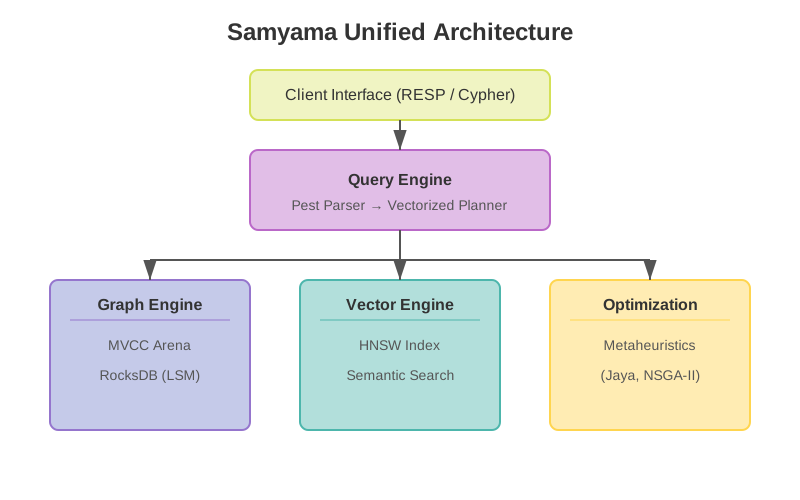
2. The Optimization Frontier
A Pareto front chart illustrating how the NSGA-II solver identifies optimal trade-offs in multi-objective resource allocation directly on the graph.
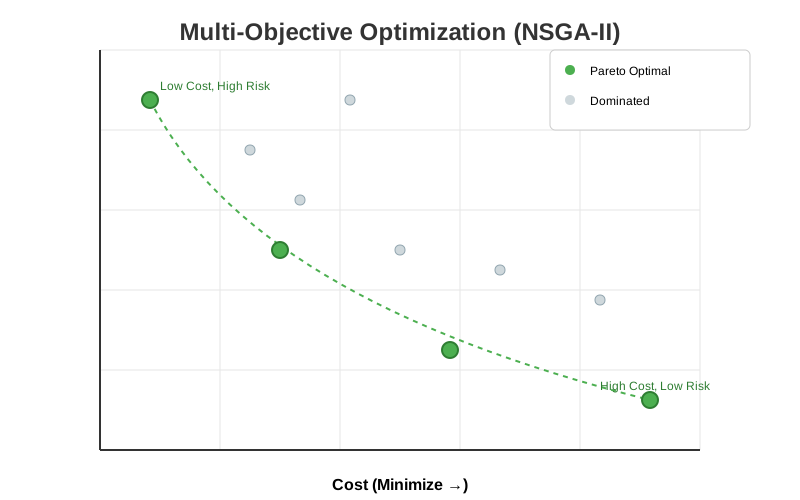
3. JIT Knowledge Graph Expansion
A sequence diagram showing the Agentic Enrichment loop: an event trigger initiates an LLM search which automatically creates new nodes and edges, “healing” the graph’s missing knowledge.
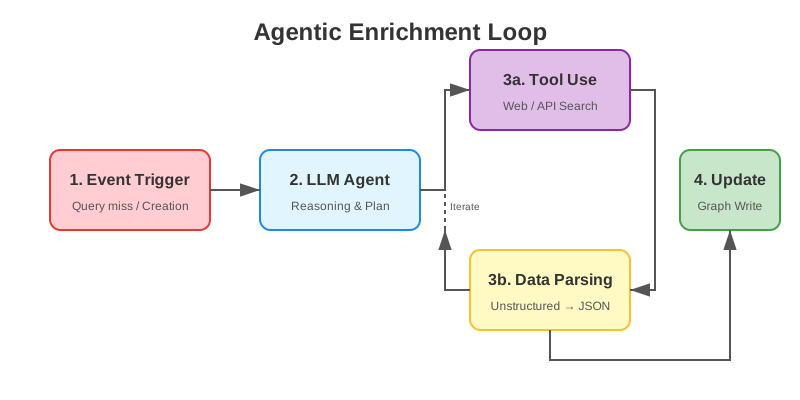
Implemented Research
For a comprehensive list of the specific academic algorithms, models, and architectures implemented directly within the Samyama codebase, please see the Index of Implemented Papers.
Research Paper: Knowledge Graphs for Industrial Operations
We have published a research paper evaluating knowledge graphs as the data layer for LLM-based industrial asset operations, building on the AssetOpsBench benchmark.
Title: Knowledge Graphs as the Missing Data Layer for LLM-Based Industrial Asset Operations
Authors: Madhulatha Mandarapu (madhulatha@samyama.ai), Sandeep Kunkunuru (sandeep@samyama.ai)
March 2026 | GitHub (assetops-kg) | IBM AssetOpsBench
Keywords: Knowledge Graphs, Large Language Models, Industrial Asset Operations, Benchmark, OpenCypher, Vector Search, Graph Algorithms.
Download PDF
- Paper PDF — arxiv-ready LaTeX version (12 pages)
- arxiv Upload Bundle — tex + bib for arxiv submission
Abstract
LLM-based agents for industrial asset operations show promise but achieve limited accuracy when reasoning over flat document stores. The AssetOpsBench benchmark establishes that GPT-4 agents achieve 65% success on 139 industrial maintenance scenarios backed by CouchDB, YAML, and CSV data sources. AssetOpsBench evaluates LLM agent autonomy; we ask a complementary question: how much does the data model behind the tools affect agent performance?
Building on the same benchmark data and scenarios, we introduce a knowledge graph layer (781 nodes, 955 edges, 16 relationship types) and evaluate three architectures of increasing LLM involvement:
| Architecture | LLM Role | Pass Rate | Avg Latency |
|---|---|---|---|
| Deterministic + graph | None (pre-coded) | 99% (137/139) | 63 ms |
| LLM + graph via NLQ | Generates Cypher | 83% (115/139) | 5,874 ms |
| Baseline (tool-augmented LLM) | Does everything | ~65% (91/139) | not reported |
Our key finding is inverted LLM usage: instead of asking the LLM to reason over raw data (a broad, error-prone task), we ask it to generate structured queries from a typed schema — a narrow problem that plays to LLM strengths. The graph then executes deterministically.
Thesis
For structured operational domains, the data model is the primary bottleneck. A knowledge graph with typed relationships enables both deterministic queries (for known patterns) and LLM-assisted queries (for novel questions), while document stores place the full data-reasoning burden on the LLM — a task where LLMs consistently struggle.
Three Architectures
Baseline: Tool-Augmented LLM (65%)
User question
  → LLM parses intent → LLM selects tool → Tool queries document store
    → LLM interprets raw results → LLM synthesizes answer
The LLM handles intent parsing, tool selection, argument crafting, data interpretation, and answer synthesis. GPT-4 achieves 65%. Failures cluster around counting, cross-document correlation, and relationship traversal — data operations rather than reasoning failures.
NLQ: LLM Generates Queries (83%)
User question
  → LLM generates Cypher (given schema)
    → Graph executes deterministically
      → LLM synthesizes answer from structured results
We invert the LLM’s role: instead of broad data reasoning, ask it to generate a Cypher query from a typed schema. This is code generation — a task LLMs excel at. The graph handles traversal, counting, and algorithms deterministically.
Deterministic: No LLM (99%)
User question
  → Keyword routing → Cypher query → Structured response
Pre-coded handlers for known patterns. A software engineering solution — demonstrates the ceiling with the right data model. 63ms average latency, zero token cost.
The Inverted LLM Pattern
The key insight: schema-aware query generation outperforms free-form data reasoning for any structured domain.
- Architecture A asks: “LLM, answer this question from this data” (broad, error-prone)
- Architecture B asks: “LLM, given this schema, write a Cypher query” (narrow, plays to strengths)
The same LLM, given a sharper problem scoped to its strengths, produces dramatically better results. Code generation is an LLM strength; data traversal, counting, and relationship reasoning are graph strengths. Each system does what it’s good at.
Knowledge Graph Schema
781 nodes, 955 edges, 11 labels, 16 edge types
Built from the AssetOpsBench data sources via an 8-step ETL pipeline:
Site ─[CONTAINS_LOCATION]→ Location ─[CONTAINS_EQUIPMENT]→ Equipment ─[HAS_SENSOR]→ Sensor
                                                              │
                                           DEPENDS_ON / SHARES_SYSTEM_WITH
                                                              │
FailureMode ─[MONITORS]→ Equipment ─[EXPERIENCED]→ FailureMode
WorkOrder ─[FOR_EQUIPMENT]→ Equipment
WorkOrder ─[ADDRESSES]→ FailureMode
Anomaly ─[TRIGGERED]→ WorkOrder
Event ─[FOR_EQUIPMENT]→ Equipment
Key additions over the baseline document model:
- Equipment dependencies:
DEPENDS_ONandSHARES_SYSTEM_WITHedges enable cascade analysis - Failure mode embeddings: 384-dim Sentence-BERT vectors in HNSW index enable similarity search
- Unified event timeline: 6,256 events with ISO timestamps enable temporal queries
AssetOpsBench 139 Scenarios — Per-Type Results
| Type | Count | Deterministic | NLQ (GPT-4o) | Baseline (GPT-4) |
|---|---|---|---|---|
| IoT | 20 | 20/20 (100%) | 17/20 (85%) | — |
| FMSR | 40 | 40/40 (100%) | 37/40 (93%) | — |
| TSFM | 23 | 23/23 (100%) | 21/23 (91%) | — |
| Multi | 20 | 20/20 (100%) | 8/20 (40%) | — |
| WO | 36 | 34/36 (94%) | 32/36 (89%) | — |
| Total | 139 | 137/139 (99%) | 115/139 (83%) | ~91/139 (65%) |
NLQ Multi stays at 40% because 12/20 scenarios require TSFM pipeline execution (forecasting, anomaly detection) that cannot be expressed as Cypher queries — a structural limitation.
Custom 40 Scenarios — Graph-Native Capabilities
40 new scenarios extending the benchmark with graph-native capabilities:
| Category | Count | GPT-4o Avg | Samyama Avg | Delta |
|---|---|---|---|---|
| Failure similarity | 6 | 0.501 | 0.902 | +0.401 |
| Criticality analysis | 5 | 0.566 | 0.938 | +0.372 |
| Root cause analysis | 5 | 0.580 | 0.934 | +0.354 |
| Multi-hop dependency | 8 | 0.618 | 0.934 | +0.316 |
| Maintenance optimization | 5 | 0.634 | 0.931 | +0.297 |
| Cross-asset correlation | 6 | 0.638 | 0.929 | +0.291 |
| Temporal pattern | 5 | 0.679 | 0.923 | +0.244 |
Largest gains on failure similarity (+0.401) and criticality analysis (+0.372) — exactly where graph structure and vector search provide the most value. GPT-4o’s 6 failures all require graph traversal, PageRank, or vector search that LLMs cannot perform from parametric knowledge alone.
The Full Pipeline: LLMs at the Edges, Graph in the Middle
The query layer comparison above is only part of the story. The full industrial data pipeline has three layers:
- Data Ingestion (software engineering): Structured data (90%+) → deterministic ETL. Unstructured data (maintenance logs, PDFs) → LLM-assisted entity extraction, resolution, classification.
- Data Model (architecture decision): One-time choice between flat documents and knowledge graph.
- Query (LLM optional): Deterministic handlers for known patterns; LLM-generated Cypher for novel questions.
LLMs appear at both edges — data preparation (unstructured → structured) and query generation (natural language → Cypher). The graph is the stable center that receives data from both deterministic and LLM-assisted ingestion, and serves both deterministic and LLM-generated queries.
In both cases, the LLM performs a generation task (structured output from unstructured input) — its strength. The graph handles data operations (storage, traversal, algorithms) — its strength. Neither component is asked to do what it’s bad at.
Scalability
| Dimension | Arch. A (LLM + docs) | Arch. B/C (graph ± LLM) |
|---|---|---|
| 10K queries/day | $300–500 (tokens) | $0 (deterministic) or ~$30 (NLQ) |
| Real-time streaming | Not supported | Graph updates + continuous queries |
| Multi-hop at 10K assets | LLM reasons across 10K docs | BFS traversal, O(|E|) |
| Latency per query | 5–11 seconds | 63 ms (det.) / ~6 s (NLQ) |
Honest Caveats
- Deterministic vs. autonomous: The 99% result compares pre-coded answers against an autonomous agent — fundamentally different tasks. The comparison illustrates the ceiling achievable with the right data model, not a claim of superior agent intelligence.
- Model mismatch: The baseline used GPT-4; NLQ used GPT-4o. The +18pp gap is an upper bound. Same-model comparison pending.
- Clean data: AssetOpsBench provides clean, structured data. Real-world messy data needs LLM-assisted preparation.
- Custom scenarios: Designed to extend the benchmark with graph-native capabilities, not replace the original scenarios.
- Complementary research questions: AssetOpsBench evaluates LLM agent autonomy. We evaluate data model impact. Both are valid; our results do not diminish the value of the original benchmark.
Conclusion
Building on AssetOpsBench, we show that introducing a knowledge graph as the data layer improves LLM-based industrial operations at every level of LLM involvement. For structured operational domains, the data model is the primary bottleneck. The inverted LLM pattern (schema-aware query generation instead of free-form data reasoning) is generalizable to any structured domain.
Implementation
- Benchmark code: samyama-ai/assetops-kg
- Graph database: samyama-ai/samyama-graph
- Rust demo:
cargo run --example industrial_kg_demo(871 lines) - Python SDK:
pip install samyama(PyPI) - Community PR: AssetOpsBench PR #203 — 40 new graph-native scenarios contributed back to the benchmark
Research Paper: Open Biomedical Knowledge Graphs at Scale
We have published a research paper on constructing, federating, and querying biomedical knowledge graphs with Samyama.
Title: Open Biomedical Knowledge Graphs at Scale: Construction, Federation, and AI Agent Access with Samyama Graph Database
Authors: Madhulatha Mandarapu (madhulatha@samyama.ai), Sandeep Kunkunuru (sandeep@samyama.ai)
March 2026 | Pathways KG | Clinical Trials KG
Keywords: Knowledge Graphs, Biomedical Data Integration, Graph Databases, Cross-KG Federation, Model Context Protocol, Clinical Trials, Biological Pathways, OpenCypher.
Download PDF
- Paper PDF — arxiv-ready LaTeX version (10 pages)
Abstract
Biomedical knowledge is fragmented across siloed databases — Reactome for pathways, STRING for protein interactions, Gene Ontology for functional annotations, ClinicalTrials.gov for study registries, and dozens more. We present two open-source biomedical knowledge graphs — Pathways KG (118,686 nodes, 834,785 edges from 5 sources) and Clinical Trials KG (7,711,965 nodes, 27,069,085 edges from 5 sources) — built on Samyama, a high-performance graph database written in Rust.
Our contributions are threefold:
-
Reproducible KG construction — ETL pipelines for two large-scale KGs using a common pattern: download, parse, deduplicate, batch-load via Cypher, and export as portable
.sgsnapsnapshots. -
Cross-KG federation — loading both snapshots into a single graph tenant enables property-based joins across datasets, answering questions like “Which biological pathways are disrupted by drugs currently in Phase 3 trials for breast cancer?”
-
Schema-driven MCP server generation — each KG automatically exposes typed tools for LLM agents via the Model Context Protocol, enabling natural-language access without manual tool authoring.
The combined federated graph (7.83M nodes, 27.9M edges) loads in under 3 minutes on commodity hardware.
Key Results
| Metric | Pathways KG | Clinical Trials KG | Combined |
|---|---|---|---|
| Nodes | 118,686 | 7,711,965 | 7,830,651 |
| Edges | 834,785 | 27,069,085 | 27,903,870 |
| Labels | 5 | 15 | 20 |
| Edge types | 9 | 25 | 34 |
| Data sources | 5 | 5 | 10 |
| Snapshot size | 9 MB | 711 MB | 720 MB |
| Import time | < 5 s | ~90 s | ~95 s |
Cross-KG Federation Query Patterns
| Pattern | Traversal | Latency |
|---|---|---|
| Drug → Pathway | Trial → Drug → Protein → Pathway | 2.5 s |
| Drug → GO Process | Trial → Drug → Protein → GOTerm | 1.8 s |
| Drug → PPI Network | Drug → Protein target → INTERACTS_WITH | 1.2 s |
| Disease → Pathway | Gene → Disease + Gene → Protein → Pathway | 1.8 s |
| Adverse Event → Pathway | Trial → AE → Drug → Protein → Pathway | 3.2 s |
Index of Implemented Research Papers
Samyama Graph Database is built on the foundations of cutting-edge computer science research. Below is a comprehensive index of the research papers, algorithms, data structures, and standards implemented directly within the core engine and its specialized crates.
Core System Architecture
Query Execution
-
Volcano Iterator Model
- Paper: “Volcano — An Extensible and Parallel Query Evaluation System” (Graefe, 1994)
- Implementation:
src/query/executor/operator.rs— 35 physical operators using pull-basednext_batch()with vectorizedRecordBatchprocessing (batch size 1,024) - Key insight: Lazy evaluation avoids materializing intermediate results; each operator pulls only what downstream needs
-
Late Materialization
- Paper: “Column-Stores vs. Row-Stores: How Different Are They Really?” (Abadi et al., 2008)
- Implementation:
src/query/executor/operator.rs— Scan operators produceValue::NodeRef(id)instead of full node clones; properties resolved on-demand atProjectOperator - Result: 4.0x improvement on 1-hop traversals, 4.7x on 2-hop traversals
-
PEG Parsing (Parsing Expression Grammars)
- Paper: “Parsing Expression Grammars: A Recognition-Based Syntactic Foundation” (Ford, 2004)
- Implementation:
src/query/cypher.pest— Pest PEG parser for OpenCypher with atomic keyword rules for word boundary enforcement
Storage Engine
-
Log-Structured Merge Trees (LSM-Tree)
- Paper: “The Log-Structured Merge-Tree (LSM-Tree)” (O’Neil et al., 1996)
- Implementation:
src/persistence/storage.rs— RocksDB with LZ4/Zstd compression, Column Families for multi-tenant isolation
-
Write-Ahead Logging (WAL)
- Paper: “ARIES: A Transaction Recovery Method Supporting Fine-Granularity Locking and Partial Rollbacks” (Mohan et al., 1992)
- Implementation:
src/persistence/wal.rs— Sequential WAL with fsync for Raft log, async for state machine
Concurrency Control
- Multi-Version Concurrency Control (MVCC)
- Paper: “Concurrency Control in Distributed Database Systems” (Bernstein & Goodman, 1981)
- Implementation:
src/graph/store.rs— Versioned arena withVec<Vec<T>>version chains enabling Snapshot Isolation without read locks
Distributed Consensus
- Raft Consensus Algorithm
- Paper: “In Search of an Understandable Consensus Algorithm” (Ongaro & Ousterhout, 2014)
- Implementation:
src/raft/via theopenraftframework — Leader election, log replication, quorum commits, CP trade-off - Enterprise: HTTP/2 transport, TLS encryption, snapshot streaming, cluster metrics
Serialization
- Bincode (Binary Encoding)
- Library:
bincodecrate — Compact binary serialization forStoredNode/StoredEdgestructs in RocksDB - Benefit: Nanosecond deserialization, no field name overhead, serde integration
- Library:
Vector Search & AI
- HNSW (Hierarchical Navigable Small World)
- Paper: “Efficient and robust approximate nearest neighbor search using Hierarchical Navigable Small World graphs” (Malkov & Yashunin, 2018)
- Implementation:
src/vector/via thehnsw_rscrate — Cosine, L2, and Dot Product metrics; 15K+ QPS on 128-dim vectors - Integration:
VectorSearchOperatorin query pipeline enables Graph RAG (combined vector + graph traversal)
Graph Analytics (samyama-graph-algorithms)
Centrality & Importance
-
PageRank
- Paper: “The PageRank Citation Ranking: Bringing Order to the Web” (Page, Brin, Motwani & Winograd, 1999)
- Implementation:
crates/samyama-graph-algorithms/src/pagerank.rs— Iterative power method with configurable damping factor, dangling node redistribution, convergence tolerance - Validation: LDBC Graphalytics 5/5 (XS + S datasets including cit-Patents 3.8M vertices)
-
Local Clustering Coefficient (LCC)
- Paper: “Collective dynamics of ‘small-world’ networks” (Watts & Strogatz, 1998)
- Implementation:
crates/samyama-graph-algorithms/src/lcc.rs— Both directed and undirected variants; measures neighborhood connectivity - Validation: LDBC Graphalytics 5/5
Community Detection & Connectivity
-
Community Detection via Label Propagation (CDLP)
- Paper: “Near linear time algorithm to detect community structures in large-scale networks” (Raghavan, Albert & Kumara, 2007)
- Implementation:
crates/samyama-graph-algorithms/src/cdlp.rs— Iterative neighbor voting with configurable max iterations - Validation: LDBC Graphalytics 5/5
-
Weakly Connected Components (WCC)
- Algorithm: Union-Find with path compression and union by rank
- Implementation:
crates/samyama-graph-algorithms/src/community.rs— O(n * α(n)) near-linear time - Validation: LDBC Graphalytics 5/5
-
Strongly Connected Components (SCC)
- Algorithm: Tarjan’s Algorithm (Tarjan, 1972)
- Implementation:
crates/samyama-graph-algorithms/src/community.rs— Single DFS pass with lowlink tracking
-
Triangle Counting
- Algorithm: Node-iterator method with sorted adjacency intersection
- Implementation:
crates/samyama-graph-algorithms/src/topology.rs— Used for social cohesion analysis and network clustering metrics
Pathfinding & Network Flow
-
Breadth-First Search (BFS)
- Algorithm: Level-synchronous BFS (Moore, 1959)
- Implementation:
crates/samyama-graph-algorithms/src/pathfinding.rs— Standard BFS + all shortest paths variant - Validation: LDBC Graphalytics 5/5
-
Dijkstra’s Shortest Path
- Paper: “A note on two problems in connexion with graphs” (Dijkstra, 1959)
- Implementation:
crates/samyama-graph-algorithms/src/pathfinding.rs— Binary heap priority queue; also used for SSSP in LDBC validation - Validation: LDBC Graphalytics SSSP 3/3
-
Edmonds-Karp Maximum Flow
- Paper: “Theoretical Improvements in Algorithmic Efficiency for Network Flow Problems” (Edmonds & Karp, 1972)
- Implementation:
crates/samyama-graph-algorithms/src/flow.rs— BFS-based augmenting path selection; O(VE²) complexity
-
Prim’s Minimum Spanning Tree
- Algorithm: Prim’s Algorithm (Prim, 1957)
- Implementation:
crates/samyama-graph-algorithms/src/mst.rs— Greedy MST construction with priority queue
Statistical & Dimensionality Reduction
-
PCA — Randomized SVD
- Paper: “Finding structure with randomness: Probabilistic algorithms for constructing approximate matrix decompositions” (Halko, Martinsson & Tropp, 2011)
- Implementation:
crates/samyama-graph-algorithms/src/pca.rs— Gaussian random projection → power iterations → QR factorization → small SVD; O(n·d·k) complexity - Auto-selection:
PcaSolver::Autouses Randomized SVD for n > 500 nodes
-
PCA — Power Iteration (Deflation)
- Algorithm: Classical power iteration with Gram-Schmidt re-orthogonalization
- Implementation:
crates/samyama-graph-algorithms/src/pca.rs— Legacy solver,PcaResultincludestransform()andtransform_one()for projection
Metaheuristic Optimization (samyama-optimization)
The engine natively supports 22 state-of-the-art optimization algorithms, all implemented in crates/samyama-optimization/src/algorithms/:
Metaphor-Less Algorithms
-
Jaya Algorithm
- Paper: “Jaya: A simple and new optimization algorithm for solving constrained and unconstrained optimization problems” (R. Venkata Rao, 2016)
- Key property: Parameter-free—requires no algorithm-specific tuning
-
Quasi-Oppositional Jaya (QOJAYA)
- Paper: “Quasi-oppositional based Jaya algorithm” (derived from Rao, 2016)
- Enhancement: Opposition-based initialization improves convergence speed
-
Rao Algorithms (Rao-1, Rao-2, Rao-3)
- Paper: “Rao algorithms: Three metaphor-less simple algorithms for solving optimization problems” (R. Venkata Rao, 2020)
- Key property: Three progressively complex variants; all metaphor-free
-
TLBO (Teaching-Learning-Based Optimization)
- Paper: “Teaching–learning-based optimization: A novel method for constrained mechanical design optimization problems” (R. Venkata Rao, Savsani & Vakharia, 2011)
-
ITLBO (Improved TLBO)
- Enhancement: Adaptive learning factor and improved selection mechanisms
-
GOTLBO (Group-Optimized TLBO)
- Enhancement: Group-based teaching phase with oppositional learning
Swarm & Evolutionary Algorithms
-
Particle Swarm Optimization (PSO)
- Paper: “Particle swarm optimization” (Kennedy & Eberhart, 1995)
-
Differential Evolution (DE)
- Paper: “Differential Evolution – A Simple and Efficient Heuristic for global Optimization over Continuous Spaces” (Storn & Price, 1997)
-
Genetic Algorithm (GA)
- Paper: “Adaptation in Natural and Artificial Systems” (Holland, 1975)
-
Grey Wolf Optimizer (GWO)
- Paper: “Grey Wolf Optimizer” (Mirjalili, Mirjalili & Lewis, 2014)
-
Artificial Bee Colony (ABC)
- Paper: “An Idea Based On Honey Bee Swarm for Numerical Optimization” (Karaboga, 2005)
-
Bat Algorithm
- Paper: “A New Metaheuristic Bat-Inspired Algorithm” (Yang, 2010)
-
Cuckoo Search
- Paper: “Cuckoo Search via Lévy Flights” (Yang & Deb, 2009)
-
Firefly Algorithm
- Paper: “Firefly Algorithms for Multimodal Optimization” (Yang, 2009)
-
Flower Pollination Algorithm (FPA)
- Paper: “Flower Pollination Algorithm for Global Optimization” (Yang, 2012)
Physics-Based Algorithms
-
Gravitational Search Algorithm (GSA)
- Paper: “GSA: A Gravitational Search Algorithm” (Rashedi, Nezamabadi-pour & Saryazdi, 2009)
-
Simulated Annealing (SA)
- Paper: “Optimization by Simulated Annealing” (Kirkpatrick, Gelatt & Vecchi, 1983)
-
Harmony Search (HS)
- Paper: “A New Heuristic Optimization Algorithm: Harmony Search” (Geem, Kim & Loganathan, 2001)
-
BMR & BWR
- Specialized reinforcement-based solvers for constrained search spaces
Multi-Objective Algorithms
-
NSGA-II (Non-dominated Sorting Genetic Algorithm II)
- Paper: “A fast and elitist multiobjective genetic algorithm: NSGA-II” (Deb, Pratap, Agarwal & Meyarivan, 2002)
- Enhancement: Constrained Dominance Principle for feasibility-first selection
-
MOTLBO (Multi-Objective TLBO)
- Paper: Multi-objective extension of TLBO (derived from Rao et al., 2011)
- Feature: Pareto front discovery with crowding distance for diversity preservation
RDF & Semantic Web Standards
-
RDF (Resource Description Framework)
- Standard: W3C RDF 1.1 Concepts and Abstract Syntax (2014)
- Implementation:
src/rdf/— Triple/Quad storage with SPO/POS/OSP indices viaoxrdfcrate
-
Turtle (Terse RDF Triple Language)
- Standard: W3C RDF 1.1 Turtle (2014)
- Implementation:
src/rdf/serialization/turtle.rsviario_turtle
-
SPARQL 1.1
- Standard: W3C SPARQL 1.1 Query Language (2013)
- Implementation:
src/sparql/— Parser infrastructure viaspargebra; query execution in development
Hardware Acceleration (samyama-gpu)
-
Parallel Graph Algorithms on GPU
- Implementation: 8+ WGSL compute shaders targeting WebGPU (Metal, Vulkan, DX12)
- Algorithms: PageRank, Triangle Counting, CDLP, LCC, PCA
- Operators: SUM aggregation (parallel reduction), ORDER BY (bitonic sort)
- Vector: Cosine distance, inner product (batch re-ranking)
-
GPU PCA (Fused Power Iteration)
- Implementation: Five WGSL shaders:
pca_mean,pca_center,pca_covariance(tiled, 64-sample tiles),pca_power_iter,pca_power_iter_norm(fused mat-vec + parallel norm + normalize in single dispatch) - Threshold:
MIN_GPU_PCA = 50,000nodes,d > 32dimensions
- Implementation: Five WGSL shaders:
-
Bitonic Sort
- Paper: “Sorting networks and their applications” (Batcher, 1968)
- Implementation:
crates/samyama-gpu/src/shaders/bitonic_sort.wgsl— GPU argsort for ORDER BY on >10K result sets
Benchmark Validation
- LDBC Graphalytics
- Standard: “The LDBC Graphalytics Benchmark” (Iosup et al., 2016)
- Result: 28/28 tests passed (100%) across BFS, PageRank, WCC, CDLP, LCC, SSSP on XS and S-size datasets
- Datasets: example-directed, example-undirected, cit-Patents (3.8M vertices), datagen-7_5-fb (633K vertices, 68M edges), wiki-Talk (2.4M vertices)